
From Broadcast to Purchase: What a Complete WhatsApp Customer Journey Looks Like
See how a WhatsApp broadcast can move customers from product discovery to conversation, purchase, payment, delivery updates and repeat engagement.
On this page16 sections
- Step 1: Define the Right Audience
- Step 2: Send a Clear Broadcast
- Step 3: Let the Customer Choose Their Interest
- Step 4: Capture the Customer Automatically
- Step 5: Personalise Product Discovery
- Step 6: Provide Human Assistance When Needed
- Step 7: Make Ordering Simple
- Step 8: Collect Payment Securely
- Step 9: Send Order Updates
- Step 10: Request Feedback
- Step 11: Encourage Repeat Purchases
- Example of a Complete Journey
- Track the Entire Journey
- Respect Consent and Customer Preferences
- How Voixt.ai Connects Broadcasts With Purchases
- Final Thoughts
A WhatsApp broadcast can attract attention, but sending a message is only the beginning. The real value comes from what happens after a customer clicks, replies or shows interest.
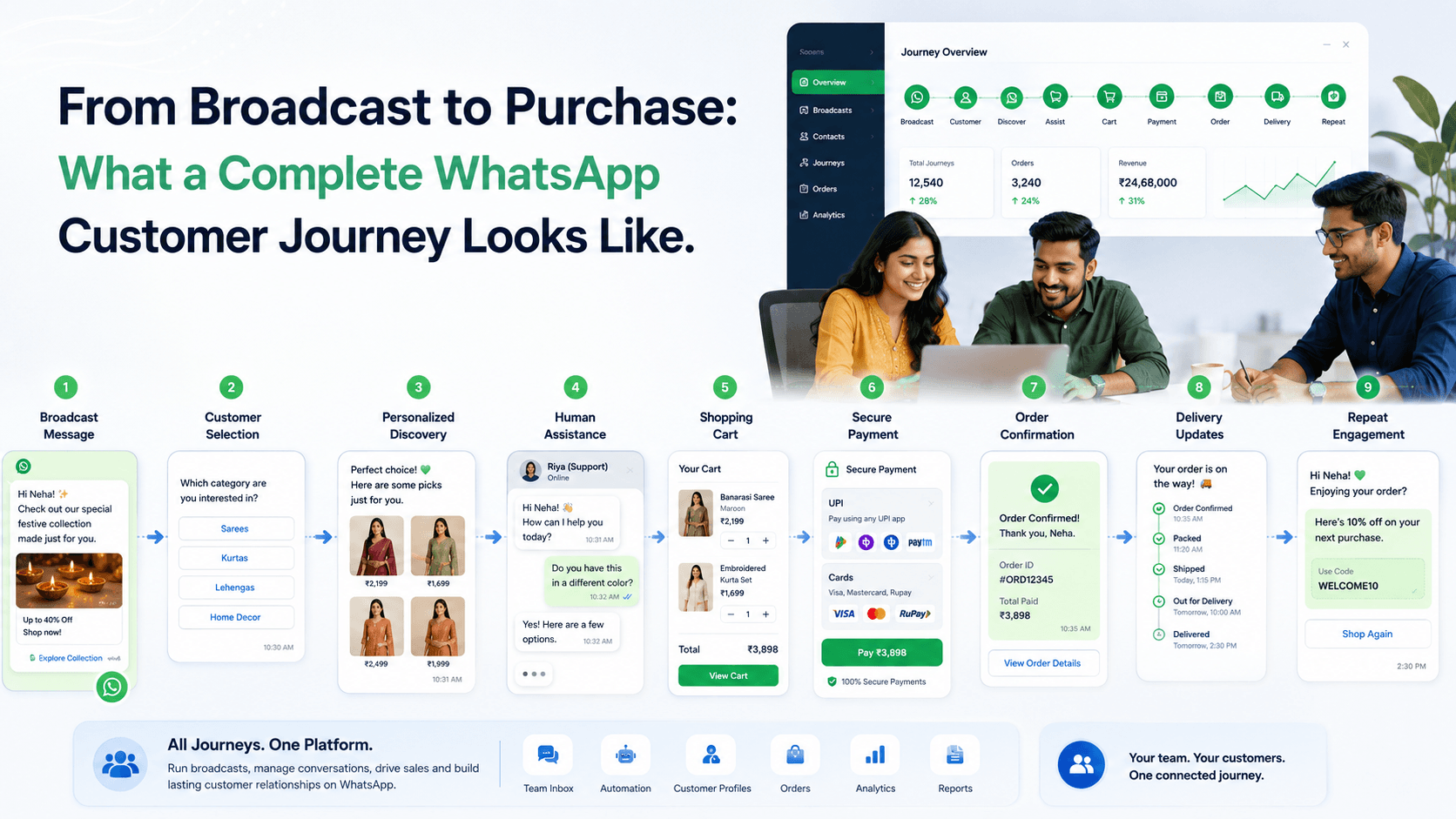
A complete WhatsApp customer journey connects the broadcast with product discovery, personalised assistance, ordering, payment and post-purchase communication.
Step 1: Define the Right Audience
A successful journey starts before the broadcast is sent. Businesses should identify who genuinely needs the message.
Useful customer segments may include:
- Customers interested in a product category
- Previous buyers
- Customers in a specific location
- Leads at a particular sales stage
- Customers waiting for a restocked product
- People with upcoming birthdays or anniversaries
- Customers likely to reorder
Sending every campaign to every contact can make messages feel irrelevant and increase opt-outs.
Step 2: Send a Clear Broadcast
The broadcast should quickly explain:
- What is being offered
- Why it is relevant
- Any important deadline
- What the customer should do next
For example:
“Hi Riya, our festive jewellery collection is now available. Tap below to explore lightweight designs under ₹25,000.”
The message should have one clear call to action instead of several competing options.
Step 3: Let the Customer Choose Their Interest
A button or quick reply can allow the customer to select a category, product type or preferred action.
For example:
- View New Arrivals
- Shop Under ₹2,000
- Talk to an Expert
The selected option can start a relevant automation flow and add a customer tag for future personalisation.
Step 4: Capture the Customer Automatically
When a customer responds, their contact information and campaign source should be recorded automatically.
The customer profile may include:
- Name and phone number
- Broadcast or campaign source
- Selected product category
- Previous purchases
- Assigned employee
- Current sales stage
- Follow-up requirement
This turns campaign engagement into a trackable sales opportunity.
Step 5: Personalise Product Discovery
Instead of sending the complete catalogue, the business can ask a few useful questions.
For example, a clothing business may ask about size, colour and budget. A service business may ask about location, preferred date and requirement.
Based on the answers, the customer can receive a focused selection of relevant products or services.
Step 6: Provide Human Assistance When Needed
Automation can guide customers through common choices, but a person should be available for:
- Complex product recommendations
- Custom requirements
- High-value purchases
- Negotiation
- Payment concerns
- Questions not covered by the flow
An AI-to-human handover should preserve the conversation so the customer does not need to repeat their requirements.
Step 7: Make Ordering Simple
A WhatsApp E-Shop can allow the customer to:
- Browse products
- View images and prices
- Select variants
- Add items to a cart
- Confirm quantities
- Provide delivery details
- Choose a payment method
- Place the order
The transition from product discovery to checkout should require as few unnecessary steps as possible.
Step 8: Collect Payment Securely
After the order is confirmed, the customer should receive a clear payment request containing:
- Order reference
- Product summary
- Payable amount
- Delivery charges
- Approved payment method
The business should automatically record the payment status and send confirmation after successful payment.
Sensitive card or banking information should never be requested through chat.
Step 9: Send Order Updates
The journey should continue after payment. Customers can receive automatic updates when the order is:
- Confirmed
- Being prepared
- Shipped
- Out for delivery
- Delivered
- Cancelled or refunded
Clear updates reduce “Where is my order?” messages and improve customer confidence.
Step 10: Request Feedback
After delivery or service completion, the business can send a short feedback request.
For example:
“Thank you for your order. How would you rate your experience from 1 to 5?”
Negative feedback should be transferred to a responsible team member for personal resolution.
Step 11: Encourage Repeat Purchases
The completed order creates useful context for future communication.
The business can use previous purchases and customer preferences to send:
- Reorder reminders
- Product-care tips
- Relevant new arrivals
- Restock updates
- Loyalty rewards
- Birthday or anniversary offers
Future campaigns should build on the existing relationship rather than treating the customer as a new lead every time.
Example of a Complete Journey
A clothing store sends a WhatsApp broadcast announcing a festive collection. The customer taps “View Women’s Collection” and enters an automation flow.
The flow asks for preferred category, size and budget. Based on the responses, the customer receives suitable product recommendations inside the E-Shop.
The customer adds a kurta to the cart but asks about delivery time. The conversation is transferred to a sales employee who confirms availability and delivery.
The customer places the order and completes payment. Automatic updates are sent during preparation, dispatch and delivery.
After delivery, the customer receives a feedback request. Their purchase history and preferences are saved so the next campaign can be more relevant.
The broadcast did not simply send a promotion. It started a complete and measurable customer journey.
Track the Entire Journey
Businesses should measure:
- Broadcast delivery
- Customer replies and button clicks
- Product interest
- Leads created
- Conversations assigned
- Carts created
- Payments completed
- Orders delivered
- Campaign conversion rate
- Repeat purchases
This helps businesses understand which campaigns generate real customer activity and revenue.
Respect Consent and Customer Preferences
Businesses should send broadcasts only with appropriate consent and according to applicable messaging requirements.
Customers should receive relevant messages, have clear opt-out options and be excluded from campaigns that no longer apply to them.
A connected journey should improve convenience without creating excessive communication.
How Voixt.ai Connects Broadcasts With Purchases
Voixt.ai helps businesses manage the complete WhatsApp customer journey through:
- Contact tags and filters
- Targeted campaign management
- No-code automation workflows
- Automatic contact capture
- Shared multi-agent WhatsApp inboxes
- Conversation assignments
- Visual CRM pipelines
- AI-powered responses
- AI-to-human handovers
- Follow-up reminders
- WhatsApp E-Shop
- Orders and payments
- Automated order updates
- Private internal notes
Businesses can track customers from the first campaign interaction through conversation, order, payment and repeat engagement.
Final Thoughts
A WhatsApp broadcast should not be treated as a standalone message. It should be the entry point to a connected customer journey.
When campaigns, conversations, CRM, automation, E-Shop, payments and order updates work together, businesses can turn customer attention into measurable sales.
Voixt.ai helps create this complete journey so every broadcast can lead to a clear and relevant next action.