
How Clinics Can Use WhatsApp for Appointment Reminders
Learn how clinics can use WhatsApp confirmations, reminders, rescheduling, waiting lists, and privacy-conscious workflows to reduce missed appointments.
On this page31 sections
- How Clinics Can Use WhatsApp for Appointment Reminders
- Start With a Clear Communication Preference
- Collect the Correct WhatsApp Number
- Send an Immediate Booking Confirmation
- Use Privacy-Conscious Wording
- Choose an Appropriate Reminder Schedule
- Make Confirmation Simple
- Make Rescheduling Easy
- Make Cancellation Simple
- Use Waiting Lists to Fill Cancelled Slots
- Include Clear Location Information
- Share Only Approved Preparation Instructions
- Confirm Schedule Changes Clearly
- Keep Marketing Separate From Care Communication
- Do Not Share Sensitive Results in Routine Reminders
- Create a Human-Handover Path
- Do Not Use Appointment Automation for Emergencies
- Assign Every Patient Reply
- Use Private Internal Notes Carefully
- Use Role-Based Access
- Protect Account and Device Access
- Keep Appointment Data Accurate
- Prevent Duplicate and Outdated Reminders
- Send a Respectful No-Show Follow-Up
- Follow Up After Completed Appointments Carefully
- Build a Complete Reminder Workflow
- Test Before Launch
- Measure Reminder Performance
- Common Mistakes to Avoid
- How Voixt.ai Helps Clinics Manage Appointment Communication
- Final Thoughts
How Clinics Can Use WhatsApp for Appointment Reminders
Missed appointments create empty time slots, delay care, increase administrative work, and prevent other patients from using available appointments.
Patients do not always miss appointments intentionally. They may forget, record the wrong time, misunderstand the location, overlook preparation instructions, or find it difficult to reschedule.
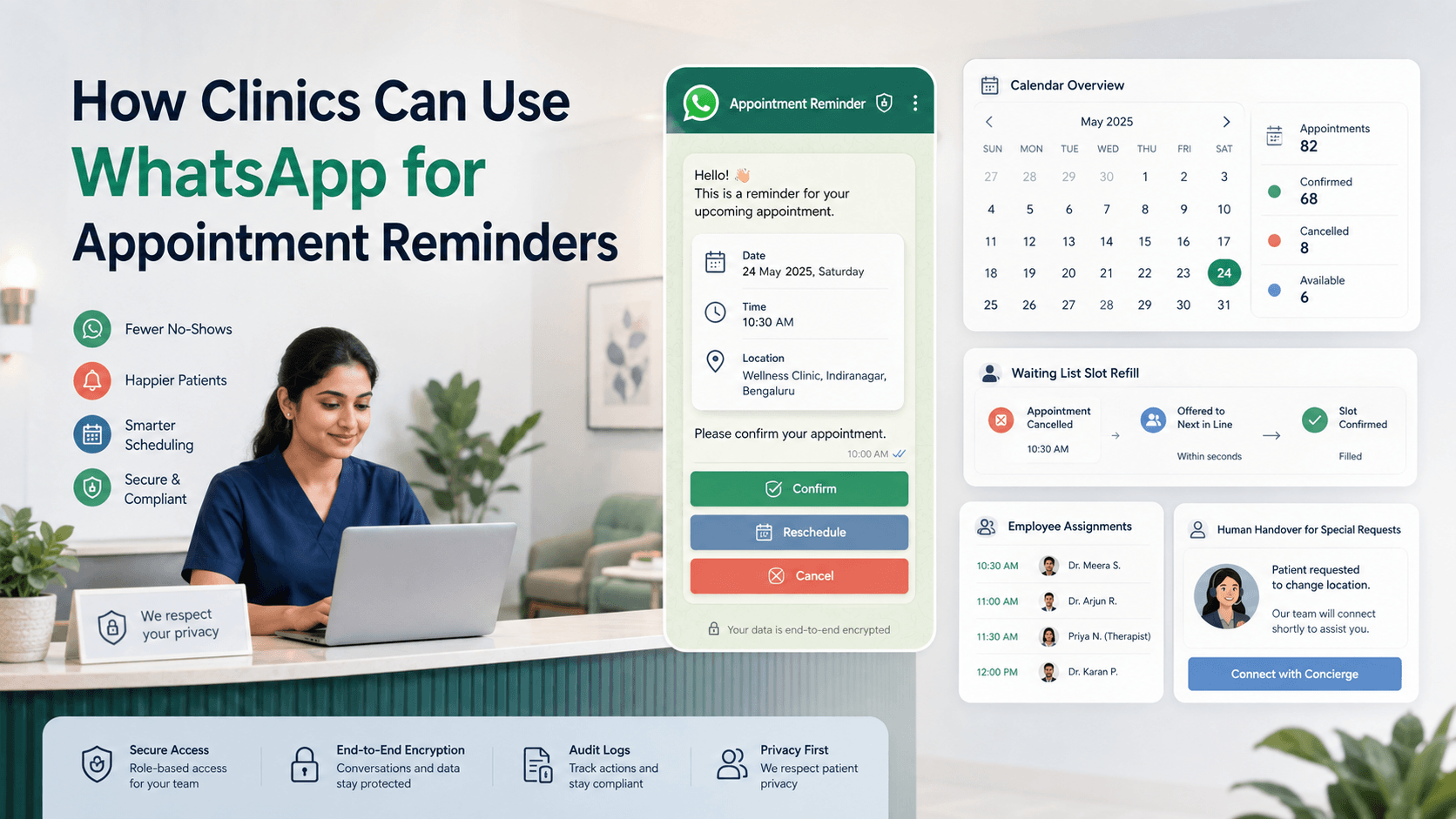
WhatsApp reminders can help clinics confirm bookings, provide practical information, and let patients reschedule or cancel without calling reception.
The process must remain accurate, respectful, and privacy-conscious. A reminder should make the appointment easier to manage without revealing unnecessary health information.
Start With a Clear Communication Preference
Patients should understand how the clinic will use their phone number.
A booking form might say:
Receive appointment confirmations, reminders, schedule changes, and service-related updates from BrightCare Clinic on WhatsApp. You can change this preference at any time.
WhatsApp requires businesses to obtain appropriate permission before initiating messages and to respect requests to stop communication. WhatsApp Business Messaging Policy
India’s Digital Personal Data Protection Act states that consent should be specific, informed, unambiguous, and limited to personal data necessary for the stated purpose. It also provides for withdrawal of consent. Clinics should review their processes with qualified privacy and healthcare advisers for the laws and professional requirements that apply to them. Digital Personal Data Protection Act, 2023
Appointment reminders should remain separate from promotional health packages or general marketing.
Collect the Correct WhatsApp Number
At booking, confirm:
- Patient’s preferred WhatsApp number
- Whether the number is personal or shared
- Preferred language when available
- Permission to send appointment communication
- Any request to use another communication channel
Read the number back or show it for confirmation.
A reminder sent to the wrong person can expose private information and cause the actual patient to miss the appointment.
Send an Immediate Booking Confirmation
Send a confirmation after the appointment is successfully created.
Include only the details necessary for the patient to identify and manage the booking:
- Clinic name
- Appointment date
- Appointment time
- Branch or location
- Doctor or department when appropriate
- Booking reference
- Rescheduling and cancellation options
For example:
Hi Meera, your appointment with BrightCare Clinic is confirmed.
Date: 24 August Time: 3:30 p.m. Location: Indiranagar branch Booking reference: BC-4821
Reply CONFIRM, RESCHEDULE, or CANCEL.
Avoid including detailed symptoms, diagnoses, test results, or treatment information in a routine reminder.
Use Privacy-Conscious Wording
Some patients use a shared family phone, workplace number, or device accessible to other people.
A reminder should use the minimum necessary information.
Instead of:
Reminder: Your diabetes consultation and blood-test review are tomorrow.
Use:
Reminder: Your appointment with BrightCare Clinic is tomorrow at 3:30 p.m. Reply HELP if you need assistance.
Where the patient has requested discreet communication, use the clinic name, date, time, and booking reference without mentioning the specialty or reason for the visit.
Choose an Appropriate Reminder Schedule
The best schedule depends on how far in advance appointments are booked and whether preparation or travel is required.
A practical sequence may include:
Immediately after booking
Send the complete confirmation.
Two or three days before
Ask the patient to confirm, reschedule, or cancel.
The day before
Send a concise reminder with the time, location, and approved preparation instructions.
A few hours before
Use only when helpful, expected, and appropriate for the appointment type.
Do not send several reminders within a short period simply because the patient has not replied.
Make Confirmation Simple
Patients should not need to call reception to confirm a routine booking.
For example:
Your appointment is tomorrow at 3:30 p.m. Reply YES to confirm, CHANGE to reschedule, or CANCEL if you cannot attend.
The appointment record should update when the patient responds.
Possible statuses include:
- Booked
- Confirmation requested
- Confirmed
- Rescheduling requested
- Cancelled
- Completed
- No-show
Reception employees should be able to see the latest status without reading every message.
Make Rescheduling Easy
A patient who cannot attend may become a no-show when changing the appointment is difficult.
Offer a direct option:
Reply RESCHEDULE to view the next available times.
A standard workflow can:
- Identify the existing booking
- Display appropriate available times
- Allow the patient to select a new time
- Show the revised booking details
- Request confirmation
- Release the previous slot
- Send an updated confirmation
Transfer the conversation to reception when the patient needs an unusual time, a different clinician, or another exception.
Make Cancellation Simple
A cancellation gives the clinic time to offer the slot to another patient.
Use:
If you cannot attend, reply CANCEL. You can request another appointment whenever you are ready.
After cancellation, confirm the action:
Your appointment on 24 August at 3:30 p.m. has been cancelled. No further action is required.
Stop all reminders linked to the cancelled booking immediately.
Use Waiting Lists to Fill Cancelled Slots
When a booking is cancelled, the clinic can offer the opening to an eligible person who requested an earlier appointment.
A waiting-list record may include:
- Requested service or department
- Preferred branch
- Suitable dates
- Preferred time range
- Required clinician when applicable
- Contact preference
- Expiry date
A notification might say:
An earlier appointment is available tomorrow at 4:00 p.m. at our Indiranagar branch. Reply BOOK within 30 minutes if you would like this slot. No action is needed if it is unsuitable.
Do not promise the same appointment to several people unless the booking system can reserve it reliably for the first confirmed response.
Include Clear Location Information
Patients may miss appointments because they visit the wrong branch or cannot locate the clinic.
Include:
- Branch name
- Full address
- Approved map link
- Floor or suite number
- Nearby landmark
- Parking or entry instructions when relevant
- Accessibility information when appropriate
For example:
Location: BrightCare Clinic, second floor, 18 CMH Road, Indiranagar. The entrance is next to Metro Pharmacy. Directions: [Approved Map Link]
For virtual appointments, send the approved joining link and basic access instructions through the clinic’s authorised process.
Share Only Approved Preparation Instructions
Some appointments require preparation.
Examples may include:
- Bring identification
- Bring previous reports
- Arrive early
- Complete a form
- Follow clinician-approved preparation instructions
Use wording approved by the responsible healthcare professional.
For example:
Please arrive 15 minutes early and bring your booking reference, identification, and any reports the clinic previously asked you to bring.
Do not use a general marketing or automation team to create clinical instructions independently.
If the patient asks a medical question about preparation, route the conversation to an authorised healthcare professional or the clinic’s approved support process.
Confirm Schedule Changes Clearly
When the clinic changes an appointment, clearly explain:
- Which booking is affected
- What changed
- The proposed alternative
- Whether the patient must confirm
- How to request another option
For example:
We need to change your BrightCare Clinic appointment scheduled for 24 August at 3:30 p.m. Available alternatives are 25 August at 11:00 a.m. or 26 August at 4:00 p.m. Reply 1, 2, or HUMAN for assistance.
Do not silently change the calendar and rely on a later reminder to inform the patient.
Keep Marketing Separate From Care Communication
A patient who agrees to receive appointment reminders has not necessarily agreed to receive promotional messages.
Maintain separate preferences for:
- Appointment confirmations
- Appointment reminders
- Schedule changes
- Service-related updates
- General promotions
Do not attach unrelated offers to essential reminders.
Avoid:
Your appointment is tomorrow. Book our premium package today for 20% off.
Use:
Your appointment is tomorrow at 3:30 p.m. Reply CONFIRM, RESCHEDULE, or CANCEL.
Do Not Share Sensitive Results in Routine Reminders
Routine appointment workflows should not automatically include:
- Diagnosis
- Test results
- Prescription details
- Treatment plans
- Detailed symptoms
- Insurance or payment information beyond what is necessary
If the clinic offers digital access to sensitive records, use an appropriately controlled and authorised system with suitable identity verification.
Do not rely on an ordinary reminder thread as a substitute for secure clinical record access.
Create a Human-Handover Path
Automation can manage routine confirmation, rescheduling, cancellation, directions, and basic booking information.
Human assistance is appropriate when:
- The patient requests a person
- The booking record is incorrect
- A clinical question is asked
- A special arrangement is needed
- The patient is upset
- A payment or policy dispute appears
- An urgent concern is mentioned
- The workflow cannot understand the request
A handover message might say:
I’m connecting you with our clinic team. They can see your booking reference and the appointment details already provided.
The employee should receive the relevant context so the patient does not need to repeat everything.
Do Not Use Appointment Automation for Emergencies
Appointment reminders and booking workflows are not emergency-response systems.
If a message suggests an urgent medical or safety concern, stop the routine workflow and follow the clinic’s approved emergency guidance and escalation process.
Do not allow an automated assistant to diagnose symptoms, determine medical urgency independently, or promise that a clinician will respond within an unapproved timeframe.
Assign Every Patient Reply
Reminder messages may generate questions and schedule changes.
Each unresolved conversation should have one owner.
Assignments can use:
- Branch
- Department
- Appointment type
- Language
- Reception team
- Employee availability
- Priority
Clear ownership prevents two employees from changing the same booking or assuming someone else will respond.
Use Private Internal Notes Carefully
Internal notes may help clinic employees coordinate non-clinical booking information.
For example:
Patient requested wheelchair-accessible entry information. Reception to confirm the appropriate entrance before 4:00 p.m.
Notes should be:
- Relevant
- Factual
- Limited to authorised employees
- Appropriate for the clinic’s recordkeeping policy
Avoid copying unnecessary sensitive health information into general customer-management notes.
Use Role-Based Access
Not every employee needs access to every conversation or patient detail.
Access can be organised by:
- Branch
- Department
- Reception role
- Clinical role
- Management responsibility
Review permissions regularly and remove access when roles change or employees leave.
Clinic staff should use authorised business systems rather than personal WhatsApp accounts for patient communication.
Protect Account and Device Access
Clinics should maintain appropriate operational safeguards, including:
- Strong account protection
- Controlled employee access
- Secure devices
- Timely removal of former employees
- Approved backup and retention practices
- Staff training
- Incident-response procedures
Avoid leaving patient conversations accessible on shared or unattended devices.
The clinic should document who can access the WhatsApp workspace and why.
Keep Appointment Data Accurate
Automation depends on reliable booking information.
Verify:
- Patient contact number
- Appointment date
- Appointment time
- Branch
- Clinician or department
- Booking status
- Cancellation status
- Reminder preference
Incorrect data can create missed appointments and privacy problems.
Connect reminder workflows to the current booking record rather than copying details manually into separate spreadsheets.
Prevent Duplicate and Outdated Reminders
A patient should not receive:
- Two confirmations for one appointment
- Reminders after cancellation
- The previous time after rescheduling
- Messages for another patient
- Duplicate reminders from separate systems
Use:
- Unique booking references
- Current-status checks
- Duplicate-event protection
- Cancellation exclusions
- Patient and booking matching
- Workflow logs
Test rescheduled, cancelled, repeated, and same-day appointments before launching the workflow.
Send a Respectful No-Show Follow-Up
Avoid language that blames the patient.
Use:
Hi Meera, we noticed that you were unable to attend your appointment today at 3:30 p.m. We hope everything is okay. Reply REBOOK if you would like another time or HELP for assistance.
If a fee or deposit condition applies, ensure the policy was communicated before booking and allow authorised employees to review exceptional situations.
Follow Up After Completed Appointments Carefully
A post-appointment message may include:
- Administrative confirmation
- Receipt availability
- Approved follow-up scheduling
- Feedback request
- Contact option for non-emergency assistance
For example:
Thank you for visiting BrightCare Clinic today. Reply BOOK if you need help scheduling the follow-up appointment recommended by your care team.
Do not include clinical details unless the clinic’s authorised process and applicable requirements support them.
Build a Complete Reminder Workflow
A practical clinic workflow might include:
- Patient selects or requests an appointment
- Contact preference is recorded
- Required booking details are collected
- Appointment is created
- Confirmation is sent
- Reminder is scheduled
- Patient confirms, reschedules, or cancels
- Booking status updates automatically
- Cancelled slot is offered through the waiting-list process
- Complex replies are assigned to an employee
- Appointment is marked completed or no-show
- Appropriate administrative follow-up is sent
Every step should update one authoritative booking record.
Test Before Launch
Test:
- Correct patient and phone-number matching
- Appointment date and time
- Time zones when relevant
- Duplicate bookings
- Rescheduled appointments
- Cancelled appointments
- Missing names
- Incorrect branches
- Broken map links
- Shared-phone preferences
- Opt-outs
- Human handovers
- Waiting-list conflicts
- Access permissions
Use fictional or authorised test records rather than real patient data during routine workflow testing whenever practical.
Measure Reminder Performance
Track operational metrics such as:
- Appointments booked
- Confirmation rate
- Rescheduling rate
- Cancellation rate
- No-show rate
- Reminder response rate
- Average cancellation notice
- Waiting-list conversions
- Slots filled after cancellation
- Conversations requiring human assistance
- Opt-outs
Compare performance by reminder timing, branch, and appointment type without exposing unnecessary patient information in reports.
Common Mistakes to Avoid
Including Too Much Health Information
Use only the minimum details needed to identify and manage the booking.
Sending Reminders to an Unverified Number
Confirm the patient’s preferred WhatsApp contact.
Mixing Reminders With Promotions
Maintain separate communication preferences.
Making Cancellation Difficult
Provide a simple cancellation option so the slot can be reused.
Forgetting Rescheduled Appointments
Stop the previous workflow and schedule the revised one.
Automating Clinical Advice
Route medical questions to authorised professionals.
Using Personal Employee Accounts
Keep patient communication inside an authorised clinic workspace.
Ignoring Human Handover
Give patients a direct way to reach the clinic team.
How Voixt.ai Helps Clinics Manage Appointment Communication
Voixt.ai helps clinics organise routine WhatsApp appointment communication while keeping employees available for situations requiring human assistance.
Teams can use:
- No-code automation workflows for booking confirmations, reminders, rescheduling, cancellations, and administrative follow-ups
- Shared multi-agent WhatsApp inboxes so authorised clinic employees can manage conversations together
- Conversation assignments so every unresolved scheduling request has one owner
- Automatic contact capture to maintain organised contact records
- Contact tags and filters for branch, appointment status, and communication preference
- Visual CRM pipelines to track administrative booking stages
- Follow-up reminders for unresolved schedule changes and promised callbacks
- AI-powered responses to help with approved routine administrative questions
- AI-to-human handovers when patients need personal assistance
- Private internal notes for relevant non-clinical booking context
- Campaign management for permission-based administrative communication
Clinics should configure access, retention, consent, and message content according to their privacy, healthcare, and professional obligations.
Final Thoughts
WhatsApp appointment reminders can help clinics reduce missed bookings and make scheduling easier for patients.
Use verified contact details, clear permission, minimal information, accurate booking data, and simple confirm, reschedule, or cancel options.
Automation can handle routine administrative steps. Clinical questions, urgent concerns, sensitive situations, and exceptions should move to authorised people through a clear handover.
Voixt.ai helps clinics organise confirmations, reminders, assignments, and scheduling conversations while preserving human support where it matters.