
How Clothing Stores Can Sell New Arrivals Through WhatsApp
Learn how clothing stores can use WhatsApp to promote new arrivals, recommend relevant styles, confirm sizes, manage stock, collect payments, and complete orders.
On this page28 sections
- How Clothing Stores Can Sell New Arrivals Through WhatsApp
- Start With Customer Permission
- Segment Customers Before Sending
- Build Exclusion Rules
- Send a Curated Introduction
- Use Product Codes
- Provide Complete Product Information
- Use Clear, Consistent Images
- Share a Size Guide
- Explain Fit, Not Only Size
- Ask What the Customer Needs
- Recommend a Small Number of Relevant Styles
- Keep Inventory Accurate
- Offer Restock Notifications
- Use Reservations Honestly
- Assign Every Interested Customer
- Track Customers Through a Sales Pipeline
- Follow Up With Useful Information
- Confirm the Order Before Payment
- Share an Approved Payment Option
- Send Order Updates
- Explain Exchange and Return Conditions
- Support In-Store Visits
- Use Automation for Repetitive Tasks
- Measure New-Arrival Sales Performance
- Common Mistakes to Avoid
- How Voixt.ai Helps Clothing Stores Sell Through WhatsApp
- Final Thoughts
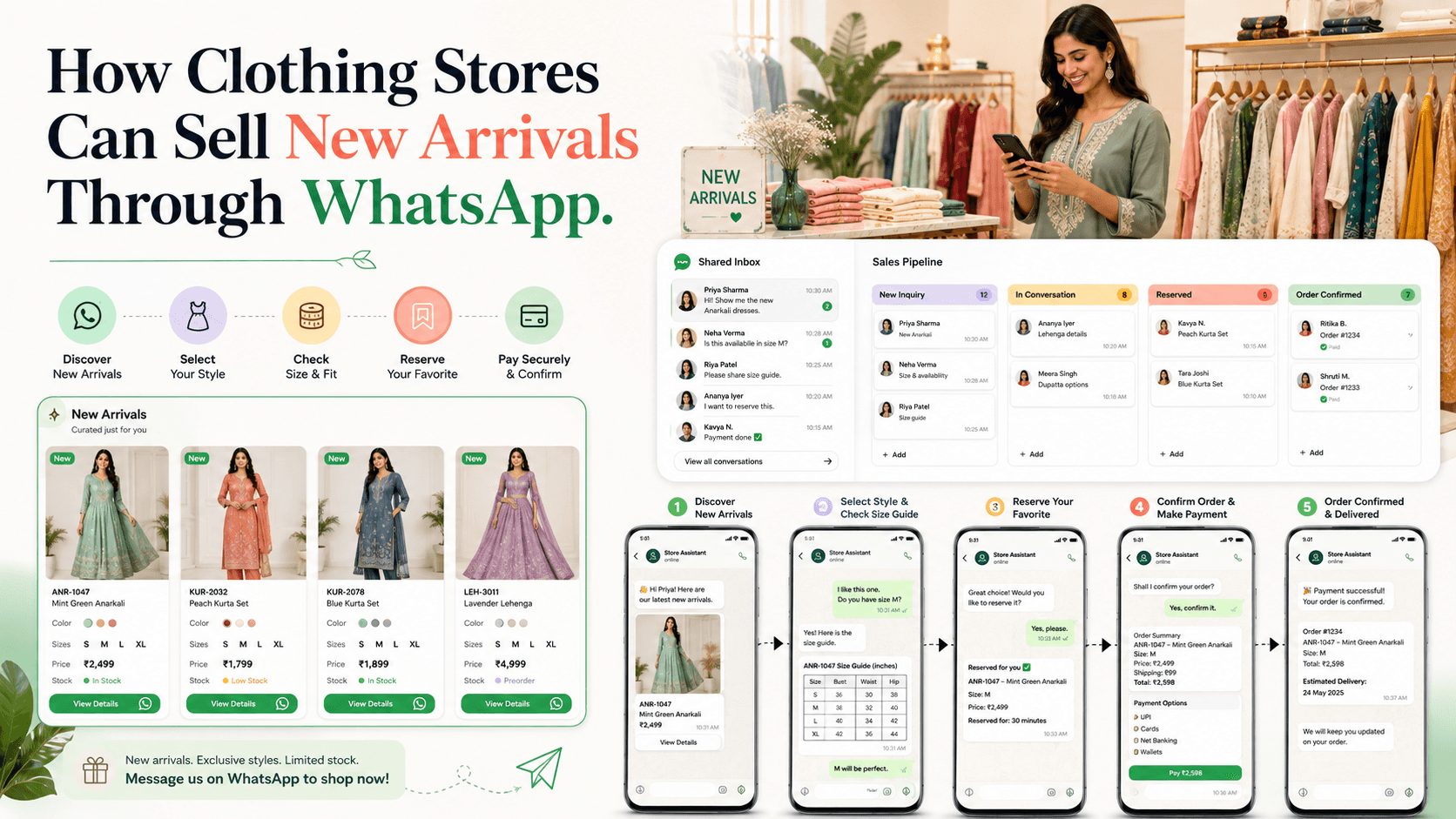
How Clothing Stores Can Sell New Arrivals Through WhatsApp
New clothing collections often create immediate customer interest.
Shoppers want to see available styles, colours, sizes, prices, fabric details, delivery options, and exchange conditions before making a decision.
WhatsApp allows clothing stores to answer these questions inside a familiar conversation. However, simply sending dozens of product photos to every customer rarely creates a good shopping experience.
Stores need relevant customer segments, organised product information, accurate inventory, clear conversation ownership, and a simple path from discovery to payment.
Here is how clothing stores can sell new arrivals through WhatsApp without overwhelming customers or employees.
Start With Customer Permission
A customer who shared their number for an order update may not want promotional messages about every new collection.
A clear opt-in might say:
Receive new-arrival updates and up to four promotional messages per month from UrbanStyle on WhatsApp. Reply STOP at any time to unsubscribe.
WhatsApp requires businesses to obtain appropriate opt-in permission before initiating messages and to respect requests to stop communication. WhatsApp Business Messaging Policy
Where practical, allow customers to choose the updates they want.
Possible categories include:
- Women’s clothing
- Men’s clothing
- Children’s clothing
- Ethnic wear
- Western wear
- Workwear
- Occasion wear
- New arrivals
- Sale updates
This creates more relevant communication than one general broadcast list.
Segment Customers Before Sending
Not every new collection is relevant to every customer.
Useful segments may include:
- Previous product category
- Preferred size
- Style preference
- Typical budget
- Location
- Preferred branch
- Online or in-store preference
- Previous campaign response
- Purchase history
- Loyalty status
For example:
Customers in Ahmedabad + interested in women’s ethnic wear + sizes M to XL + opted into new-arrival updates.
Use information customers knowingly provided through purchases, enquiries, and preference selections.
Avoid sensitive assumptions or hidden profiling.
Build Exclusion Rules
Good targeting also requires deciding who should not receive the campaign.
Exclude customers who:
- Asked to stop promotional messages
- Declined the product category
- Already purchased from the collection
- Recently received the same message
- Live outside the delivery area
- Have an unresolved complaint
- Do not meet the campaign conditions
Exclusions reduce irrelevant communication and repeated promotions.
Send a Curated Introduction
Do not begin by sending twenty product images.
Start with a concise message that explains:
- What has arrived
- Why it may interest the customer
- Available sizes
- Price range
- How to view the collection
For example:
Hi Meera, our new lightweight cotton kurta collection has arrived in sizes S to XXL, starting at ₹1,299. Since you previously preferred everyday ethnic styles, we selected five suitable options. Reply STYLES to view them.
This gives the customer control over whether to continue.
Use Product Codes
Every item should have a short, unique product code.
For example:
- Kurta KU-108
- Dress DR-204
- Shirt SH-316
- Saree SA-412
Product codes prevent confusing messages such as:
What is the price of the third blue one?
Customers can reply:
I want DR-204 in size M.
Employees can then identify the correct item immediately.
Provide Complete Product Information
Each product should include:
- Product name
- Product code
- Price
- Available colours
- Available sizes
- Fabric or material
- Fit
- Key features
- Current stock status
- Delivery estimate
- Exchange conditions
For example:
Product: Cotton A-Line Kurta Code: KU-108 Price: ₹1,499 Colours: Blue, peach, and olive Sizes: S to XXL Fabric: 100% cotton Fit: Regular Availability: In stock Delivery: Two to four business days
Complete information reduces repetitive questions and helps customers make faster decisions.
Use Clear, Consistent Images
Clothing customers depend heavily on visuals.
Product images should show:
- Front view
- Back view
- Fabric texture
- Relevant detail
- Accurate colour
- Fit on a model or mannequin when available
Use consistent lighting, background, and image proportions across the collection.
Do not heavily edit colours in a way that makes the actual product look different.
If colour may vary by screen or lighting, communicate that clearly.
Share a Size Guide
Size uncertainty is one of the biggest barriers to buying clothing remotely.
Provide a clear size guide containing relevant measurements such as:
- Bust or chest
- Waist
- Hip
- Shoulder
- Garment length
- Sleeve length
A size reply might say:
For KU-108, size M has a 38-inch bust and 44-inch garment length. Would you like the complete size guide?
Do not recommend a size based only on a customer’s appearance or assumptions.
Ask for the garment measurements they normally use or allow the customer to compare with an existing item.
Explain Fit, Not Only Size
Two garments with the same labelled size may fit differently.
Useful fit descriptions include:
- Slim fit
- Regular fit
- Relaxed fit
- Oversized fit
- Stretch fabric
- Non-stretch fabric
- Adjustable waist
- Elasticated waist
For example:
DR-204 has a relaxed fit and non-stretch fabric. If you are between sizes, compare your measurements with the size guide before ordering.
Accurate fit guidance can reduce exchanges and dissatisfaction.
Ask What the Customer Needs
A salesperson can narrow the selection using a few natural questions.
For example:
Are you shopping for daily wear, work, or an occasion?
Then:
Which size and price range should we focus on?
Useful details may include:
- Occasion
- Size
- Preferred colour
- Style
- Budget
- Required date
- Delivery location
Do not turn the conversation into a long questionnaire.
Ask only what helps the customer choose.
Recommend a Small Number of Relevant Styles
Once the requirement is clear, share three to five suitable options.
For example:
Based on your preference for lightweight workwear under ₹2,000, these three styles may suit your requirement:
- KU-108 — Cotton A-Line Kurta — ₹1,499
- KU-214 — Straight Linen-Blend Kurta — ₹1,799
- KU-306 — Printed Office Kurta — ₹1,899
All three are available in size M. Would you like detailed images or measurements?
Curated recommendations save customers from searching through an entire catalogue.
Keep Inventory Accurate
A customer should not reach the payment stage before learning that their size is unavailable.
Check stock by:
- Product code
- Colour
- Size
- Branch
- Quantity
Avoid vague availability such as:
It should be available.
Use:
KU-108 is currently available in blue, size M, at our Ahmedabad store. One unit is available as of 2:30 p.m.
If inventory changes quickly, verify again before payment.
Offer Restock Notifications
When a requested item is unavailable, ask whether the customer wants a notification.
For example:
KU-108 in blue, size M, is currently out of stock. Reply NOTIFY if you would like a WhatsApp message when it returns.
Record:
- Product code
- Colour
- Size
- Customer
- Notification expiry
When stock returns:
Hi Meera, KU-108 in blue, size M, is back in stock for ₹1,499. Reply RESERVE if you would like us to hold it until tomorrow.
Do not substitute a different size or colour without confirming with the customer.
Use Reservations Honestly
A short reservation can help customers who need time to decide.
State:
- Product code
- Colour
- Size
- Reservation expiry
- Whether payment is required
- What happens after expiry
For example:
We can reserve KU-108 in blue, size M, until tomorrow at 6:00 p.m. No payment is required until you confirm.
Do not claim an item is reserved unless the inventory process actually prevents another sale.
Assign Every Interested Customer
When a campaign generates many replies, assign each conversation to one employee.
Without clear ownership:
- Two employees may reply
- Different prices may be shared
- Stock may be promised twice
- Follow-ups may be forgotten
- Customers may repeat their requirements
Assignments can use:
- Product category
- Branch
- Customer language
- Location
- Employee availability
- Existing customer owner
The assigned employee should see the complete conversation and customer context.
Track Customers Through a Sales Pipeline
A clothing-store pipeline might include:
- New enquiry
- Preference identified
- Styles shared
- Size confirmed
- Stock confirmed
- Follow-up scheduled
- Awaiting decision
- Awaiting payment
- Order confirmed
- Dispatched
- Completed
- Lost or not interested
Each active opportunity should have:
- Owner
- Stage
- Product code
- Preferred size
- Next action
- Follow-up date
This prevents interested shoppers from disappearing after product photos are shared.
Follow Up With Useful Information
Avoid:
Did you check the collection?
Use:
Hi Meera, I’m following up on KU-108 and KU-214. Both are still available in size M, and delivery to Ahmedabad is possible by Saturday. Would you like a measurement comparison?
Useful follow-ups may provide:
- Updated stock
- Size information
- A relevant alternative
- Delivery timing
- Product comparison
- Genuine reservation expiry
Do not send repeated messages when nothing has changed.
Confirm the Order Before Payment
Send one complete summary:
Order summary
Product: Cotton A-Line Kurta KU-108 Colour: Blue Size: M Quantity: 1 Product price: ₹1,499 Delivery: ₹100 Final amount: ₹1,599 Delivery area: Ahmedabad Estimated delivery: 24–26 August
Reply CONFIRM if these details are correct or CHANGE to edit the order.
This allows the customer to correct the size, colour, quantity, or address.
Share an Approved Payment Option
After confirmation, provide the approved payment method.
Include:
- Order number
- Final amount
- Payment option
- Approved link or instructions
- Help option
Never ask customers to share passwords, card PINs, or one-time passwords through WhatsApp.
Verify payment through the authorised payment system rather than relying only on screenshots.
Send Order Updates
After payment, move the conversation from sales to fulfilment.
Useful updates include:
- Order confirmation
- Payment confirmation
- Processing
- Dispatch
- Tracking
- Out for delivery
- Delivered
For example:
Order US-4821 has been dispatched and is expected to arrive on Friday. Reply TRACK for the tracking link or HELP if the information appears incorrect.
Stop promotional follow-ups for the purchased item.
Explain Exchange and Return Conditions
Clothing customers should understand exchange and return conditions before ordering.
Explain:
- Eligibility
- Time limit
- Condition requirements
- Tags and packaging requirements
- Size-exchange process
- Delivery charges
- Non-returnable categories
- Refund or store-credit process
Keep the summary readable and provide complete terms through an approved link when necessary.
Do not hide important restrictions until after payment.
Support In-Store Visits
Some customers may want to view or try the product in person.
WhatsApp can help them:
- Check branch stock
- Reserve an item
- Receive store directions
- Book a styling appointment
- Confirm operating hours
For example:
KU-108 in blue, size M, is available at our Navrangpura store. Reply VISIT if you would like us to reserve it until 6:00 p.m. today.
Update the reservation if the customer visits, purchases, or cancels.
Use Automation for Repetitive Tasks
Automation can handle:
- Contact capture
- Preference collection
- Product-category routing
- Size-guide delivery
- Catalogue requests
- Restock notifications
- Reservation reminders
- Order updates
- Follow-up tasks
- Campaign exclusions after purchase
Employees should handle:
- Style recommendations
- Fit questions
- Complex exchanges
- Complaints
- Negotiation
- Exceptions
Automation should make shopping easier without making the conversation feel robotic.
Measure New-Arrival Sales Performance
Track:
- Campaign delivery
- Catalogue requests
- Product enquiries
- Size-guide requests
- Reservations
- Store visits
- Orders
- Revenue
- Conversion by segment
- Conversion by product
- Products requested but unavailable
- Exchanges
- Opt-outs
- Blocks and complaints
A smaller campaign sent to relevant customers can produce better results than a large campaign sent to everyone.
Common Mistakes to Avoid
Sending Every Collection to Every Customer
Use interests, sizes, locations, and purchase history to build segments.
Sending Too Many Images
Share a curated selection or let customers request the catalogue.
Omitting Product Codes
Use clear codes so customers and employees identify the correct item.
Ignoring Size and Fit Information
Provide measurements and accurate fit descriptions.
Promoting Unavailable Stock
Verify product, colour, size, and branch inventory.
Hiding Exchange Conditions
Explain important terms before payment.
Forgetting Campaign Replies
Assign every interested customer and schedule relevant follow-ups.
Continuing Promotions After Purchase
Move the customer to fulfilment updates and exclude them from the remaining campaign sequence.
How Voixt.ai Helps Clothing Stores Sell Through WhatsApp
Voixt.ai helps clothing stores promote collections, manage customer conversations, and complete sales through an organised WhatsApp workflow.
Teams can use:
- Campaign management for targeted new-arrival communication
- Contact tags and filters for product interests, sizes, locations, purchases, and preferences
- Shared multi-agent WhatsApp inboxes so sales employees can manage replies together
- Automatic contact capture to maintain organised customer records
- Conversation assignments so every interested shopper has one owner
- Visual CRM pipelines to track customers from collection enquiry to completed order
- Follow-up reminders for stock checks, reservations, and customer-requested actions
- No-code automation workflows for catalogues, routing, restock alerts, and order updates
- AI-powered responses to help answer routine product questions efficiently
- Private internal notes for size, style, budget, and stock context
- AI-to-human handovers when customers need personalised recommendations
This allows clothing stores to combine the convenience of WhatsApp with the organisation required to manage sizes, stock, conversations, and sales.
Final Thoughts
Clothing stores can sell new arrivals successfully through WhatsApp when the experience feels organised and relevant.
Ask customers what they want to receive, share a curated collection, use product codes, provide complete size and fabric details, confirm stock, and make ordering simple.
Automation can handle catalogues, routing, reminders, and updates. Employees should remain available for fit guidance, style recommendations, and exceptions.
Voixt.ai helps clothing stores connect these steps so new-arrival conversations move from product discovery to completed orders without becoming difficult to manage.