
From “Price Please” to Purchase: Managing WhatsApp Leads Better
Learn how businesses can turn short WhatsApp price enquiries into qualified opportunities through faster responses, better conversations, CRM tracking, structured follow-ups, and automation.
On this page17 sections
- From “Price Please” to Purchase: Managing WhatsApp Leads Better
- 1. Respond Quickly
- 2. Identify the Product or Service
- 3. Share the Price Clearly
- 4. Explain What Is Included
- 5. Ask One Relevant Question at a Time
- 6. Recommend the Right Option
- 7. Handle Price Objections Carefully
- 8. Capture the Enquiry in the CRM
- 9. Assign One Owner
- 10. Propose One Clear Next Step
- 11. Schedule Useful Follow-Ups
- 12. Use Automation With Human Support
- Example WhatsApp Price-Enquiry Workflow
- WhatsApp Price-Enquiry Checklist
- How Voixt.ai Helps
- Final Thoughts
From “Price Please” to Purchase: Managing WhatsApp Leads Better
“Price please” is one of the most common messages businesses receive on WhatsApp.
Although the message contains little information, it shows that the customer is interested. What happens next determines whether the enquiry becomes a purchase or disappears among other conversations.
Some businesses reply with only a price. Others send a large catalogue, ask too many questions, or respond several hours later. These approaches create friction because customers usually want more than a number. They also want to understand suitability, availability, delivery, quality, and the next step.
Here is how businesses can manage WhatsApp price enquiries more effectively.
1. Respond Quickly
Customers often contact several businesses before making a decision. A delayed response gives competitors time to answer and build trust.
If an employee is unavailable, send an automated acknowledgement:
Hi! Thanks for contacting HomeCraft Furniture. We’ve received your enquiry and will respond within 10 minutes. Meanwhile, please share the product name or photo so we can confirm the price.
For after-hours enquiries, clearly state when the team will respond. Avoid promising response times that cannot be maintained.
2. Identify the Product or Service
“Price please” may come from an advertisement, catalogue, website, social media post, or forwarded image.
Whenever possible, preserve the campaign and product context. This allows the business to provide a relevant response immediately.
If the product is unclear, ask one simple question:
Certainly. Could you share the product name, screenshot, or photo so I can confirm the correct price?
Do not ask the customer to repeat information already available in the conversation or campaign data.
3. Share the Price Clearly
If the price is fixed, provide it directly:
The dining table is ₹18,500 and includes six chairs.
If pricing varies, explain the starting price and what affects the final amount:
Plans start at ₹1,349 per month. The final price depends on the number of users, WhatsApp connections, and automation requirements. How many team members need access?
If an assessment is required, explain why:
Installation pricing depends on the room size and existing wiring. Please share the approximate area so we can prepare an accurate estimate.
Customers are more likely to continue when the pricing process is transparent.
4. Explain What Is Included
A price without context is difficult to evaluate.
Instead of replying:
₹25,000.
Use:
The package is ₹25,000 and includes design, installation, delivery within Bengaluru, and a one-year service warranty.
Clearly mention relevant details such as:
- Product quantity or size
- Included features
- Delivery and installation
- Taxes
- Warranty
- Support
- Payment terms
- Additional charges
This helps customers compare value rather than only the price.
5. Ask One Relevant Question at a Time
Qualification is necessary, but a long questionnaire can cause customers to leave.
Answer the original question first, then ask one useful question:
Our office chairs start at ₹6,500 and include a three-year warranty. Are you looking for one chair or furnishing a larger office?
Continue based on the customer’s response.
Useful qualification details may include:
- Required product or service
- Quantity
- Location
- Budget
- Purchase timeline
- Intended use
- Delivery requirements
- Team or company size
Only collect information that affects the recommendation or next action.
6. Recommend the Right Option
Sending an entire catalogue transfers the decision-making burden to the customer.
Once the requirement is understood, recommend the most suitable option:
Based on your requirement for five users and automated lead qualification, the Growth plan would be the best fit. It includes a shared inbox, CRM pipeline, automation workflows, and conversation assignments.
If alternatives are needed, offer two or three clear choices:
We have two suitable packages:
- Standard — ₹9,500, including delivery
- Premium — ₹13,500, including delivery, installation, and a two-year warranty
Would you like photos of both options?
Too many choices can delay the decision.
7. Handle Price Objections Carefully
If a customer says the price is too high, do not immediately offer a discount.
First, understand the concern:
I understand. Are you comparing it with another option, or would you prefer something within a specific budget?
The customer may be concerned about the total cost, payment timing, delivery charges, missing features, or unclear value.
Depending on the reason, the business can:
- Explain the included value
- Suggest a smaller package
- Remove optional features
- Offer a suitable payment option
- Clarify the warranty or support
- Recommend an alternative product
Understanding the objection prevents unnecessary discounting.
8. Capture the Enquiry in the CRM
A genuine price enquiry should not remain only inside a WhatsApp conversation.
Create or update a CRM record with:
- Customer name and WhatsApp number
- Enquiry source
- Product or service
- Quoted price
- Customer requirement
- Budget and location
- Assigned agent
- Lead stage
- Next action
- Follow-up date
- Conversation history
Voixt.ai connects WhatsApp conversations with contact records and visual CRM pipelines, helping teams track leads from initial interest to purchase.
9. Assign One Owner
Every lead should have one responsible agent.
Without clear ownership, messages may remain unanswered, multiple employees may send conflicting replies, and follow-ups may be missed.
Assignment can depend on:
- Product
- Department
- Location
- Language
- Lead value
- Agent availability
- Customer type
- Campaign source
A shared inbox allows employees to collaborate while showing who is responsible for each conversation.
10. Propose One Clear Next Step
Providing the price should move the customer toward a simple action.
Possible next steps include:
- Receive a quotation
- View product photos
- Confirm the quantity
- Check availability
- Book a demonstration
- Reserve the product
- Schedule a visit
- Complete payment
For example:
The package is ₹11,500, including delivery and installation. Would you like a formal quotation with the complete specifications?
One clear call to action makes it easier for the customer to continue.
11. Schedule Useful Follow-Ups
Many customers need time to compare options, discuss the purchase, arrange payment, or receive approval.
Agree on a follow-up time whenever possible:
I’ll send the quotation now. Would it be helpful if I followed up on Thursday afternoon?
Record the follow-up date, reason, owner, and promised information.
Avoid messages such as:
Any update?
Instead, add value:
Hi Neha, I’m following up on the wardrobe quotation. I’ve added an alternative finish that keeps the total within your budget. Would you like to see it?
Use a limited follow-up sequence and stop messaging if the customer declines or opts out.
12. Use Automation With Human Support
Automation can help businesses:
- Respond instantly
- Identify the product or campaign
- Share starting prices
- Collect basic requirements
- Create CRM records
- Assign conversations
- Schedule follow-ups
- Send booking or payment information
However, customers should have an easy way to reach a person.
Human handover is important for complex requirements, negotiations, large orders, complaints, payment problems, and direct requests for assistance.
The employee receiving the conversation should also receive its complete history and qualification details.
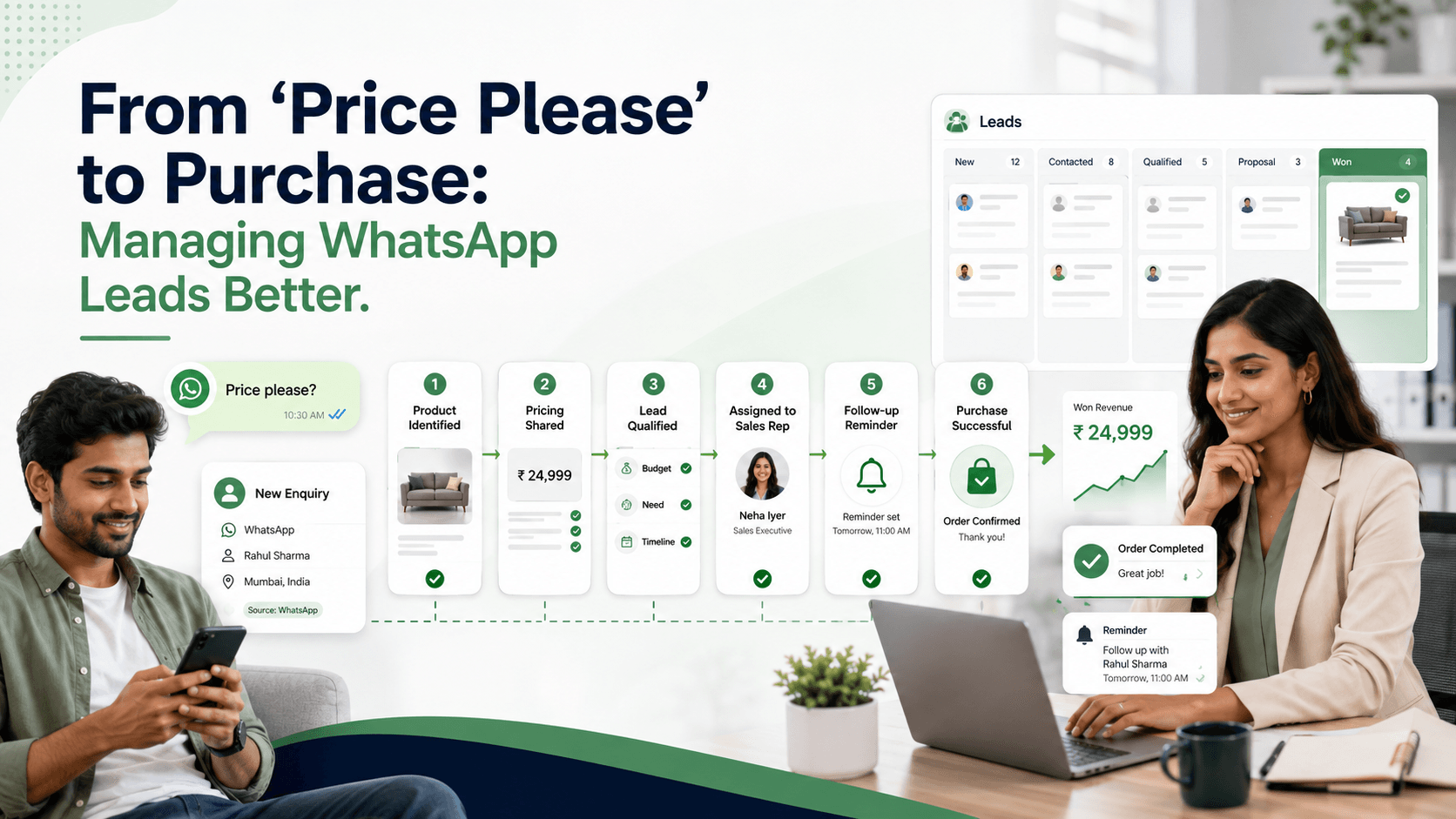
Example WhatsApp Price-Enquiry Workflow
Customer
Price please.
Automated response
Hi! Thanks for your interest in Voixt.ai. Plans start at ₹1,349 per month. How many team members need inbox access?
Customer
Five people.
Qualification
Thank you. Do you need only a shared inbox, or would you also like automation and CRM tracking?
Customer
We need automation and CRM.
Agent response
Hi, I’m Ananya from Voixt.ai. Based on your requirements, I can recommend the most suitable package and demonstrate how the workflow would operate. Would tomorrow at 11:00 AM work for a short demonstration?
The lead is then captured, assigned, moved to the Qualified stage, and scheduled for follow-up.
WhatsApp Price-Enquiry Checklist
For every price enquiry, confirm that:
- The customer received a quick response.
- The correct product or campaign was identified.
- The price and inclusions were explained.
- Only necessary questions were asked.
- A suitable option was recommended.
- The lead was recorded in the CRM.
- One agent owns the conversation.
- A clear next step was proposed.
- A follow-up was scheduled when necessary.
- Human assistance remains available.
- The final outcome was recorded.
How Voixt.ai Helps
Voixt.ai helps businesses manage WhatsApp price enquiries through:
- AI-powered instant responses
- Shared multi-agent inboxes
- Automated lead qualification
- Conversation assignments
- Contact tags and filters
- Visual CRM pipelines
- No-code automation workflows
- Targeted follow-ups
- AI-to-human handovers
- Campaign and contact management
Instead of leaving enquiries scattered across phones and spreadsheets, businesses can capture customer context, assign responsibility, and track every opportunity from one workspace.
Final Thoughts
“Price please” is not an unimportant message. It is the beginning of a buying conversation.
Businesses should respond quickly, share pricing clearly, explain the value, ask relevant questions, recommend the right option, and propose one simple next step.
Start using Voixt.ai to capture, qualify, assign, track, and convert WhatsApp price enquiries into purchases.