
How Service Businesses Can Manage Enquiries, Follow-Ups and Payments on WhatsApp
Learn how service businesses can organise WhatsApp enquiries, automate follow-ups, manage appointments and collect payments without losing the personal touch.
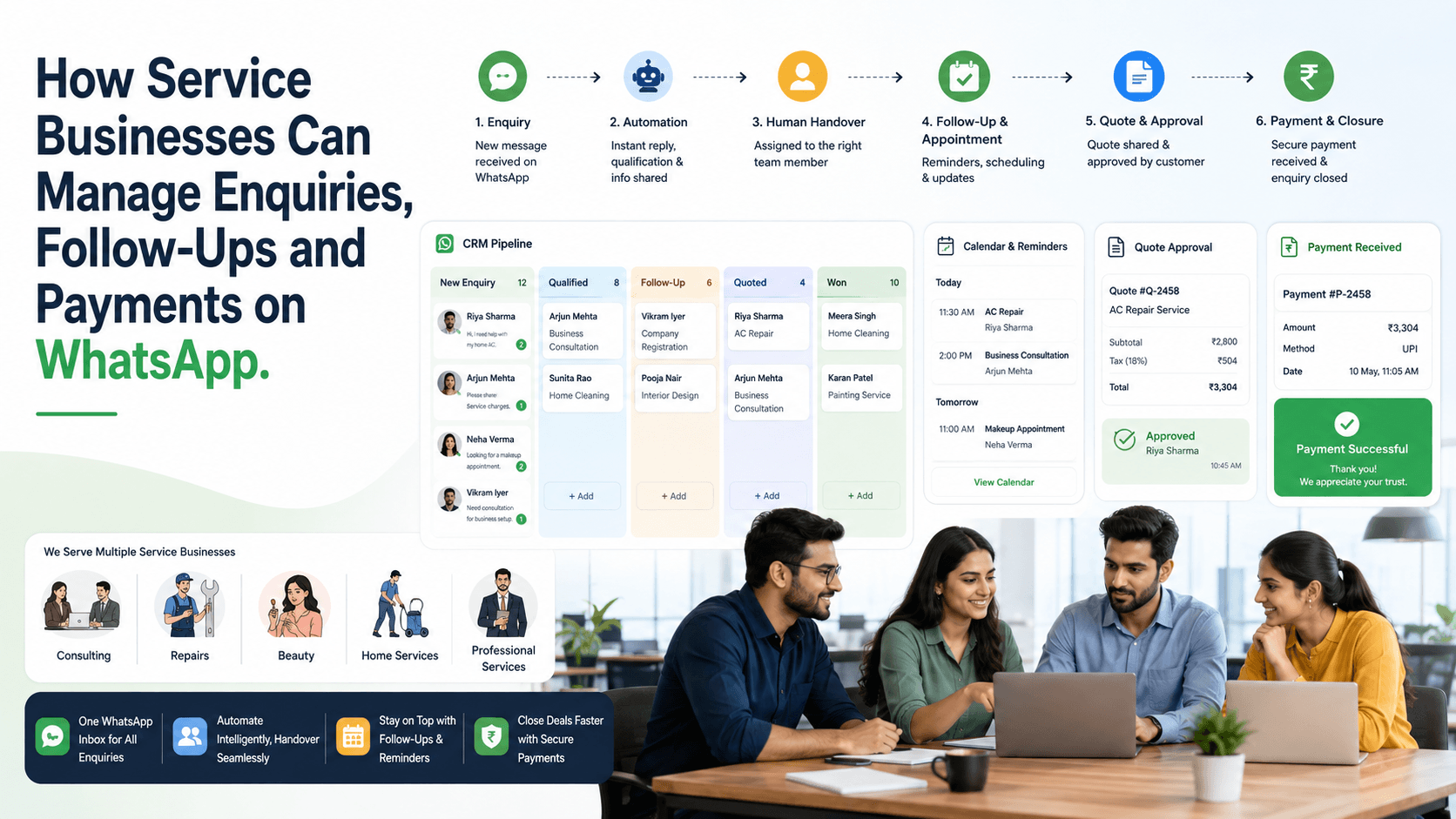
On this page15 sections
- Why Service Enquiries Get Lost
- Use a Shared WhatsApp Inbox
- Capture Essential Customer Requirements
- Organise Enquiries in a Sales Pipeline
- Respond Quickly Without Sounding Robotic
- Create Reliable Follow-Ups
- Send Appointment Reminders
- Share Clear Quotations
- Simplify Payment Collection
- Automate Routine Communication
- Segment Customers Before Sending Campaigns
- Collect Feedback After Service Completion
- Track Business Performance
- How Voixt.ai Helps Service Businesses
- Final Thoughts
Service businesses often receive customer enquiries through WhatsApp. Customers may ask about pricing, availability, appointments, service packages or payment options before making a decision.
WhatsApp makes these conversations convenient, but managing them manually becomes difficult as enquiry volumes grow. Messages get buried, follow-ups are forgotten and payment confirmations become scattered across different chats.
A structured WhatsApp process can help service businesses manage the complete customer journey from the first enquiry to payment and ongoing support.
Why Service Enquiries Get Lost
Small service businesses often manage WhatsApp through the owner’s or receptionist’s personal phone. This may work initially, but problems appear when multiple customers and employees are involved.
Common issues include:
- Slow or missed responses
- Duplicate replies from team members
- Enquiries buried under other chats
- Forgotten follow-ups
- Inconsistent pricing information
- Missed appointments
- Unclear payment status
- Limited visibility for business owners
Every enquiry should have a responsible employee, a clear status and a defined next action.
Use a Shared WhatsApp Inbox
A shared inbox allows authorised employees to manage customer conversations from one organised workspace.
It helps teams:
- Assign enquiries to specific employees
- Review conversation history
- Prevent duplicate replies
- Transfer conversations when required
- Leave private internal notes
- Monitor pending conversations
- Continue conversations when someone is unavailable
Customers still experience one continuous WhatsApp conversation while the team coordinates behind the scenes.
Capture Essential Customer Requirements
Do not overwhelm customers with a long questionnaire. Start with the few details needed to understand their request.
Useful details may include:
- Customer name
- Required service
- Preferred date and time
- Location
- Budget range
- Urgency
- Enquiry source
- Assigned employee
- Follow-up date
Ask questions naturally and collect information gradually.
For example:
“Thank you for contacting us. Which service do you need, and what date would you prefer?”
Organise Enquiries in a Sales Pipeline
A simple service pipeline may include:
- New enquiry
- Contacted
- Requirement collected
- Quotation shared
- Follow-up required
- Appointment booked
- Payment pending
- Service confirmed
- Completed
- Lost or cancelled
This structure helps employees understand what should happen next without reading every conversation again.
Respond Quickly Without Sounding Robotic
An automated acknowledgement can confirm that the enquiry has been received and set clear expectations.
For example:
“Hi! Thank you for contacting us. We’ve received your enquiry. Please share the service you need, and a team member will assist you shortly.”
Automation should begin and organise the conversation, not replace personalised assistance when customers need guidance.
Create Reliable Follow-Ups
Many service enquiries do not convert during the first conversation. Customers may need time to compare quotations, confirm dates or discuss the decision with someone else.
Useful follow-up triggers include:
- A quotation was shared
- The customer requested a later callback
- An appointment is approaching
- Required information is incomplete
- A payment link was shared
- A preferred appointment slot becomes available
- The customer postponed the service
Every reminder should contain a specific date and reason instead of a vague note such as “follow up later.”
Send Appointment Reminders
Appointment-based businesses can reduce missed bookings by sending timely reminders containing:
- Service name
- Appointment date and time
- Location or online meeting link
- Assigned professional
- Preparation instructions
- Rescheduling or cancellation option
Messages should be helpful and proportionate. Sending too many reminders can frustrate customers.
Share Clear Quotations
Before asking for payment, provide a clear summary of what the customer is purchasing.
A quotation should explain:
- Service description
- Included work
- Price
- Applicable taxes
- Additional charges
- Validity period
- Expected completion time
- Payment terms
Keep approved pricing templates available so employees provide consistent information.
Simplify Payment Collection
Once the customer accepts the service, make payment simple and secure.
The payment request should clearly mention:
- Service or booking reference
- Payable amount
- Payment purpose
- Approved payment method
- Payment deadline, when applicable
After payment, send an automatic confirmation and update the customer’s status from “Payment Pending” to “Service Confirmed.”
Avoid requesting sensitive card or banking information through chat.
Automate Routine Communication
Service businesses can automate predictable tasks such as:
- Acknowledging new enquiries
- Capturing basic requirements
- Assigning conversations
- Sending appointment confirmations
- Creating follow-up reminders
- Sharing approved information
- Sending payment links
- Confirming payments
- Sending service-status updates
- Requesting feedback
Human involvement remains important for quotations, negotiation, complaints, custom requirements and complex service decisions.
Segment Customers Before Sending Campaigns
The same offer is rarely relevant to every customer. Useful segments may include:
- New enquiries
- Quotation shared
- Follow-up required
- Appointment booked
- Payment pending
- Completed customers
- Repeat customers
- Customers interested in a specific service
- Customers inactive for a defined period
Segmentation improves relevance and prevents existing customers from receiving messages intended for new leads.
Collect Feedback After Service Completion
A short feedback request helps businesses understand customer satisfaction and identify service problems.
For example:
“Thank you for choosing us. How would you rate your experience from 1 to 5? Please reply here if you need any further assistance.”
Negative feedback should be transferred to a responsible team member for personal resolution.
Track Business Performance
Business owners should be able to understand performance without reading every chat.
Useful metrics include:
- Number of new enquiries
- First-response time
- Pending conversations
- Follow-ups due or overdue
- Quotations shared
- Appointments booked
- Payments pending
- Confirmed customers
- Completed services
- Enquiry-to-customer conversion rate
- Revenue by service or source
- Reasons for lost enquiries
These insights show where customers are leaving the process and where the team needs improvement.
How Voixt.ai Helps Service Businesses
Voixt.ai helps service businesses organise enquiries, follow-ups and payments through:
- Shared multi-agent WhatsApp inboxes
- Automatic contact capture
- Conversation assignments
- Visual CRM pipelines
- Contact tags and filters
- Follow-up reminders
- No-code automation workflows
- AI-powered responses
- AI-to-human handovers
- Targeted campaign management
- Orders and payments
- Automated confirmations and updates
- Private internal notes
Teams can manage the complete customer journey from one organised platform instead of depending on personal WhatsApp accounts, spreadsheets and manual reminders.
Final Thoughts
WhatsApp can become more than a messaging channel for service businesses. With the right process, it can support enquiries, customer qualification, appointments, follow-ups, payments and post-service communication.
The goal is not to automate every conversation. It is to organise repetitive work so employees can focus on customers who need genuine human assistance.
Voixt.ai brings WhatsApp conversations, CRM, automation, campaigns and payments together so service businesses can respond faster, reduce missed opportunities and deliver a more professional customer experience.