
The Problem Isn't Getting Leads. It's Managing What Happens After the Lead Arrives.
Getting leads is only the beginning. Learn how businesses can assign enquiries, track progress, schedule follow-ups and convert more WhatsApp leads into customers.
On this page19 sections
- What Happens After a Lead Arrives?
- Why Good Leads Get Lost
- Slow responses
- No clear ownership
- Duplicate replies
- Missing customer context
- Forgotten follow-ups
- No sales-stage visibility
- Capture Every Lead Automatically
- Assign One Owner to Every Lead
- Use a Clear Sales Pipeline
- Respond Quickly and Consistently
- Qualify Leads Through Conversation
- Make Every Follow-Up Specific
- Automate Repetitive Lead-Management Tasks
- Keep Internal Coordination Private
- Track the Right Lead Metrics
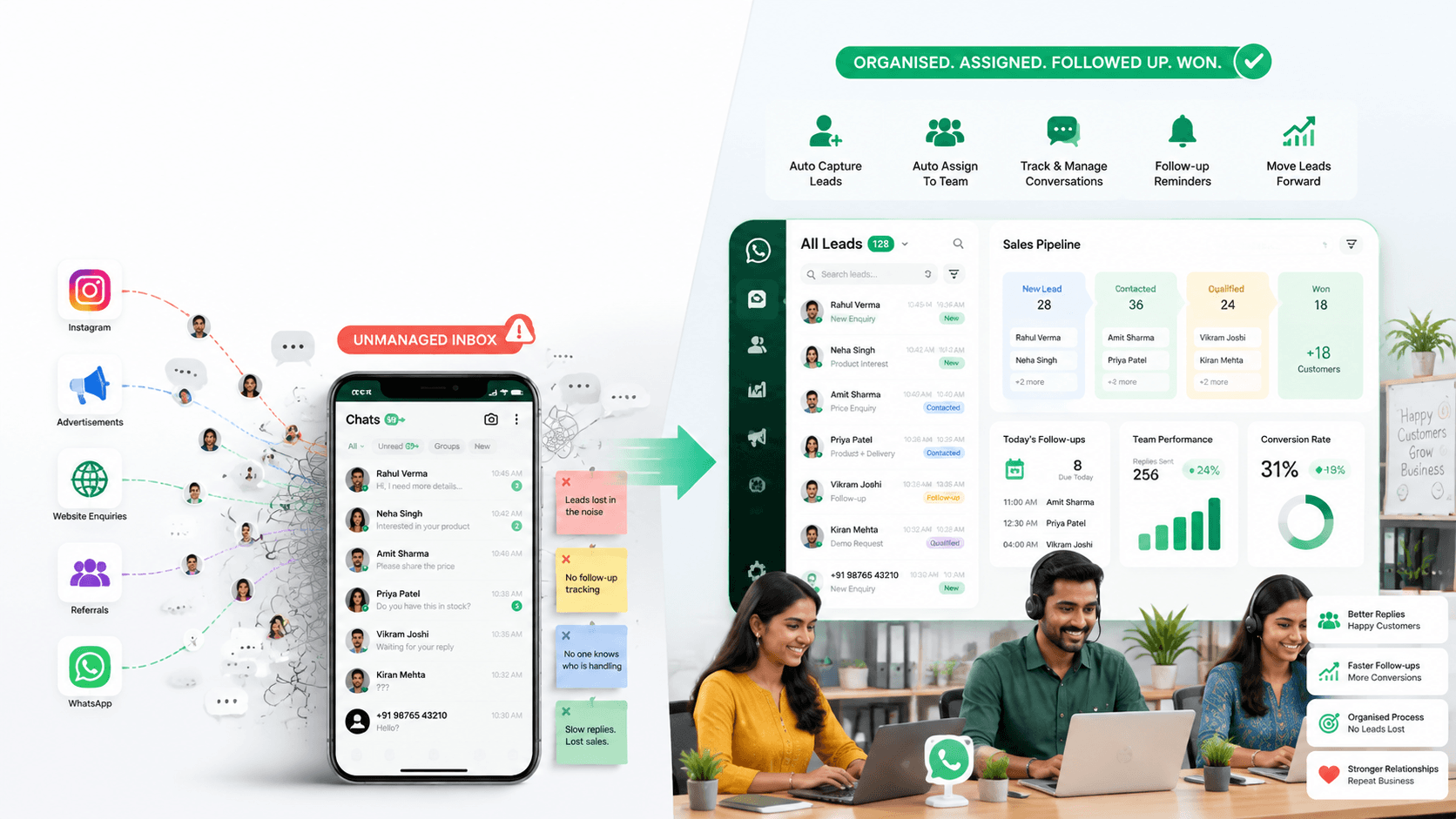
- How Voixt.ai Helps Businesses Manage Leads
- Final Thoughts
Businesses invest in advertisements, social media, websites and referrals to generate leads. But attracting enquiries is only the first step.
The real challenge begins after a lead arrives. If nobody responds quickly, ownership is unclear or the follow-up is forgotten, even a highly interested customer can disappear.
Generating more leads will not solve a broken lead-management process.
What Happens After a Lead Arrives?
A potential customer may contact a business through:
- Click-to-WhatsApp advertisements
- Instagram or Facebook
- Google search
- A website
- A referral
- An offline campaign
- A QR code
- A direct WhatsApp message
Once the message arrives, the business needs to capture the contact, understand the requirement, assign the conversation and define the next action.
Without this structure, the lead becomes another unread or forgotten chat.
Why Good Leads Get Lost
Slow responses
Customer interest is usually highest when the enquiry is sent. A delayed response gives the customer time to contact another business.
No clear ownership
When multiple employees can see an enquiry but nobody is responsible for it, everyone may assume someone else will respond.
Duplicate replies
Two employees may answer the same customer with different information, creating confusion and reducing trust.
Missing customer context
If the team does not record the customer’s requirement, source and previous discussion, every follow-up begins from the start.
Forgotten follow-ups
Many customers do not purchase during the first conversation. Without a specific follow-up date and purpose, interested leads are easily forgotten.
No sales-stage visibility
If every lead remains inside the inbox, managers cannot see which customers are new, qualified, awaiting a quotation, payment pending or close to purchase.
Capture Every Lead Automatically
When a new customer sends a WhatsApp message, their contact information should be captured automatically.
The customer record can include:
- Name
- Phone number
- Enquiry source
- Product or service interest
- Location
- Assigned employee
- Sales stage
- Follow-up date
- Relevant tags
Automatic contact capture reduces manual data entry and ensures that each enquiry enters the lead-management process.
Assign One Owner to Every Lead
Every active lead should have one responsible owner. That employee should be accountable for:
- Responding to the customer
- Understanding the requirement
- Recording important details
- Updating the sales stage
- Scheduling the next action
- Completing the follow-up
Assignment can be based on location, product, service, language, availability or lead source.
Ownership does not prevent teamwork. It prevents confusion.
Use a Clear Sales Pipeline
A visual pipeline helps teams understand where every lead stands.
A simple pipeline may include:
- New lead
- Contacted
- Requirement collected
- Qualified
- Demo or appointment scheduled
- Quotation shared
- Follow-up required
- Negotiation
- Payment pending
- Won or lost
Each stage should have a clear meaning so employees know what action is expected next.
Respond Quickly and Consistently
An automatic acknowledgement can confirm that the enquiry has been received and ask one useful question.
For example:
“Hi! Thank you for contacting us. Please tell us which product or service you are interested in, and our team will assist you shortly.”
Approved response templates can help employees answer common questions consistently. Team members should still personalise replies based on the customer’s requirement.
Qualify Leads Through Conversation
Not every enquiry has the same urgency or potential. Teams can qualify leads by asking relevant questions about:
- Requirement
- Budget
- Location
- Preferred timeline
- Decision-making stage
- Product or service fit
Qualification should feel like a helpful conversation, not an interrogation.
The objective is to understand what the customer needs and identify the most suitable next step.
Make Every Follow-Up Specific
A reminder such as “follow up later” does not provide enough context.
A useful follow-up should include:
- Date and time
- Reason for follow-up
- Previous discussion
- Expected next action
For example:
“Follow up on Friday to confirm whether the customer wants the premium package after reviewing the quotation.”
Specific reminders help employees continue the conversation naturally.
Automate Repetitive Lead-Management Tasks
Businesses can automate predictable activities such as:
- Capturing new contacts
- Acknowledging enquiries
- Assigning conversations
- Adding tags
- Updating pipeline stages
- Creating follow-up reminders
- Sending appointment confirmations
- Sharing approved information
- Alerting an employee when human assistance is required
Automation should organise the process while keeping employees available for important sales conversations.
Keep Internal Coordination Private
Employees may need to discuss pricing approval, product availability or customer requirements. These discussions should not appear in the customer-facing chat.
Private internal notes can include:
- “Customer prefers a callback after 6:00 p.m.”
- “Manager approval required for discount.”
- “Customer needs the product before Monday.”
- “Do not send another campaign; follow up next month.”
Internal notes give the team useful context without exposing operational discussions to the customer.
Track the Right Lead Metrics
Lead volume alone does not show whether the sales process is working.
Businesses should track:
- New leads received
- First-response time
- Unassigned leads
- Pending conversations
- Qualified leads
- Follow-ups due or overdue
- Lead conversion rate
- Sales by source
- Time spent in each stage
- Reasons for lost leads
These metrics reveal where leads are getting delayed or lost.
How Voixt.ai Helps Businesses Manage Leads
Voixt.ai helps businesses organise the complete journey after a lead arrives through:
- Automatic contact capture
- Shared multi-agent WhatsApp inboxes
- Conversation assignments
- Visual CRM pipelines
- Contact tags and filters
- Follow-up reminders
- No-code automation workflows
- AI-powered responses
- AI-to-human handovers
- Private internal notes
- Targeted campaign management
- Orders and payments
Managers can see where each lead stands, who is responsible and what action is required next without reading every conversation.
Final Thoughts
Generating more leads is valuable only when the business can manage them effectively.
Every lead needs a fast response, a responsible owner, a clear stage and a specific next action. Without these basics, marketing investment produces conversations but not customers.
Voixt.ai helps businesses turn incoming WhatsApp enquiries into organised sales opportunities so teams can follow up consistently and convert more leads.