
How a Small Sales Team Can Manage WhatsApp Leads Together
Learn how a small sales team can manage WhatsApp leads using a shared inbox, clear ownership, routing, pipeline stages, internal notes, and follow-up reminders.
On this page28 sections
- How a Small Sales Team Can Manage WhatsApp Leads Together
- Why WhatsApp Lead Management Becomes Difficult
- Use One Shared Business Inbox
- Assign One Owner to Every Lead
- Route New Leads Automatically
- Create Simple Sales Roles
- Capture Every New Contact Automatically
- Qualify Leads With a Few Useful Questions
- Use Contact Tags Carefully
- Track Leads Through a Visual Pipeline
- Record the Lead Source
- Use Private Internal Notes
- Standardise Important Information
- Send Complete Quotation Summaries
- Schedule Every Follow-Up
- Follow Up With Relevant Information
- Prevent Duplicate Replies
- Create a Clear Handover Process
- Manage Shifts and Absences
- Separate Sales and Support Conversations
- Use Automation for Repetitive Administration
- Use AI to Assist Salespeople
- Respect Communication Preferences
- Build a Daily Team Routine
- Measure Team Performance
- Common Mistakes to Avoid
- How Voixt.ai Helps Small Sales Teams Work Together
- Final Thoughts
How a Small Sales Team Can Manage WhatsApp Leads Together
A small sales team may receive WhatsApp enquiries from advertisements, social media, referrals, website buttons, QR codes, and existing customers.
At first, one employee may handle everything from a single phone. As enquiries increase, the team starts forwarding screenshots, maintaining separate spreadsheets, and asking each other who is replying to which customer.
This creates missed leads, duplicate responses, conflicting prices, and forgotten follow-ups.
A small team does not need a complicated sales operation. It needs one shared inbox, clear conversation ownership, visible customer stages, useful internal context, and a reliable follow-up process.
Why WhatsApp Lead Management Becomes Difficult
A lead may ask for a price, receive product details, request a quotation, postpone the decision, and return several days later.
During that time:
- Another employee may answer the customer
- The original owner may take leave
- New messages may push the chat down the inbox
- The quotation may change
- Stock may become unavailable
- The promised follow-up may be forgotten
The conversation remains inside WhatsApp, but the sales process becomes difficult to see.
Use One Shared Business Inbox
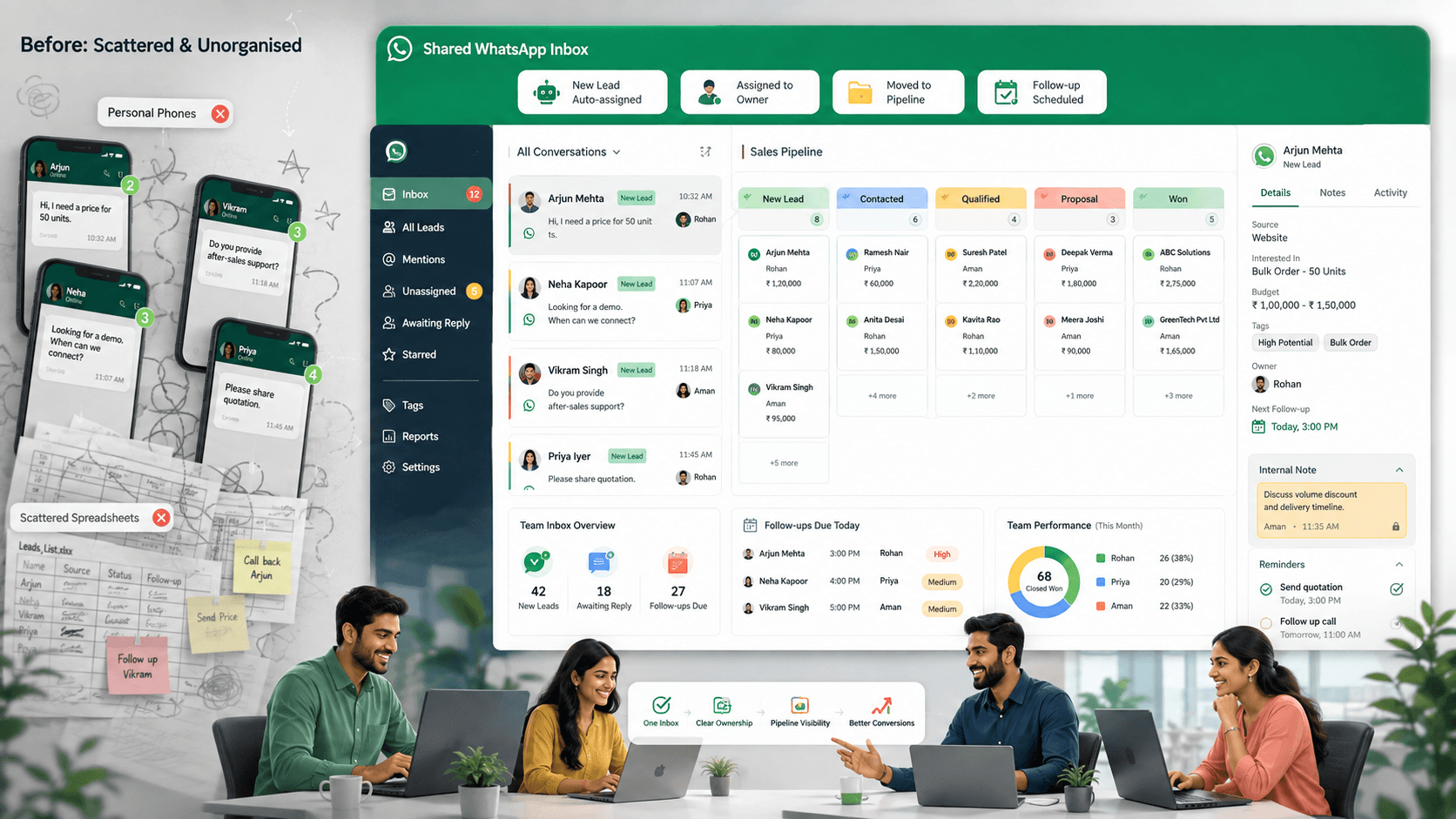
A shared WhatsApp inbox allows authorised employees to manage conversations from one business number.
The team should be able to see:
- New leads
- Assigned conversations
- Unassigned conversations
- Customer history
- Current owner
- Sales stage
- Internal notes
- Follow-up date
- Priority
Shared access does not mean everyone should reply to every lead.
Every active conversation still needs one responsible owner.
Assign One Owner to Every Lead
Conversation ownership prevents two common problems:
- Several employees reply to the same customer
- Everyone assumes someone else will reply
A lead record might show:
Customer: Meera Shah Owner: Arjun Stage: Quotation sent Priority: High Next action: Follow up on Friday
The owner is responsible for moving the opportunity forward, recording important context, and completing promised actions.
Other employees can assist through internal notes or a formal handover.
Route New Leads Automatically
Manual assignment becomes difficult when several enquiries arrive together.
Leads can be routed using:
- Product category
- Customer location
- Branch
- Language
- Lead source
- Employee availability
- Existing account owner
- Current workload
For example:
- Furniture enquiries → Arjun
- Fashion enquiries → Meera
- Mumbai leads → Mumbai salesperson
- Existing customers → Previous owner
- Unclear enquiries → Unassigned queue
Keep a fallback queue for conversations that do not match any rule.
Create Simple Sales Roles
A small team does not need several complicated departments.
A practical structure may include:
Lead coordinator
- Monitors new enquiries
- Checks unassigned conversations
- Verifies routing
- Reassigns leads when employees are unavailable
Sales owner
- Understands the customer’s requirement
- Shares relevant products or services
- Prepares quotations
- Schedules follow-ups
- Moves the opportunity through the pipeline
Sales manager
- Reviews high-value opportunities
- Approves exceptions and discounts
- Monitors overdue follow-ups
- Balances employee workload
One person may perform more than one role in a very small team. The responsibilities should still remain clear.
Capture Every New Contact Automatically
When a new customer messages the business, create or update the contact record automatically.
Capture:
- Name when available
- WhatsApp number
- First-contact date
- Lead source
- Initial enquiry
- Relevant tags
- Assigned employee
For example, someone responding to a furniture advertisement might receive:
- Source: Instagram advertisement
- Interest: Office furniture
- Stage: New enquiry
- Location: Pune
Employees can add more specific information during the conversation.
Avoid creating duplicate records when an existing customer returns.
Qualify Leads With a Few Useful Questions
A long questionnaire can make a WhatsApp conversation feel like a form.
Ask only what is required to recommend the next step.
Useful qualification details may include:
- Product or service needed
- Quantity
- Location
- Broad budget
- Preferred timeline
- Required variant
For example:
Thanks for contacting UrbanHome. Are you looking for a home-office desk or furniture for a larger team?
After the customer answers:
What size and budget range would suit your requirement?
Automation can collect basic details, while the assigned salesperson handles recommendations and complex questions.
Use Contact Tags Carefully
Tags help the team organise leads by:
- Product interest
- Location
- Branch
- Lead source
- Priority
- Customer type
- Purchase status
- Communication preference
Useful tags might include:
- New lead
- High intent
- Waiting for stock
- Quotation sent
- Repeat customer
- Follow-up due
Use tags for verified information. Do not create sensitive or unsupported assumptions about customers.
Track Leads Through a Visual Pipeline
A pipeline shows where each opportunity stands.
A simple WhatsApp sales pipeline might include:
- New enquiry
- Requirement identified
- Product or service shared
- Quotation sent
- Follow-up scheduled
- Awaiting decision
- Awaiting payment
- Order confirmed
- Completed
- Lost or not interested
Each lead should have:
- One owner
- One current stage
- One next action
- One follow-up date when required
Update the stage whenever the conversation progresses.
Record the Lead Source
Knowing where a lead came from helps the team measure marketing performance.
Possible sources include:
- Instagram advertisement
- Facebook advertisement
- Website
- QR code
- Referral
- Store visit
- Existing customer
- WhatsApp campaign
Source tracking helps answer:
- Which campaigns generate qualified leads?
- Which channels produce completed orders?
- Which advertisements create many low-intent enquiries?
- Where should the business invest more effort?
Record the source automatically when possible.
Use Private Internal Notes
Internal notes allow employees to share context without sending operational information to the customer.
For example:
Customer needs six walnut desks before 30 August. Budget is ₹80,000. Quoted ₹78,000, including delivery. Waiting for manager approval on installation.
A useful note should record:
- Customer requirement
- Quotation or decision
- Promise made
- Pending action
- Due time
Notes should be concise, factual, and relevant.
Standardise Important Information
Customers should receive consistent information regardless of which employee replies.
Maintain approved sources for:
- Prices
- Discounts
- Product specifications
- Stock
- Delivery timelines
- Payment methods
- Return conditions
Templates can help with:
- First replies
- Product details
- Quotation summaries
- Payment instructions
- Follow-ups
- Order confirmations
- Handovers
Employees should adapt templates to the customer’s actual situation.
Send Complete Quotation Summaries
A quotation should not remain scattered across several messages.
Send one clear summary:
Quotation Q-1842
Product: Walnut study desk WD-208 Quantity: 2 Product total: ₹25,000 Delivery: ₹1,000 Final amount: ₹26,000 Estimated delivery: 25–27 August Quotation valid until: 22 August
Reply ACCEPT if these details are correct or CHANGE to request an update.
Store the latest quotation with the lead record so every employee can identify the current version.
Schedule Every Follow-Up
A follow-up should never depend only on memory.
Record:
- Customer
- Owner
- Reason
- Due date and time
- Next action
For example:
Follow up with Meera on Friday at 11:00 a.m. regarding quotation Q-1842 and delivery timing.
Create a reminder immediately when:
- A quotation is sent
- The customer requests contact later
- Stock confirmation is pending
- A payment is expected
- A salesperson promises an update
Stop reminders after purchase, rejection, opt-out, or completion.
Follow Up With Relevant Information
Avoid generic messages such as:
Any update?
Use customer context:
Hi Meera, I’m following up on quotation Q-1842 for the two walnut study desks. Delivery to Baner is still available next week. Would you like any detail clarified before the quotation expires on Friday?
Useful follow-ups may provide:
- Stock updates
- Delivery confirmation
- Revised quotation
- Relevant alternative
- Product comparison
- Genuine deadline
Repeated messages without new value can feel like pressure.
Prevent Duplicate Replies
A shared inbox should show:
- Who owns the conversation
- Who is viewing it
- Who is typing
- Whether a draft is in progress
- Current status
When an employee accepts a lead, ownership should become visible immediately.
If another employee needs to help, they can add an internal note or request a transfer rather than replying independently.
Create a Clear Handover Process
A lead may need to change owners because of leave, workload, product expertise, or territory.
The handover should include:
- Customer requirement
- Products discussed
- Quotation details
- Previous actions
- Promise made
- Current stage
- Next action
- Due time
For example:
Transfer to Priya. Customer needs six office desks before 30 August. Quotation Q-1842 was sent. Waiting for installation approval. Update promised by 4:00 p.m.
The new employee should continue from the existing context.
Manage Shifts and Absences
Before an employee becomes unavailable, review:
- Active leads
- Quotations awaiting decisions
- Follow-ups due
- Payment conversations
- High-priority opportunities
- Promised callbacks
Every unfinished lead should be:
- Reassigned
- Placed in a visible team queue
- Scheduled for follow-up
- Escalated when necessary
Customers should not wait for one employee to return when another informed team member can help.
Separate Sales and Support Conversations
The same WhatsApp inbox may receive:
- New sales enquiries
- Existing-order questions
- Delivery issues
- Complaints
- Payment concerns
Route these conversations appropriately.
A customer with an unresolved complaint should not receive a routine sales follow-up.
Separating sales and support queues protects both response quality and pipeline accuracy.
Use Automation for Repetitive Administration
Automation can help a small team by:
- Capturing contacts
- Adding tags
- Identifying intent
- Routing conversations
- Assigning owners
- Updating stages
- Creating follow-up reminders
- Sending appointment reminders
- Sending order updates
- Stopping campaigns after purchase
Employees should remain responsible for recommendations, negotiation, complaints, and exceptions.
Use AI to Assist Salespeople
AI can help employees:
- Summarise long conversations
- Identify customer intent
- Extract requirements
- Suggest responses
- Draft follow-ups
- Translate messages
- Recommend next actions
Employees should review important responses before sending them.
AI should not invent prices, stock, discounts, policies, or delivery commitments.
Respect Communication Preferences
A lead should not automatically enter every promotional campaign.
Maintain preferences for:
- Order updates
- New arrivals
- Offers
- Reorder reminders
- Appointments
WhatsApp requires businesses to obtain appropriate opt-in permission before initiating messages and to respect requests to stop communication. WhatsApp Business Messaging Policy
Apply opt-outs centrally so every employee and campaign respects them.
Build a Daily Team Routine
Start of day
- Review unassigned leads
- Review overdue follow-ups
- Confirm team availability
- Reassign leads from absent employees
During the day
- Accept ownership before replying
- Update lead stages
- Record important context
- Create reminders when promises are made
End of day
- Review unanswered leads
- Transfer unfinished work
- Check overdue quotations and callbacks
- Escalate high-priority opportunities
A short, consistent routine prevents lead management from becoming a weekly cleanup exercise.
Measure Team Performance
Track:
- New leads
- First-response time
- Assigned and unassigned leads
- Qualified opportunities
- Quotations sent
- Follow-ups completed
- Overdue tasks
- Conversion rate
- Revenue
- Average sales cycle
- Performance by source
- Lost reasons
Use these metrics to improve the process—not only to compare employees.
Common Mistakes to Avoid
Giving Everyone Access Without Ownership
Assign one responsible employee to every lead.
Using Unread Chats as a Sales Pipeline
Track stages, due dates, and next actions.
Keeping Customer Context in Personal Notes
Use shared customer records and internal notes.
Following Up Without New Value
Continue the specific conversation and provide relevant information.
Allowing Several Price Sources
Maintain one approved catalogue or quotation process.
Ignoring Shift Handovers
Transfer ownership and context before employees become unavailable.
Automating Complex Sales Decisions
Keep recommendations, negotiation, and exceptions human.
How Voixt.ai Helps Small Sales Teams Work Together
Voixt.ai helps small sales teams manage WhatsApp leads through one organised workspace.
Teams can use:
- Shared multi-agent WhatsApp inboxes so employees can manage one business number together
- Conversation assignments so every lead has one responsible owner
- Automatic contact capture to maintain organised customer records
- Contact tags and filters for interests, sources, locations, stages, and priorities
- Visual CRM pipelines to track leads from first enquiry to completed purchase
- Follow-up reminders with clear due dates and next actions
- Private internal notes for quotations, promises, and handovers
- No-code automation workflows for routing, tagging, assignments, and stage updates
- AI-powered responses to help employees reply efficiently
- AI-to-human handovers for complex sales conversations
- Campaign management for targeted messages and organised replies
This allows a small team to work from one WhatsApp number without losing personal service or sales accountability.
Final Thoughts
A small sales team can manage WhatsApp leads effectively when every conversation is visible, assigned, and connected to a clear sales stage.
Use one shared inbox, one owner per lead, structured customer records, internal notes, and specific follow-up reminders. Automate repetitive administration while keeping employees responsible for understanding customers and closing sales.
Voixt.ai helps teams create this structure so leads do not disappear inside individual phones, spreadsheets, or unread-message lists.