
5 WhatsApp Broadcast Ideas Customers Actually Find Useful
Discover five practical WhatsApp broadcast ideas that provide real value, encourage customer engagement, and promote sales without overwhelming your audience.
On this page13 sections
- 5 WhatsApp Broadcast Ideas Customers Actually Find Useful
- Before Sending Any WhatsApp Broadcast
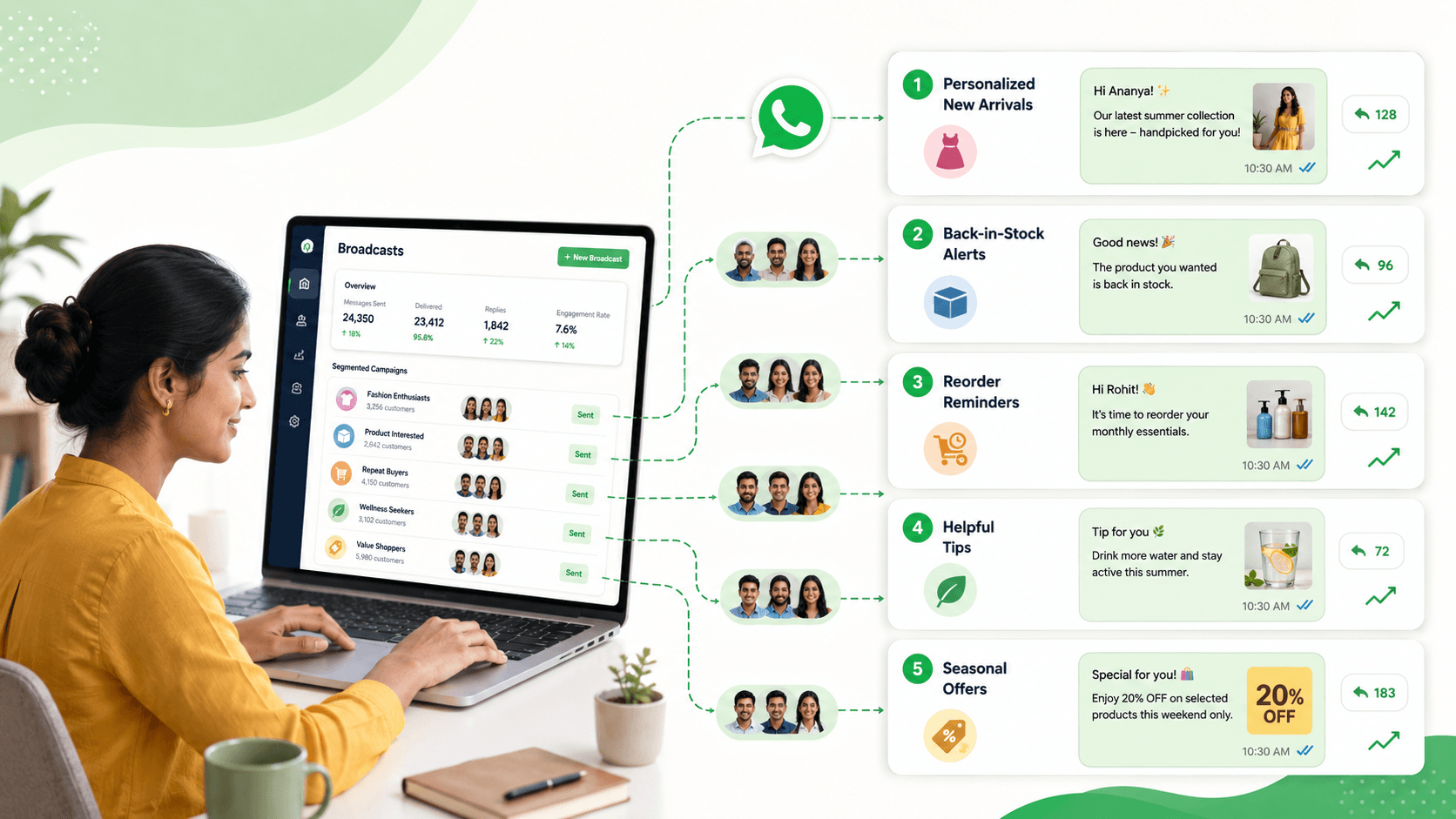
- 1. New Arrivals Based on Customer Interests
- 2. Back-in-Stock and Availability Updates
- 3. Reorder and Replenishment Reminders
- 4. Helpful Tips, Checklists, and Service Guidance
- 5. Relevant Seasonal Offers and Customer Benefits
- How to Write a Useful WhatsApp Broadcast
- When Should Businesses Send Broadcasts?
- Measure More Than Delivery
- Common Broadcast Mistakes
- How Voixt.ai Helps Businesses Run Better WhatsApp Broadcasts
- Final Thoughts
5 WhatsApp Broadcast Ideas Customers Actually Find Useful
WhatsApp broadcasts can help businesses announce new products, encourage repeat purchases, share important updates, and reconnect with existing customers.
However, customers do not find every broadcast useful. Messages that are frequent, irrelevant, unclear, or overly promotional can quickly lead to muted conversations, unsubscribes, blocks, and complaints.
The difference between a useful broadcast and an annoying one is relevance.
A useful message reaches the right customer, contains information they care about, arrives at an appropriate time, and gives them a clear next step. It should feel like helpful communication from a business they recognise—not an advertisement sent to thousands of unknown contacts.
Here are five WhatsApp broadcast ideas customers are more likely to appreciate.
Before Sending Any WhatsApp Broadcast
A good broadcast campaign begins before the message is written.
Businesses should first confirm that recipients have agreed to receive the type of communication being sent. Consent should be clear, informed, and appropriately recorded according to applicable messaging and privacy requirements.
Customers should understand:
- Which business will message them
- What types of messages they may receive
- How frequently messages may be sent
- How they can stop receiving them
For example:
Receive new-arrival updates and up to four promotional messages per month from UrbanStyle on WhatsApp. Reply STOP at any time to unsubscribe.
Businesses should also segment their contact lists. A message that is useful to one group may be irrelevant to another.
Useful segments can include:
- Product interests
- Previous purchases
- Location
- Customer type
- Purchase frequency
- Preferred branch
- Service history
- Membership level
- Enquiry stage
- Communication preferences
Once the audience is defined, the business can create a campaign that serves a specific customer need.
1. New Arrivals Based on Customer Interests
Customers may appreciate hearing about new products when those products match their known interests.
A clothing retailer, for example, should not send every new arrival to every customer. Someone who regularly purchases women’s ethnic wear may be interested in a new festive collection but not an update about men’s formal shirts.
Similarly, a home-furnishing store can separate customers interested in curtains, furniture, lighting, and décor instead of promoting the entire catalogue in every campaign.
What to include
A useful new-arrival broadcast can include:
- A clear description of the collection
- Two or three carefully selected images
- Relevant prices or starting prices
- Available sizes, colours, or variants
- Store location or delivery availability
- A simple reply-based action
Example
Hi Ananya, our new cotton kurta collection has arrived, with sizes from S to XXL and prices starting at ₹1,299. We selected a few styles similar to your previous purchases. Reply CATALOGUE to view them or VISIT to book an in-store styling appointment.
This message works because it explains why the customer is receiving it and makes the next step easy.
How to make it more relevant
Segment customers using information such as:
- Product category purchased
- Preferred size
- Typical price range
- Brand preference
- Last purchase date
- Online or in-store buying preference
Avoid making sensitive or overly personal assumptions. Use information the customer knowingly shared through purchases, enquiries, preferences, or previous conversations.
What to avoid
Do not send:
- An entire product catalogue without guidance
- Ten or fifteen images in one message
- New arrivals from unrelated categories
- The same launch announcement repeatedly
- Products the customer recently purchased unless complementary items are being suggested
The goal is not to display everything. It is to help the customer discover something relevant quickly.
2. Back-in-Stock and Availability Updates
A back-in-stock message is useful because it answers an existing customer need.
Customers frequently ask businesses to notify them when a product, size, appointment slot, property, course batch, or service becomes available. If the business records that interest, it can send a highly relevant update later.
Examples include:
- A clothing size becoming available
- A popular product returning to stock
- A cancelled appointment slot reopening
- A new course batch being announced
- A rental property becoming available
- Tickets or registrations reopening
- A seasonal item returning
Example
Hi Rahul, the black running shoes you asked about are back in stock in size 9. We can reserve one pair until 6:00 p.m. tomorrow. Reply RESERVE if you would like us to keep them aside.
This message is specific, timely, and connected to the customer’s previous request.
Create an interest list
Whenever an item is unavailable, staff should record:
- Customer name
- Product or service requested
- Required variant
- Preferred branch or location
- Date of request
- Permission to send an availability update
When availability changes, the business can contact only the relevant customers.
Be honest about availability
Do not create false scarcity with claims such as “Only one left” unless the information is accurate. Customers lose trust when urgency appears artificial.
If stock is limited, explain the reservation process clearly. Avoid promising an item unless the inventory system or responsible employee has confirmed it.
Close the loop
Once the customer purchases the product, declines the offer, or the opportunity expires, remove them from that particular interest list. They should not continue receiving unnecessary availability messages.
3. Reorder and Replenishment Reminders
Some products and services are purchased repeatedly. A well-timed reminder can save customers from having to remember when to reorder.
This approach may work for:
- Groceries and household supplies
- Pet food
- Water deliveries
- Printer supplies
- Beauty and personal-care products
- Contact-lens supplies
- Vehicle servicing
- Equipment maintenance
- Subscription renewals
- Regular business supplies
The timing should be based on a reasonable purchase cycle or a preference directly provided by the customer.
Example
Hi Meera, it may be time to reorder your usual 10 kg pack of pet food. The current price is ₹1,850, and delivery is available on Thursday. Reply REORDER to confirm or LATER if you do not need it yet.
The message is useful because it refers to a familiar product, gives essential information, and allows the customer to respond with minimal effort.
Give customers control
Not every customer uses a product at the same rate. Allow them to change the reminder timing or stop the reminder.
For example:
Reply 30 DAYS to receive the next reminder in one month, or STOP to discontinue reorder reminders.
This makes the campaign feel like a service rather than pressure to purchase.
Avoid inappropriate assumptions
Reorder campaigns should not expose or infer sensitive personal information. Businesses handling healthcare-related or otherwise sensitive products should use additional care, obtain appropriate consent, minimise message details, and follow applicable privacy requirements.
Recommend only confirmed products
Use verified purchase history instead of guessing. A customer should not receive repeated reminders for a product they never purchased or no longer use.
4. Helpful Tips, Checklists, and Service Guidance
Not every broadcast has to ask customers to buy something.
Helpful educational messages can build trust and keep the business relevant between purchases. The information should be short, practical, and connected to the product or service the customer uses.
Examples include:
- Clothing-care instructions
- Product setup guidance
- Home-maintenance checklists
- Pre-appointment instructions
- Travel preparation lists
- Exam preparation reminders
- Seasonal vehicle-maintenance tips
- Advice for getting better results from a purchased product
- Important service changes
Example for a clothing store
Monsoon care tip: Allow damp garments to dry completely before storing them, and avoid placing wet clothes directly in a closed wardrobe. Reply CARE if you would like our short fabric-care guide.
Example for an appointment-based business
Your appointment is easier when you arrive prepared. Please bring your booking confirmation and any documents listed in your appointment message. Reply CHECKLIST if you need the complete preparation list.
Keep the message focused
A useful broadcast usually communicates one main idea. Do not copy an entire blog post into WhatsApp.
Use the broadcast to provide the most valuable point and let interested customers request more information or open a relevant page.
Connect advice to customer context
Send guidance only to people who can use it.
For example:
- Send product-care tips to customers who purchased that product
- Send exam reminders to students in the relevant course
- Send maintenance advice to customers who own the applicable equipment
- Send branch updates only to customers using that location
Educational content becomes spam when it is disconnected from the recipient’s needs.
5. Relevant Seasonal Offers and Customer Benefits
Customers may welcome promotional offers when they are timely, understandable, and relevant.
A seasonal campaign should provide more than a generic discount announcement. It should help recipients understand what the offer includes, why it may be relevant, and how to use it.
Possible campaigns include:
- Festival collections
- Birthday benefits
- Loyalty rewards
- Early-access sales
- Service packages before a seasonal change
- Location-specific events
- Offers linked to a previous purchase
- Renewal benefits
Example
Hi Kavya, as a returning customer, you have early access to our Diwali home-décor collection from 18 to 20 October. Get 10% off selected lamps and table accessories during the preview. Reply PREVIEW to see the collection and terms.
The value is clear, the audience is defined, and the customer knows what to do next.
Explain the offer properly
Include essential conditions such as:
- Validity dates
- Eligible products or services
- Minimum purchase requirements
- Location restrictions
- Redemption method
- Availability limitations
- Important exclusions
Do not hide essential terms behind vague phrases such as “conditions apply.” The initial message can remain concise while linking to or offering the complete terms.
Avoid artificial urgency
Messages such as “FINAL HOURS” or “LAST CHANCE” lose their effect when used every week. Use urgency only when a genuine deadline or availability limit exists.
Exclude the wrong recipients
Before sending an offer, remove contacts who:
- Already purchased the promoted item
- Previously declined the offer
- Asked to stop promotional messages
- Live outside the eligible location
- Are not part of the relevant customer segment
- Have an unresolved complaint that should be addressed first
Customer exclusions are as important as customer selections.
How to Write a Useful WhatsApp Broadcast
Regardless of the campaign idea, a strong broadcast usually contains five elements.
1. Recognition
Make it clear which business is sending the message. Customers should not have to guess.
2. Relevance
Explain why the information matters to the recipient. This may be based on a requested alert, previous purchase, selected preference, location, or membership.
3. Value
State the benefit quickly. It could be availability, convenience, useful information, early access, or a relevant offer.
4. Clear action
Tell the customer what to do next. Simple actions include replying with a keyword, requesting a catalogue, booking an appointment, confirming a reorder, or speaking with an employee.
5. Preference control
Provide an appropriate way for customers to change their preferences or stop receiving promotional messages.
A simple structure is:
Hi [name], [relevant update and reason]. [Important details]. Reply [keyword] to [action], or STOP to unsubscribe from promotional messages.
Templates should guide the team, but messages should still be adapted to the audience and campaign.
When Should Businesses Send Broadcasts?
There is no universal broadcast schedule that works for every business.
Frequency depends on:
- Customer expectations
- Type of business
- Buying cycle
- Urgency of the information
- Message value
- Consent provided
- Previous engagement
A retailer with frequent product launches may communicate more often than a property agent, coaching centre, or vehicle-service business.
Monitor customer behaviour instead of choosing frequency arbitrarily. If opt-outs, blocks, complaints, and declining engagement increase, review both the content and the sending frequency.
Do not respond to poor engagement by sending more messages. Improve targeting and relevance first.
Measure More Than Delivery
A delivered message is not necessarily a successful message.
Businesses should monitor outcomes such as:
- Replies
- Product enquiries
- Catalogue requests
- Bookings
- Reorders
- Purchases
- Link engagement
- Opt-outs
- Blocks and complaints
- Revenue generated
- Performance by customer segment
Compare campaigns to understand which messages customers value.
For example, a broad discount campaign may reach thousands of contacts but generate few purchases. A smaller back-in-stock campaign may produce fewer replies but a much higher conversion rate.
The smaller campaign can be more successful because it serves a clear customer need.
Common Broadcast Mistakes
Sending every message to every customer
Large audiences may look impressive, but poor targeting reduces relevance and increases complaints.
Using only promotional content
If every message asks customers to spend money, they have little reason to remain subscribed.
Sending long messages
Customers should be able to understand the main point quickly.
Overloading messages with media
Too many images, videos, documents, and links can make the campaign difficult to review.
Ignoring responses
A broadcast can generate many replies at once. Ensure the team is ready to answer before sending it.
Continuing after an opt-out
Record opt-outs immediately and exclude those contacts from future promotional campaigns.
Failing to update segments
Customer interests and circumstances change. Review tags, preferences, purchase history, and campaign exclusions regularly.
How Voixt.ai Helps Businesses Run Better WhatsApp Broadcasts
Voixt.ai helps businesses organise customer information, create relevant segments, manage campaigns, and handle the conversations generated by broadcasts.
With Voixt.ai, businesses can use:
- Contact tags and filters to build audiences based on interests, purchases, locations, and customer stages
- Campaign management to organise broadcasts and monitor customer responses
- Shared multi-agent WhatsApp inboxes so employees can manage replies from one workspace
- Automatic contact capture to maintain organised customer records
- Conversation assignments to direct campaign replies to the appropriate employee
- Visual CRM pipelines to track enquiries, orders, bookings, and follow-ups
- Follow-up reminders so interested customers do not get forgotten
- No-code automation workflows for opt-ins, customer preferences, assignments, and follow-up actions
- AI-powered responses to help teams answer common campaign questions efficiently
- Private internal notes for sharing customer context without exposing internal discussions
- AI-to-human handovers when a response needs personal attention
A broadcast should not end when the message is delivered. Businesses need a reliable way to manage replies, assign opportunities, record customer interests, and complete follow-ups.
Final Thoughts
Customers do not automatically dislike business messages on WhatsApp. They dislike messages that waste their time, ignore their preferences, or arrive without permission.
New-arrival updates, availability alerts, reorder reminders, helpful guidance, and relevant seasonal benefits can all be useful when they are sent to carefully selected customers.
Before launching a broadcast, ask one simple question:
Why would this specific customer be glad to receive this message today?
If the answer is unclear, the campaign needs better targeting or a stronger purpose.
Voixt.ai helps businesses move from mass messaging to structured, relevant WhatsApp communication—while giving their teams the tools to manage every reply and follow-up.