
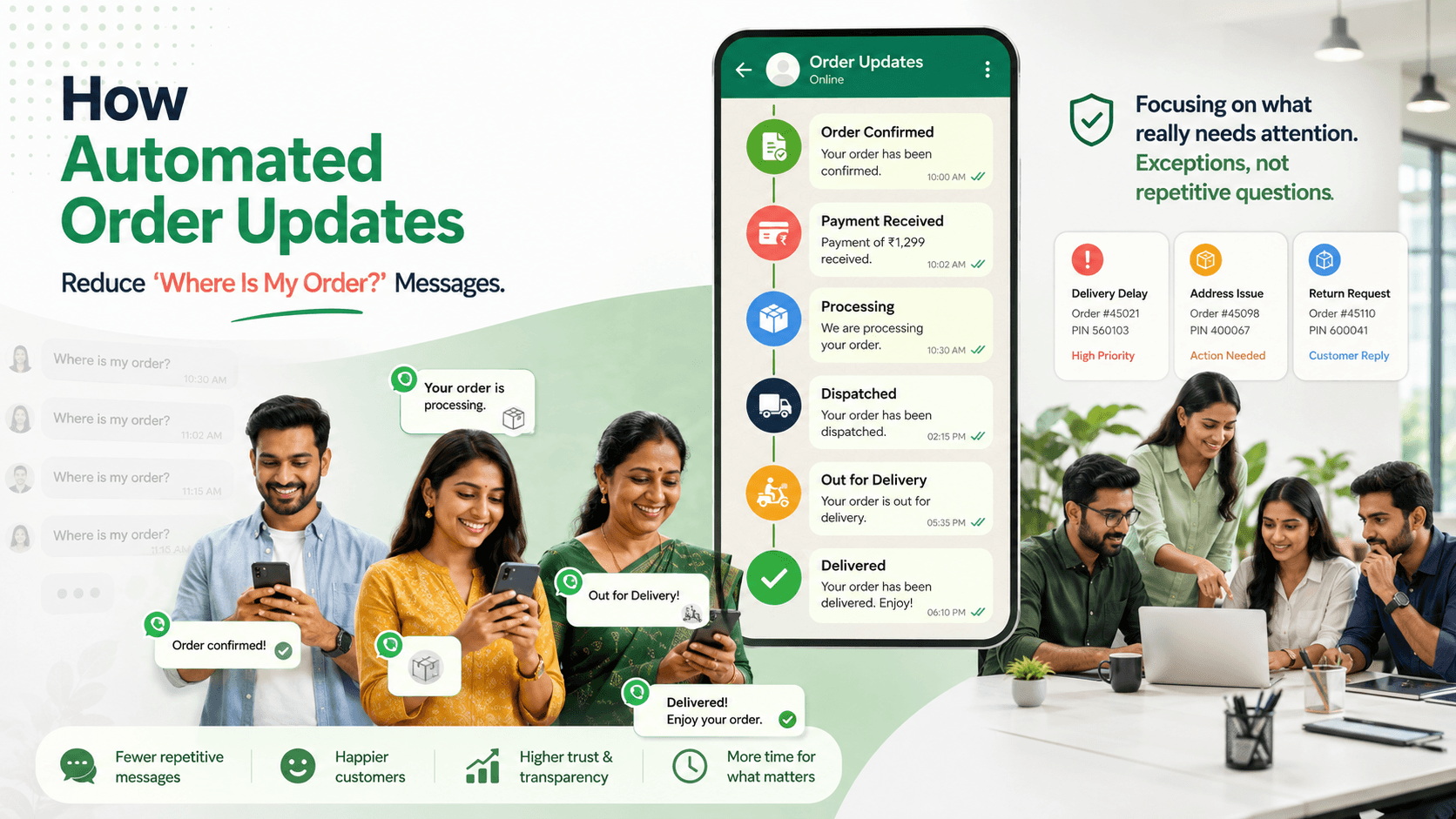
How Automated Order Updates Reduce “Where Is My Order?” Messages
Learn how timely WhatsApp order confirmations, dispatch alerts, tracking links, delay notices, and delivery updates reduce repetitive customer enquiries.
On this page30 sections
- How Automated Order Updates Reduce “Where Is My Order?” Messages
- Why Customers Ask “Where Is My Order?”
- The Cost of Manual Order Updates
- What Makes an Order Update Useful?
- 1. Send an Immediate Order Confirmation
- 2. Separate Order Confirmation From Payment Confirmation
- 3. Send a Processing Update When It Adds Value
- 4. Send Dispatch Details Automatically
- 5. Send an Out-for-Delivery Alert
- 6. Confirm Successful Delivery
- 7. Communicate Delays Before Customers Ask
- 8. Explain Failed Delivery Attempts
- 9. Handle Address Changes Carefully
- 10. Provide Self-Service Order Status
- 11. Connect Updates to Real Order Events
- 12. Use One Source of Truth
- 13. Stop Incorrect or Duplicate Updates
- 14. Handle Split Shipments Clearly
- 15. Distinguish Delays From Exceptions
- 16. Preserve Context During Human Handover
- 17. Keep Transactional Updates Separate From Promotions
- 18. Respect Timing and Frequency
- 19. Make Every Update Actionable
- 20. Prepare Employees for Exceptions
- Build an Automated Order-Update Workflow
- Test Before Launch
- Measure the Reduction in Order Enquiries
- Common Mistakes to Avoid
- How Voixt.ai Automates Order Updates
- Final Thoughts
How Automated Order Updates Reduce “Where Is My Order?” Messages
“Where is my order?” is one of the most common questions businesses receive after a purchase.
Customers ask because they want reassurance that the order was received, payment was recorded, fulfilment is progressing, and delivery will happen when expected.
When businesses provide no updates, customers must request the information themselves. Employees then spend time checking order systems, contacting fulfilment teams, copying tracking links, and replying to the same question repeatedly.
Automated WhatsApp order updates can provide this information before customers need to ask.
The objective is not to send a message for every internal event. It is to communicate the milestones, changes, and exceptions that matter to the customer.
Why Customers Ask “Where Is My Order?”
Customers usually contact the business because:
- They did not receive an order confirmation
- Payment status is unclear
- The promised dispatch date passed
- No tracking link was provided
- The tracking page has not changed
- The estimated delivery date is missing
- The order is delayed
- The courier attempted delivery unexpectedly
- The customer needs to change the address
- The order was marked delivered but cannot be found
- The business and courier show different information
These messages are not always support problems. They are often information problems.
A clear update at the correct moment can prevent the enquiry entirely.
The Cost of Manual Order Updates
Without automation, employees may need to:
- Read the customer’s message
- Ask for the order number
- Open the order-management system
- Find the current status
- Open the courier portal
- Copy the tracking link
- Contact the warehouse when information is missing
- Write a response
- Record the conversation
- Follow up later
Repeating these steps across dozens of orders consumes time that employees could use to resolve genuine exceptions.
Manual updates also create inconsistency. One customer may receive complete information, while another receives only:
Your order is on the way.
Automation can provide the same approved information to every customer when the relevant order event occurs.
What Makes an Order Update Useful?
A useful update should answer the customer’s immediate questions:
- Which order is this?
- What is the current status?
- What happens next?
- When should I expect another update?
- Is any action required?
- How can I get help if something is wrong?
Every message should include enough context to be understood without opening several previous messages.
Avoid exposing unnecessary product or personal information on a shared device.
1. Send an Immediate Order Confirmation
The first update should arrive immediately after the order is successfully created.
Include:
- Order number
- Product summary
- Quantity
- Final amount
- Payment status
- Delivery method
- Delivery location summary
- Estimated dispatch or delivery date
- Support option
For example:
Thanks for your order, Meera.
Order: VH-4821 Items: Two medium-roast coffee packs Final amount: ₹1,800 Payment: Confirmed Delivery area: Baner, Pune Estimated delivery: 24–26 August
Reply HELP if any detail appears incorrect.
This confirms that the business received the order and gives the customer a reference number for future communication.
2. Separate Order Confirmation From Payment Confirmation
An order may exist before payment is completed or verified.
Do not describe an unpaid or unverified order as confirmed.
Use clear statuses such as:
- Order created
- Payment pending
- Payment received
- Payment verification required
- Payment failed
- Order confirmed
For example:
Order VH-4821 has been created, but payment has not yet been confirmed. Reply PAY to view the approved payment option or HELP if you have already paid.
After verification:
Payment of ₹1,800 for order VH-4821 has been confirmed. We will notify you when the order is dispatched.
Verify payments through the authorised payment system rather than relying only on screenshots.
Never ask customers to share passwords, card PINs, or one-time passwords through WhatsApp.
3. Send a Processing Update When It Adds Value
Customers do not need a message for every warehouse action.
However, a processing update can be useful when:
- Fulfilment takes several days
- The product is made to order
- Stock must be transferred
- A quality check is required
- Installation must be scheduled
- The order includes customisation
For example:
Order VH-4821 is now being prepared. Dispatch is expected by 24 August, and we will send tracking details when the courier collects it.
This message explains what is happening and when the next update should arrive.
Avoid sending several vague messages such as “Order received,” “Order accepted,” “Order being processed,” and “Order processing completed” within a short period.
4. Send Dispatch Details Automatically
Dispatch is one of the most important milestones.
A dispatch update should include:
- Order number
- Courier or delivery method
- Tracking link or tracking number
- Dispatch date
- Estimated delivery date
- Support option
For example:
Order VH-4821 has been dispatched through SwiftShip.
Estimated delivery: Friday, 25 August Tracking number: SS248119 Track: [Approved Tracking Link]
Reply HELP if the tracking information appears incorrect.
WhatsApp describes utility messages as suitable for timely order and transaction updates. WhatsApp Utility Messages
Use only approved links and ensure that the tracking page works on mobile devices.
5. Send an Out-for-Delivery Alert
An out-for-delivery message helps customers prepare to receive the order.
For example:
Order VH-4821 is out for delivery today. Please ensure someone is available at the delivery address. Reply HELP if you need assistance.
Where reliable information is available, the message may also include:
- Expected delivery window
- Delivery verification method
- Courier contact process
- Payment due on delivery
- Safe delivery instructions
Do not promise an exact time unless the delivery system can support that promise.
6. Confirm Successful Delivery
A delivery confirmation closes the fulfilment stage and gives customers a way to report a problem.
For example:
Order VH-4821 was marked delivered at 4:18 p.m. today. Reply RECEIVED if everything arrived correctly or HELP if you cannot locate the parcel.
A delivery confirmation can also include:
- Receipt link
- Installation instructions
- Relevant product-care information
- Return or support link
Do not immediately send an unrelated promotion before confirming that the order arrived successfully.
7. Communicate Delays Before Customers Ask
Delays generate the highest number of “Where is my order?” messages when businesses stay silent.
A delay update should explain:
- Which order is affected
- What changed
- The revised estimate
- Whether the customer needs to act
- How to request help
For example:
We’re sorry—order VH-4821 has been delayed during transit. The revised delivery estimate is 27–28 August. No action is required. Reply HELP if the new timing does not work for you.
If the revised date is uncertain, say so honestly:
Order VH-4821 has been delayed, and we are confirming a new delivery date with the courier. Our team will update you by 4:00 p.m. tomorrow.
Create an internal follow-up reminder for the promised time.
8. Explain Failed Delivery Attempts
A failed delivery update should help the customer understand what happens next.
Include:
- Attempt date and time
- Reason when verified
- Next delivery attempt
- Collection option when available
- Address-correction option
- Human-support option
For example:
Delivery of order VH-4821 was attempted today at 2:10 p.m. The courier will try again tomorrow. Reply ADDRESS to check the delivery details or HELP to speak with our team.
Do not blame the customer when the reason has not been verified.
9. Handle Address Changes Carefully
An address change can affect security, fraud risk, delivery charges, and fulfilment.
Automation may collect the requested address, but the business should check:
- Whether the order has already been dispatched
- Whether the new address is eligible
- Whether charges will change
- Whether verification is required
- Whether the courier accepts changes
Before updating the order, show a clear summary:
Requested delivery-address change for order VH-4821:
New area: Wakad, Pune Additional delivery charge: ₹100 Revised delivery estimate: 27–28 August
Reply CONFIRM to approve or CANCEL to keep the current address.
Use human review when the request is unusual, high-risk, or unsupported by the delivery system.
10. Provide Self-Service Order Status
Even with proactive updates, some customers will ask for the current status.
A self-service workflow can:
- Identify the customer
- Request or retrieve the order number
- Check the connected order system
- Return the latest verified status
- Offer relevant next actions
- Transfer exceptions to an employee
For example:
Order VH-4821 was dispatched on 24 August and is expected on 26 August. The latest courier update is “In transit to Pune facility.” Reply TRACK for the tracking link or HELP if you need assistance.
The workflow should retrieve live or recently updated information—not repeat an outdated message stored in the conversation.
11. Connect Updates to Real Order Events
Automated messages should be triggered by verified changes in the order system.
Possible triggers include:
- Order created
- Payment confirmed
- Order approved
- Preparation started
- Order dispatched
- Delivery delayed
- Out for delivery
- Delivery attempted
- Delivered
- Cancelled
- Refund started
- Refund completed
Do not schedule a dispatch message based only on the expected dispatch date. Send it when the order is actually marked dispatched.
Event-based updates reduce inaccurate messages and customer confusion.
12. Use One Source of Truth
Order status may exist in several places:
- Ecommerce platform
- CRM
- Warehouse system
- Courier portal
- Accounting system
- Employee spreadsheet
- WhatsApp conversation
Conflicting information creates unreliable updates.
Define which system is authoritative for each status.
For example:
| Information | Authoritative source |
|---|---|
| Order details | Order-management system |
| Payment status | Approved payment system |
| Packing status | Warehouse system |
| Courier tracking | Delivery partner |
| Customer conversation | Shared WhatsApp inbox |
Automation should use approved integrations rather than manually copied status labels.
13. Stop Incorrect or Duplicate Updates
A poorly configured workflow may send:
- Two order confirmations
- Dispatch messages after cancellation
- Delivery reminders after completion
- Tracking links for the wrong order
- Updates for an old address
- Repeated delay notices
Prevent these problems using:
- Unique order identifiers
- Current-status checks
- Duplicate-event protection
- Cancellation exclusions
- Completed-order exclusions
- Contact and order matching
- Workflow logs
Test orders containing several products, split shipments, partial cancellations, and repeated status updates.
14. Handle Split Shipments Clearly
If an order is delivered in multiple packages, explain that before the first package arrives.
For example:
Order VH-4821 will arrive in two packages.
Package 1: Coffee machine — dispatched, expected Friday Package 2: Filters — preparing, expected Monday
We will send separate tracking details for each package.
Without this information, customers may assume that items are missing.
Track every package separately while keeping them connected to the original order.
15. Distinguish Delays From Exceptions
Not every delivery problem can be resolved automatically.
Transfer the conversation when:
- The parcel is marked delivered but missing
- Tracking has not changed for an unusual period
- The courier and order system disagree
- The package is damaged
- The customer disputes the address
- A high-value order is lost
- A payment or refund is disputed
- The customer expresses serious dissatisfaction
Automation can collect the order number and issue type. A person should investigate and own the resolution.
16. Preserve Context During Human Handover
The employee should receive:
- Customer name
- Order number
- Current order status
- Tracking details
- Delivery address summary
- Previous automated messages
- Customer’s reported problem
- Actions already attempted
- Reason for escalation
A useful transition might say:
I’m connecting you with our delivery-support team. They can see order VH-4821 and the tracking information already shared.
The employee can then continue with context:
Hi Meera, I can see that your order was marked delivered today, but you cannot locate it. I’m checking the delivery confirmation with the courier now.
Do not ask the customer to restart the explanation.
17. Keep Transactional Updates Separate From Promotions
Order updates serve a specific customer need.
Do not add unrelated offers to every delivery message.
Avoid:
Your order has shipped! Buy another item today and receive 10% off!
Use:
Your order has shipped. Estimated delivery is Friday. Reply TRACK for the tracking link.
Promotional messages should follow the customer’s communication preferences and appropriate permission requirements.
18. Respect Timing and Frequency
Send updates when meaningful events occur.
Avoid sending several messages for internal statuses that do not change the customer’s expectations.
A practical sequence may include:
- Order confirmation
- Payment confirmation when separate
- Processing update for longer fulfilment periods
- Dispatch and tracking
- Delay notice when required
- Out-for-delivery alert
- Delivery confirmation
The correct sequence depends on the product, fulfilment model, and customer expectations.
19. Make Every Update Actionable
Give customers a relevant next step.
Useful actions include:
- TRACK
- ADDRESS
- RESCHEDULE
- CANCEL
- RECEIVED
- RETURN
- HELP
For example:
Your order is out for delivery. Reply ADDRESS if the delivery information appears incorrect or HELP to contact our support team.
Avoid adding several unrelated actions to one message.
20. Prepare Employees for Exceptions
Automation may reduce routine enquiries while increasing the proportion of complex cases handled by employees.
Before launching, confirm:
- Which team handles delivery issues
- How conversations are assigned
- Who contacts couriers
- Who can approve replacements or refunds
- How urgent cases are prioritised
- Which response times are promised
- How follow-up tasks are recorded
Every escalated conversation should have one owner.
Build an Automated Order-Update Workflow
A practical workflow may include:
- Customer confirms the order
- Order record is created
- Confirmation message is sent
- Payment status is verified
- Payment confirmation is sent
- Fulfilment status updates
- Dispatch triggers tracking message
- Delay events trigger proactive notices
- Out-for-delivery status triggers preparation message
- Delivery triggers completion message
- Customer can request help at every stage
- Exceptions are assigned to an employee
- Completed orders stop receiving fulfilment updates
Each message should use the latest verified order information.
Test Before Launch
Test:
- Correct order numbers
- Customer and order matching
- Payment status
- Cancelled orders
- Partial orders
- Split shipments
- Address changes
- Duplicate courier events
- Broken tracking links
- Delayed deliveries
- Failed delivery attempts
- Delivered-but-missing reports
- Human handovers
- Completed-order exclusions
Use internal test orders before activating the workflow for customers.
Measure the Reduction in Order Enquiries
Track:
- Total “Where is my order?” conversations
- Order-status enquiries per 100 orders
- Self-service status completions
- Tracking-link usage
- First-response time
- Resolution time
- Human-handover rate
- Delivery complaints
- Delayed-order contacts
- Repeat enquiries for the same order
- Customer satisfaction
- Employee time saved
Compare results before and after introducing automated updates.
Also review message timing. If customers continue asking before the dispatch notification, the processing period may need clearer communication.
Common Mistakes to Avoid
Sending Updates From Inaccurate Data
Use verified order, payment, warehouse, and courier information.
Messaging Every Internal Status
Communicate milestones that matter to the customer.
Staying Silent During Delays
Send a proactive update and a revised expectation.
Omitting the Order Number
Give customers a clear reference in every important update.
Using Broken or Unapproved Tracking Links
Test links on mobile devices before sending them.
Sending Updates After Cancellation
Check the current order status before triggering messages.
Automating Complex Exceptions
Transfer missing, damaged, disputed, or high-risk orders to an employee.
Losing Context During Handover
Give the assigned employee the order details and conversation history.
Mixing Promotions With Essential Updates
Keep fulfilment communication focused on the order.
How Voixt.ai Automates Order Updates
Voixt.ai helps businesses organise WhatsApp order communication and reduce repetitive status enquiries.
Teams can use:
- No-code automation workflows for order confirmations, payment updates, dispatch alerts, delays, and delivery notifications
- Shared multi-agent WhatsApp inboxes so employees can manage order enquiries together
- AI-powered responses to help answer routine fulfilment questions efficiently
- AI-to-human handovers when an order is missing, damaged, disputed, or delayed unusually
- Conversation assignments so every escalated delivery issue has an owner
- Automatic contact capture to connect customer records with WhatsApp conversations
- Contact tags and filters for order status, delivery issues, priority, and customer stage
- Visual CRM pipelines to track orders and support cases through defined stages
- Follow-up reminders for courier investigations and promised customer updates
- Private internal notes for sharing fulfilment context across teams
- Campaign management for permission-based post-purchase communication
This allows routine status information to reach customers automatically while employees focus on delivery exceptions and customer resolution.
Final Thoughts
Customers ask “Where is my order?” when the business leaves an information gap.
Automated WhatsApp updates can close that gap by confirming the order, verifying payment, explaining processing, sharing tracking details, communicating delays, and confirming delivery.
The information must be timely, accurate, focused, and connected to real order events. Customers should also have a clear path to human support when the status is wrong or the delivery has a genuine problem.
Voixt.ai helps businesses connect order updates, automation, customer records, and team support so customers remain informed and employees spend less time answering repetitive status questions.