
Automatic Replies vs Real Conversations: Finding the Right Balance
Learn when automatic WhatsApp replies improve customer service, when human conversations are essential, and how to create smooth handovers between the two.
On this page39 sections
- Automatic Replies vs Real Conversations: Finding the Right Balance
- What Is an Automatic Reply?
- What Is a Real Conversation?
- Where Automatic Replies Work Well
- 1. Immediate Acknowledgements
- 2. Outside-Hours Messages
- 3. Common Questions
- 4. Order and Delivery Updates
- 5. Appointment Management
- 6. Initial Information Collection
- 7. Conversation Routing
- 8. Requested Reminders
- Where Real Conversations Matter
- 1. Complaints
- 2. Complex Product Recommendations
- 3. Negotiation
- 4. Payment Problems and Disputes
- 5. Policy Exceptions
- 6. Sensitive Conversations
- 7. High-Value Decisions
- 8. Customers Who Ask for a Person
- Automatic Replies Should Support Conversations
- Design Better Automatic Replies
- Keep Them Short
- Answer the Immediate Question First
- Ask One Useful Question at a Time
- Use Natural Language
- Provide One Clear Next Step
- Be Transparent
- Create Smooth Human Handovers
- Define Handover Triggers
- Confirm Important Actions
- Keep Customer Preferences Separate
- Use Automation Behind the Conversation
- Measure Both Efficiency and Customer Experience
- Review Real Conversations
- Common Mistakes to Avoid
- How Voixt.ai Balances Automatic Replies and Real Conversations
- Final Thoughts
Automatic Replies vs Real Conversations: Finding the Right Balance
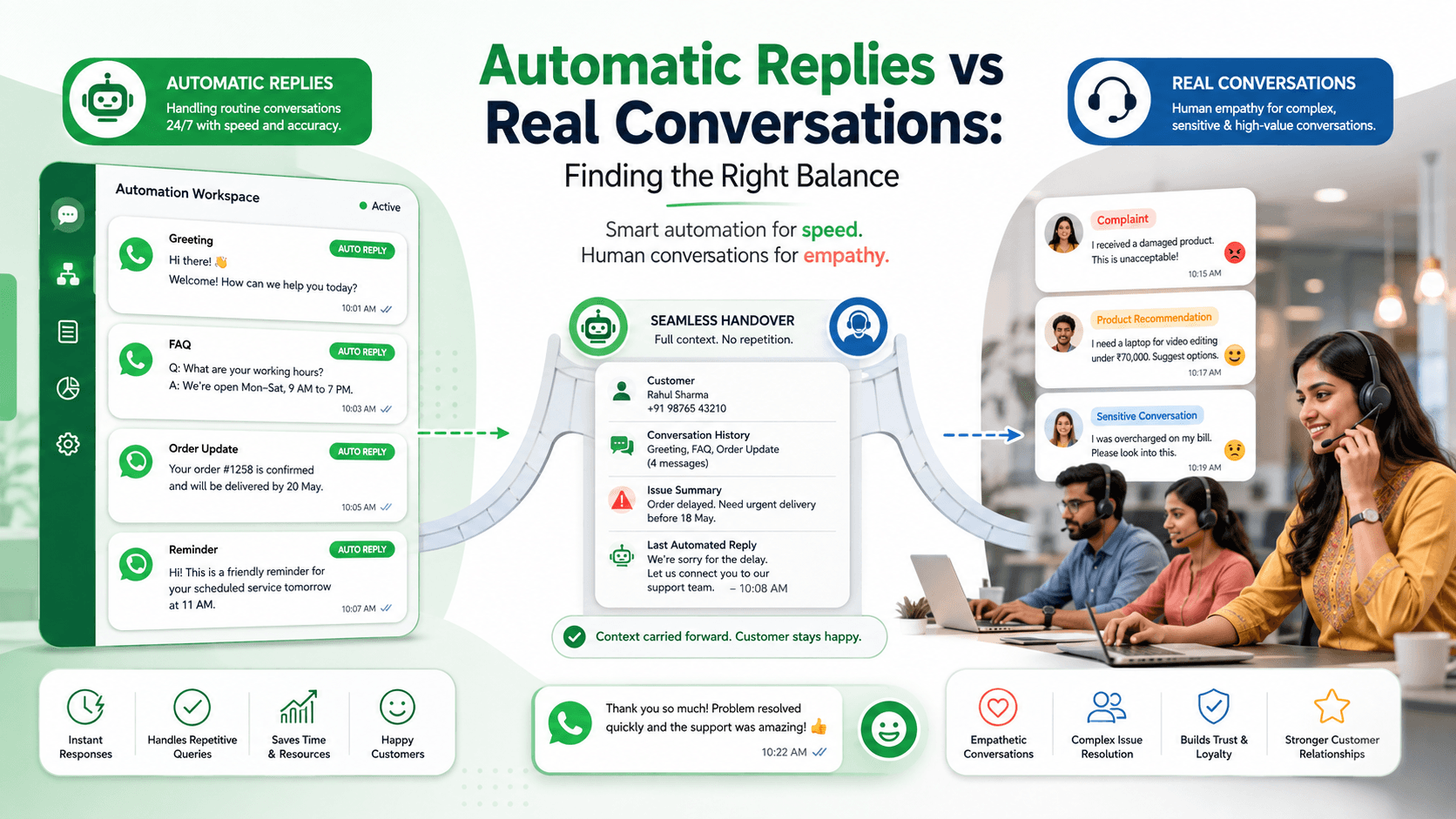
Automatic replies can acknowledge messages immediately, answer common questions, collect customer details, and reduce repetitive work.
Real conversations provide something different: judgement, empathy, flexibility, negotiation, and the ability to understand situations that do not fit a predefined workflow.
Businesses need both.
Relying entirely on employees can create slow responses and inconsistent service. Relying entirely on automatic replies can make customers feel trapped inside a system that does not understand them.
The right balance uses automation to handle predictable steps and human employees to manage conversations where context and judgement matter.
What Is an Automatic Reply?
An automatic reply is a message sent when a defined condition is met.
The condition might be:
- A customer sends their first message
- The business is closed
- A specific keyword is received
- An order changes status
- An appointment is approaching
- A customer selects an option
- A conversation enters a new stage
- No employee is available
Automatic replies can be simple:
Thanks for contacting UrbanHome. Our team is available from 9:00 a.m. to 7:00 p.m. and will reply when we reopen.
They can also support structured workflows:
Please share your order number so I can check the latest delivery status.
The value of an automatic reply depends on whether it helps the customer complete the next step.
What Is a Real Conversation?
A real conversation involves an employee who can understand the customer’s situation and respond using judgement.
Human employees can:
- Interpret incomplete information
- Ask relevant follow-up questions
- Recognise frustration
- Compare several options
- Explain complex terms
- Negotiate within authorised limits
- Handle exceptions
- Take responsibility for resolution
- Adapt their tone
A real conversation should not mean slow or unstructured service. Employees can still use templates, AI suggestions, shared customer history, and automated follow-up reminders.
Where Automatic Replies Work Well
Automation works best when the customer’s goal is clear and the answer or action follows reliable rules.
1. Immediate Acknowledgements
Customers want to know that the business received their message.
A useful acknowledgement might say:
Thanks for contacting BrightCare. Your message has been received and will be assigned to the appropriate team. Our current response time is approximately 20 minutes.
This reduces uncertainty without pretending that an employee has already reviewed the enquiry.
Avoid vague promises such as “We’ll reply shortly” when the business expects a long delay.
2. Outside-Hours Messages
An automatic reply can explain when the business will reopen and what the customer can do next.
For example:
We’re currently closed. Our support team is available Monday to Saturday from 9:00 a.m. to 7:00 p.m. You can share your order number and a short description now, and a team member will reply tomorrow morning.
An outside-hours reply can also provide safe self-service options, such as order tracking or appointment rescheduling.
It should not claim that an employee is actively reviewing the conversation.
3. Common Questions
Stable, frequently requested information can be automated.
Examples include:
- Opening hours
- Store locations
- Delivery areas
- Basic return conditions
- Accepted payment methods
- Appointment availability
- Standard product specifications
- Required documents
For example:
Our Pune store is open Monday to Saturday from 10:00 a.m. to 8:00 p.m. Would you like directions or help contacting the store?
Assign someone to update these answers whenever the information changes.
4. Order and Delivery Updates
Automatic replies are useful when they retrieve accurate information from a connected order system.
Examples include:
- Order confirmation
- Payment confirmation
- Packing status
- Dispatch notification
- Tracking details
- Delivery estimate
- Cancellation confirmation
- Refund-status update
For example:
Order VH-4821 was dispatched today and is expected to arrive on Friday. Reply TRACK for the tracking link or HELP if this information appears incorrect.
The HELP option is important because automated status information may not explain an unusual problem.
5. Appointment Management
Routine appointment tasks can often be completed automatically.
Automation can:
- Display available times
- Confirm a booking
- Send reminders
- Accept cancellations
- Offer standard rescheduling options
- Share preparation instructions
For example:
Your consultation is scheduled for 24 August at 3:30 p.m. Reply CONFIRM, RESCHEDULE, or CANCEL.
Human assistance should remain available for special scheduling needs or policy exceptions.
6. Initial Information Collection
Automation can collect a few essential details before assigning an employee.
A sales workflow might ask for:
- Product or service required
- Location
- Quantity
- Broad budget range
- Preferred callback time
A support workflow might ask for:
- Order number
- Product code
- Issue category
- Short description
Collect only the details needed for routing or preparing the next response.
A customer should not complete a long questionnaire before being allowed to speak with a person.
7. Conversation Routing
Automatic routing can send each customer to the appropriate employee or team.
Routing rules may use:
- Enquiry type
- Product category
- Branch
- Location
- Language
- Existing account owner
- Priority
- Employee availability
The customer should not need to understand the business’s internal departments.
Someone reporting a delivery problem should reach support directly rather than entering a general sales queue.
8. Requested Reminders
Automation can send reminders that customers expect.
Examples include:
- Appointment reminders
- Reorder reminders
- Renewal notices
- Payment-due reminders
- Service-schedule reminders
- Restock notifications
For example:
Hi Meera, the blue linen dress you requested is back in stock in size M. Reply DETAILS to view it or STOP to end product-availability updates.
Automated reminders should use accurate customer preferences and stop when they are no longer relevant.
Where Real Conversations Matter
A predefined reply cannot handle every customer situation responsibly.
1. Complaints
Automation can acknowledge a complaint and collect an order number, but a person should own the resolution.
For example:
I’m sorry your order did not arrive as expected. Please share your order number, and I’ll connect you with a support specialist.
The employee should receive the information already collected and the complete conversation history.
Do not make an upset customer repeat the complaint after the handover.
2. Complex Product Recommendations
A simple availability question can be automated. A personalised recommendation may require a person.
Human assistance is valuable when the customer needs:
- A comparison
- Compatibility guidance
- A tailored configuration
- Technical explanation
- Product selection within a budget
- Advice based on space or usage
Automation can prepare the conversation by collecting the basic requirements. The employee can then make a responsible recommendation.
3. Negotiation
Negotiation involves judgement and commercial authority.
Examples include:
- Bulk-order pricing
- Custom discounts
- Payment terms
- Contract conditions
- Delivery commitments
- Service-level agreements
Automatic replies should not invent discounts or commit the business to unapproved terms.
They can identify negotiation intent and route the conversation to an authorised employee.
4. Payment Problems and Disputes
Customers need human help when:
- A payment appears missing
- The amount is incorrect
- A refund is delayed
- A duplicate charge appears
- A transaction is disputed
- Fraud is suspected
Automation may collect a reference number or provide a verified status. A person should investigate the exception and explain the outcome.
5. Policy Exceptions
Standard policies can be explained automatically. Exceptions require human review.
Examples include:
- A late return request
- An urgent delivery change
- A missed cancellation deadline
- A replacement without standard documentation
- A special accessibility requirement
- An unusual service request
The employee may need to balance customer history, operational constraints, cost, and fairness.
6. Sensitive Conversations
Human care is essential when a conversation involves:
- Significant frustration
- Financial hardship
- Safety concerns
- Harassment reports
- Bereavement
- Health-related information
- Account-security concerns
Automation can acknowledge the message and prioritise the handover. It should not imitate empathy or continue with routine promotions.
7. High-Value Decisions
High-value purchases and high-risk actions deserve additional review.
Human involvement may be appropriate for:
- Large orders
- Custom projects
- High-value refunds
- Contract approvals
- Account closure
- Identity disputes
- Significant delivery commitments
Automation can organise information and prepare a summary. The authorised person should make the final decision.
8. Customers Who Ask for a Person
If the customer requests a human, provide a clear path.
Avoid forcing them to continue with several automated steps.
Use:
I’ll connect you with a team member. I’ll share the information you have already provided so you do not need to repeat it.
If nobody is available, give an honest expected response time.
Automatic Replies Should Support Conversations
The strongest customer experience often combines automation and human service.
New sales enquiry
Automation:
- Identifies the product category
- Collects location and basic requirements
- Adds relevant contact tags
- Assigns the conversation
Employee:
- Understands the detailed need
- Recommends suitable options
- Answers questions
- Confirms the order
Delivery concern
Automation:
- Collects the order number
- Retrieves the latest status
- Shares tracking information
Employee:
- Investigates delays
- Handles missing deliveries
- Approves exceptions
- Explains the resolution
Appointment request
Automation:
- Displays standard times
- Collects required details
- Confirms routine bookings
Employee:
- Handles unusual scheduling
- Reviews special requirements
- Resolves booking conflicts
Complaint
Automation:
- Acknowledges the concern
- Collects essential information
- Marks the conversation as urgent
- Stops unrelated promotional workflows
Employee:
- Investigates the issue
- Communicates with empathy
- Makes an authorised decision
- Confirms resolution
Design Better Automatic Replies
Keep Them Short
Customers should understand the message without reading a long paragraph.
Avoid:
Dear valued customer, thank you for contacting our organisation. Your enquiry is extremely important to us, and we request that you kindly select from the options listed below so we can assist you in the most efficient manner possible.
Use:
Thanks for contacting UrbanHome. Do you need help with a new purchase, an existing order, or support?
Answer the Immediate Question First
Do not send an entire policy when the customer asks one specific question.
For example:
Unused items can usually be returned within 14 days with the receipt and original packaging. Would you like me to check whether your order is eligible?
The customer can request more detail if needed.
Ask One Useful Question at a Time
Avoid collecting unnecessary information.
If an order number is enough to retrieve the status, do not also ask for the customer’s full name, address, product, and purchase date.
Every additional question should have a clear purpose.
Use Natural Language
Write automatic replies as clear business communication—not as technical system messages.
Avoid:
INVALID INPUT. SELECT AVAILABLE OPTION.
Use:
I couldn’t match that response. Please reply ORDER, APPOINTMENT, or SUPPORT—or type HUMAN to speak with our team.
Provide One Clear Next Step
A message should tell the customer what to do next.
For example:
Reply TRACK to view delivery information or HELP to speak with our support team.
Too many links, keywords, and options create friction.
Be Transparent
Customers should know when they are interacting with automation.
For example:
I’m UrbanHome’s automated assistant. I can help with order status, appointments, and common questions, or connect you with our team.
Do not present automation as a named employee or imply that a person has reviewed the message when nobody has.
Create Smooth Human Handovers
A handover should feel like the next stage of the same conversation.
The employee should receive:
- Customer name
- Conversation history
- Order or booking number
- Customer requirements
- Information collected automatically
- Previous actions
- Reason for escalation
- Relevant internal notes
A good transition might say:
Kavya from our support team has joined the conversation. She can see the order number and delivery information you shared.
The employee can then begin with context:
Hi Meera, I can see that order VH-4821 was expected yesterday but has not arrived. I’m checking the courier update now.
This is better than asking:
How can I help you?
Define Handover Triggers
Transfer the conversation when:
- The customer requests a person
- The same question is repeated
- The automatic reply fails to understand the request
- The customer expresses dissatisfaction
- A complaint or dispute appears
- Information conflicts with business records
- The request falls outside approved rules
- The conversation requires negotiation
- A sensitive subject is detected
- The financial or operational risk exceeds a defined threshold
After one or two failed attempts, stop repeating the same automated response.
Confirm Important Actions
Automation should not complete important actions based on assumptions.
Before placing an order, cancelling an appointment, changing an address, or beginning a payment, show the complete information and request confirmation.
For example:
Order summary
Product: Walnut study desk WD-208 Quantity: 1 Product price: ₹12,500 Delivery: ₹750 Final amount: ₹13,250 Delivery area: Baner, Pune Estimated delivery: 25–27 August
Reply CONFIRM if these details are correct or CHANGE to edit the order.
This reduces mistakes and gives the customer control.
Keep Customer Preferences Separate
A customer may want transactional updates without promotional messages.
Useful categories include:
- Order updates
- Appointment reminders
- Support messages
- Reorder reminders
- New arrivals
- Offers
WhatsApp requires businesses to obtain appropriate opt-in permission before initiating messages and to respect requests to stop communication. WhatsApp Business Messaging Policy
Apply opt-outs and preference changes to both automated and employee-led campaigns.
Use Automation Behind the Conversation
Some of the most effective automation is invisible to the customer.
Background workflows can:
- Assign an employee
- Add a contact tag
- Update a customer stage
- Create a follow-up reminder
- Notify a supervisor
- Stop a promotional sequence
- Add an internal note
- Move an opportunity through a pipeline
These processes save time without changing the customer’s natural conversation.
Measure Both Efficiency and Customer Experience
Operational metrics include:
- First-response time
- Average handling time
- Automated completion rate
- Handover rate
- Resolution time
- Employee workload
- Follow-ups completed
Customer-experience metrics include:
- Customer satisfaction
- Resolution rate
- Conversation abandonment
- Repeated questions
- Complaints
- Opt-outs
- Blocks
- Repeat contact for the same issue
A high automated-completion rate is not useful if customers remain confused or contact the business again.
Review Real Conversations
Regularly review customer interactions to identify:
- Questions automation cannot answer
- Incorrect routing
- Repeated failures
- Unnatural wording
- Long menus
- Missing human options
- Outdated answers
- Lost context during handovers
- Unnecessary questions
Update workflows using real customer behaviour instead of assumptions.
Common Mistakes to Avoid
Automating Everything
Use automatic replies for predictable tasks and employees for judgement, empathy, and exceptions.
Hiding Human Support
Give customers an easy and visible way to reach a person.
Using Long Menus
Identify intent from the customer’s original message whenever possible.
Repeating the Same Failed Reply
Transfer the conversation after one or two unsuccessful attempts.
Losing Context During Handover
Share the conversation history and collected information with the employee.
Pretending Automation Is Human
Explain clearly when the customer is interacting with an automated assistant.
Using Outdated Information
Review prices, availability, policies, hours, and links regularly.
Measuring Only Speed
Track whether the customer’s request was actually resolved.
How Voixt.ai Balances Automatic Replies and Real Conversations
Voixt.ai helps businesses automate repetitive WhatsApp communication while keeping employees available for conversations that require personal attention.
Teams can use:
- No-code automation workflows for acknowledgements, common questions, reminders, data collection, and routing
- AI-powered responses to help employees draft accurate messages faster
- AI-to-human handovers when a conversation requires judgement or empathy
- Shared multi-agent WhatsApp inboxes so teams can manage customer conversations together
- Conversation assignments so every enquiry has a clear owner
- Automatic contact capture to maintain structured customer records
- Contact tags and filters for preferences, enquiry types, locations, and customer stages
- Visual CRM pipelines to track sales and support conversations
- Follow-up reminders so promised actions are not forgotten
- Private internal notes for sharing relevant context across the team
- Campaign management for targeted, permission-based communication
This allows automation to provide speed and consistency while employees provide understanding, flexibility, and accountability.
Final Thoughts
Automatic replies and real conversations are not competing approaches.
Automatic replies are useful for acknowledgements, routine information, order updates, reminders, structured data collection, and routing.
Real conversations are essential for complaints, complex recommendations, negotiation, sensitive situations, payment disputes, and exceptions.
The right balance makes simple tasks faster without preventing customers from reaching a person when they need one.
Voixt.ai helps businesses create this balance by connecting automation, AI assistance, customer context, and human teamwork in one organised WhatsApp workspace.