
What Happens When Your Business Gets 100 WhatsApp Messages at Once?
Learn how businesses can manage sudden WhatsApp message surges using shared inboxes, automatic routing, priorities, assignments, templates, and human handovers.
On this page37 sections
- What Happens When Your Business Gets 100 WhatsApp Messages at Once?
- The First Few Minutes
- What Goes Wrong Without a System
- 1. Messages Are Missed
- 2. Several Employees Reply to the Same Customer
- 3. Nobody Knows Who Owns the Conversation
- 4. Urgent Issues Are Buried
- 5. Response Quality Falls
- 6. Customers Must Repeat Themselves
- 7. Follow-Ups Are Forgotten
- 8. Employees Focus on Easy Messages
- 9. Customers Receive Delayed or No Acknowledgement
- Build a Surge-Ready WhatsApp Process
- 1. Use a Shared Team Inbox
- 2. Send an Immediate Acknowledgement
- 3. Identify the Customer’s Intent
- 4. Collect Only Essential Information
- 5. Route Conversations Automatically
- 6. Assign One Owner
- 7. Set Priority Rules
- 8. Use Approved Response Templates
- 9. Give Employees Complete Customer Context
- 10. Use AI to Support, Not Confuse, the Team
- 11. Create Special Handling for Complaints
- 12. Separate New Enquiries From Existing Customers
- 13. Track Sales Enquiries Through a Pipeline
- 14. Schedule Follow-Ups Immediately
- 15. Pause Campaigns When Capacity Is Reached
- 16. Update Customers During Long Delays
- 17. Define When a Conversation Is Complete
- Plan Staffing for Expected Surges
- Run a Message-Surge Test
- Monitor the Queue in Real Time
- Measure What Happened After the Surge
- Common Mistakes to Avoid
- How Voixt.ai Helps Businesses Manage WhatsApp Message Surges
- Final Thoughts
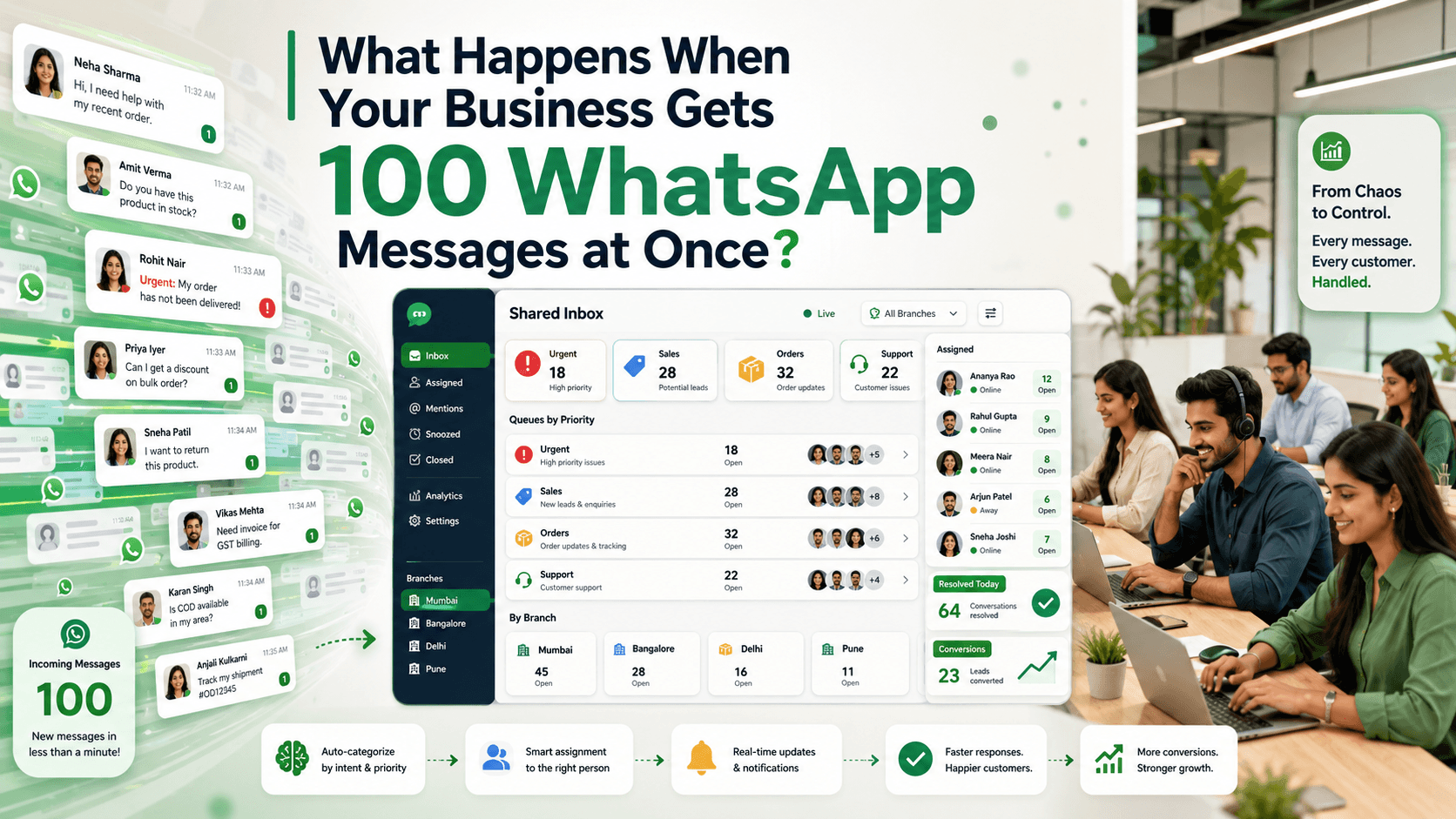
What Happens When Your Business Gets 100 WhatsApp Messages at Once?
A new product launch, advertisement, seasonal offer, service disruption, or viral social media post can generate dozens or hundreds of WhatsApp messages within minutes.
The sudden attention may appear to be a success. However, without the right process, it can quickly create operational problems.
Employees may reply to the same customer, important enquiries may disappear beneath newer messages, response times may increase, and interested buyers may choose another business before receiving help.
The challenge is not simply answering 100 messages. It is identifying what each customer needs, assigning responsibility, prioritising urgent conversations, preserving context, and ensuring that every enquiry reaches a useful outcome.
Here is what happens during a WhatsApp message surge—and how businesses can prepare for it.
The First Few Minutes
When a large number of messages arrive together, the inbox begins changing faster than employees can review it.
New conversations may include:
- Product enquiries
- Price questions
- Catalogue requests
- Existing order concerns
- Delivery-status requests
- Appointment bookings
- Complaints
- Payment questions
- Support issues
- Unsubscribe requests
- Messages sent to the wrong business
Treating every conversation identically creates immediate congestion.
A customer asking for store hours does not require the same process as someone reporting an unrecognised payment. A new sales enquiry should not take priority over an urgent service or safety concern.
The business needs a fast way to understand, categorise, and route every message.
What Goes Wrong Without a System
1. Messages Are Missed
In a busy inbox, employees naturally focus on the most recent messages.
Older unanswered conversations move out of view, even when the customer has a strong intention to purchase.
A customer may follow up several times:
Is this available?
Can someone confirm the price?
Hello?
If the business still does not respond, the customer may leave without making a complaint. The lost opportunity remains invisible.
2. Several Employees Reply to the Same Customer
When multiple employees share access without clear assignments, two or more people may open the same conversation.
This can produce:
- Duplicate greetings
- Conflicting product information
- Different prices
- Repeated questions
- Multiple payment links
- Confusing promises
The customer should experience one coordinated business, not several employees working independently.
3. Nobody Knows Who Owns the Conversation
An employee may read a message and assume someone else will answer it.
Another employee may see that the message was opened and assume it has already been handled.
The conversation then remains unresolved because no person was explicitly responsible.
Every active enquiry needs an owner, status, and next action.
4. Urgent Issues Are Buried
A serious complaint can appear between several routine product questions.
Without priority rules, an employee may answer ten catalogue requests before noticing a customer reporting:
- A duplicate payment
- A missing delivery
- A security concern
- A service outage
- A damaged product
- An urgent appointment issue
Important messages should be identified and escalated immediately.
5. Response Quality Falls
Employees under pressure may send incomplete or inaccurate replies.
Common mistakes include:
- Quoting an outdated price
- Sharing the wrong product details
- Forgetting delivery charges
- Sending the wrong catalogue
- Promising unavailable stock
- Using the wrong customer name
- Omitting important terms
- Sending a payment request before confirming the order
Speed without accuracy creates more work later.
6. Customers Must Repeat Themselves
A customer may provide a product code, preferred size, location, and budget in the first message.
If the conversation is transferred without context, another employee may ask for all the same information again.
Repeated questions make the business appear disorganised and increase handling time.
7. Follow-Ups Are Forgotten
Not every conversation can be completed immediately.
An employee may need to:
- Confirm stock
- Prepare a quotation
- Check a delivery date
- Ask a supervisor for approval
- Contact a warehouse
- Wait for a payment update
- Schedule a callback
Without follow-up reminders, these conversations may remain unfinished after the initial rush ends.
8. Employees Focus on Easy Messages
During a surge, employees may answer short questions first because they can resolve them quickly.
Complex but valuable enquiries—such as bulk orders, custom quotations, or high-intent purchases—may wait longer because they require more effort.
The inbox needs priorities based on customer impact and business value, not only response difficulty.
9. Customers Receive Delayed or No Acknowledgement
If customers receive no response, they do not know whether:
- The message was delivered
- The business is open
- Someone will reply
- The product is still available
- They should contact another channel
A short, honest acknowledgement can reduce uncertainty while the team works through the queue.
Build a Surge-Ready WhatsApp Process
The business should prepare before the first high-volume event.
1. Use a Shared Team Inbox
A shared WhatsApp inbox gives employees access to the same organised conversation queue.
The team should be able to see:
- New conversations
- Assigned conversations
- Unassigned conversations
- Waiting customers
- Conversation status
- Priority
- Customer history
- Internal notes
- Follow-up dates
WhatsApp’s Business Platform supports automation and routing conversations when live-agent assistance is needed. WhatsApp Business Platform
A shared inbox should create coordination—not simply give several people access to the same unstructured list.
2. Send an Immediate Acknowledgement
An automated acknowledgement confirms that the message was received.
For example:
Thanks for contacting UrbanHome. We’re currently receiving more messages than usual. Your message is in our queue, and a team member will reply within approximately 30 minutes.
A useful acknowledgement should:
- Confirm receipt
- Set an honest expectation
- Provide emergency or urgent instructions when relevant
- Avoid pretending that a person has reviewed the message
- Avoid promising a response time the business cannot meet
If waiting times change significantly, update the message.
3. Identify the Customer’s Intent
The first task is to understand why the customer contacted the business.
Possible intent categories include:
- New purchase
- Product availability
- Pricing
- Existing order
- Delivery support
- Payment issue
- Appointment
- Return or refund
- Complaint
- General information
- Opt-out request
Intent can be identified from the customer’s original message or through one short question.
For example:
To route your message correctly, please choose one option:
- New purchase
- Existing order
- Payment question
- Support or complaint
Do not force customers through a menu when their first message already explains the issue clearly.
4. Collect Only Essential Information
Automation can collect the minimum information required to prepare or route the conversation.
For an existing order, ask for the order number.
For a product enquiry, ask for the product name or code.
For local service, ask for the postcode or area.
Avoid presenting a long questionnaire before the customer can receive help.
One or two useful details can save employees significant time without making the interaction feel like a form.
5. Route Conversations Automatically
Routing distributes work to the employees best prepared to handle each message.
Rules may use:
- Enquiry type
- Branch
- Product category
- Customer location
- Language
- Existing account owner
- Employee availability
- Customer stage
- Priority
For example:
- New furniture enquiries → Furniture sales team
- Existing delivery concerns → Fulfilment support
- Payment problems → Accounts team
- Bengaluru appointments → Bengaluru branch
- Existing key accounts → Assigned account manager
Always create a fallback queue for conversations that do not match a routing rule.
6. Assign One Owner
Every conversation should have one responsible employee.
Ownership does not mean that only one person can help. It means one person is accountable for moving the conversation forward.
The owner should know:
- What the customer needs
- What has already been promised
- Which internal action is pending
- When the next response is due
- When the conversation can be closed
When ownership changes, transfer the context and notify the new employee.
7. Set Priority Rules
Not every message should be handled in arrival order.
A practical priority structure might include:
Urgent
- Security concerns
- Suspected fraud
- Serious complaints
- Safety issues
- Time-sensitive service failures
- Same-day appointment problems
High priority
- Payment problems
- Delayed high-value orders
- Customers ready to purchase
- Existing customers with active issues
- Bulk or commercial enquiries
Standard priority
- Product enquiries
- Catalogue requests
- Price questions
- Routine appointment requests
Low priority
- General information
- Non-urgent feedback
- Messages requiring no reply
Priority rules should be documented so employees make consistent decisions.
8. Use Approved Response Templates
Templates help employees answer common questions quickly and consistently.
Useful templates may cover:
- Product availability
- Price and delivery information
- Order-status requests
- Appointment confirmation
- Payment instructions
- Complaint acknowledgement
- Quotation follow-up
- Handover messages
- Delayed-response updates
For example:
Hi [Name], the [Product] is currently available in [Variants] for [Price]. Delivery to [Location] is available by [Date]. Would you like photos, specifications, or help placing an order?
Employees should adapt templates to the customer’s actual question rather than sending them without review.
9. Give Employees Complete Customer Context
When an employee opens a conversation, the relevant information should already be visible.
This may include:
- Customer name
- Previous conversations
- Purchase history
- Current order
- Products discussed
- Preferred branch
- Customer stage
- Tags
- Internal notes
- Information collected by automation
- Reason for routing
Context reduces repeated questions and shortens handling time.
10. Use AI to Support, Not Confuse, the Team
AI can help employees manage a large queue by:
- Summarising long conversations
- Identifying customer intent
- Suggesting suitable replies
- Extracting order numbers and product codes
- Translating messages
- Detecting possible urgency
- Recommending the next action
- Drafting follow-ups
Employees should review important responses before sending them.
AI should not invent prices, stock information, policies, delivery dates, or payment status.
When accurate information is unavailable, the response should say so and request human verification.
11. Create Special Handling for Complaints
Complaints should not remain in the general sales queue.
A complaint workflow can:
- Acknowledge the concern
- Collect the order or booking number
- Mark the conversation as high priority
- Stop unrelated promotional automation
- Assign a support employee
- Notify a supervisor when required
- Create a resolution deadline
For example:
I’m sorry your order arrived damaged. Please share your order number and one clear photo of the damage. I’ll connect you with our support team for review.
Automation can organise the first steps. A person should handle the resolution.
12. Separate New Enquiries From Existing Customers
A new customer asking for a catalogue and an existing customer reporting a failed delivery need different treatment.
Create separate queues or tags for:
- New leads
- Active sales opportunities
- Existing orders
- Repeat customers
- Support issues
- Complaints
- Payment concerns
This prevents high-volume lead generation from overwhelming existing-customer support.
13. Track Sales Enquiries Through a Pipeline
A message surge may create many opportunities that cannot be completed in one conversation.
A simple pipeline might include:
- New enquiry
- Requirement identified
- Product or service shared
- Quotation sent
- Awaiting decision
- Follow-up scheduled
- Awaiting payment
- Order confirmed
- Completed
- Lost or not interested
Each opportunity should have an owner and next action.
This prevents valuable enquiries from disappearing after the first reply.
14. Schedule Follow-Ups Immediately
When an employee promises to return with information, create a reminder at that moment.
For example:
I’ll confirm availability with our warehouse and update you by 4:00 p.m. today.
The reminder should include:
- Customer
- Required action
- Responsible employee
- Due time
- Relevant product or order
Do not rely on memory or an unread-message marker.
15. Pause Campaigns When Capacity Is Reached
If a promotional campaign creates more conversations than the team can manage, pause the next campaign batch.
Continuing to send messages while customers wait for replies increases:
- Abandonment
- Complaints
- Duplicate follow-ups
- Employee pressure
- Lost opportunities
- Customer frustration
Campaign size should reflect the team’s actual response capacity.
A smaller staged campaign may produce better results than one large broadcast.
16. Update Customers During Long Delays
If the expected wait becomes longer, send a clear update.
For example:
We’re sorry for the delay. Your enquiry remains assigned to our furniture team, and we now expect to reply within 45 minutes. No additional message is needed to keep your place in the queue.
This prevents customers from repeatedly sending “Hello?” to move the conversation upward.
Do not send frequent automated updates that create more noise than reassurance.
17. Define When a Conversation Is Complete
An employee should not close a conversation merely because a response was sent.
A conversation may be complete when:
- The customer’s question was answered
- The requested action was completed
- The order was confirmed
- The appointment was booked
- The issue was resolved
- The customer declined further help
- The conversation was transferred to another owned process
Use clear statuses such as:
- New
- Assigned
- Waiting for employee
- Waiting for customer
- Follow-up scheduled
- Escalated
- Resolved
- Closed
Statuses make the remaining workload visible.
Plan Staffing for Expected Surges
Businesses can often predict high-volume periods.
Examples include:
- Campaign launches
- Seasonal sales
- Ticket releases
- New product announcements
- Public events
- Service outages
- Delivery disruptions
- Festival periods
Before the event, confirm:
- How many employees will be available
- Which teams will handle each category
- Who will supervise the queue
- Which templates are approved
- Which products and prices are current
- Which escalation contacts are available
- When campaigns should pause
- What response time will be communicated
Do not launch a high-volume campaign immediately before the team goes offline.
Run a Message-Surge Test
Businesses should test their process before a real surge.
Simulate a queue containing:
- Product questions
- Existing-order requests
- Complaints
- Payment concerns
- Duplicate messages
- Messages in different languages
- Unclear enquiries
- Customers asking for a person
Check whether:
- Every conversation receives an acknowledgement
- Routing works correctly
- Priority issues are visible
- No conversation remains unassigned
- Employees can see customer context
- Duplicate replies are prevented
- Handovers preserve history
- Follow-up reminders are created
- Supervisors can monitor the queue
A controlled test reveals problems before customers encounter them.
Monitor the Queue in Real Time
During a surge, supervisors should track:
- New unassigned conversations
- Oldest unanswered message
- Average response time
- Urgent conversations
- Employee workload
- Conversations waiting for customers
- Conversations waiting for internal action
- Escalations
- Resolution rate
If one employee or team has too many conversations, reassign work before delays become severe.
Measure What Happened After the Surge
Useful metrics include:
- Total messages received
- Unique conversations
- First-response time
- Average resolution time
- Unanswered conversations
- Assignment time
- Automated completion rate
- Handover rate
- Conversion rate
- Orders and revenue
- Complaint resolution time
- Customer satisfaction
- Opt-outs and blocks
- Follow-ups completed
Review actual conversations as well as dashboard totals.
A fast first reply is not useful if the customer never receives a complete answer.
Common Mistakes to Avoid
Letting Everyone Answer Everything
Use assignments and routing to create clear ownership.
Handling Messages Only in Arrival Order
Prioritise urgent, high-risk, and high-intent conversations.
Sending a Generic Automated Reply Without a Process
An acknowledgement should connect to routing, assignment, and follow-up.
Asking Customers to Repeat Information
Preserve conversation history and structured customer details.
Launching Campaigns Beyond Team Capacity
Stage campaign delivery and pause when response times become unacceptable.
Forgetting Older Conversations
Monitor the oldest unanswered and unresolved messages.
Using Unapproved Information
Maintain current prices, policies, availability, and delivery estimates.
Closing Conversations Too Early
Confirm that the customer’s question or requested action is complete.
Measuring Only Message Volume
Track resolution, conversion, satisfaction, and unanswered enquiries.
How Voixt.ai Helps Businesses Manage WhatsApp Message Surges
Voixt.ai helps teams organise high-volume WhatsApp conversations without losing ownership or customer context.
Teams can use:
- Shared multi-agent WhatsApp inboxes so employees can manage one business number together
- Conversation assignments so every enquiry has a responsible owner
- No-code automation workflows for acknowledgements, data collection, routing, tagging, and status updates
- AI-powered responses to help employees answer routine questions faster
- AI-to-human handovers for complaints, complex enquiries, and exceptions
- Automatic contact capture to maintain organised customer records
- Contact tags and filters for intent, product category, location, priority, and customer stage
- Visual CRM pipelines to track enquiries from first message to completed purchase or resolution
- Follow-up reminders so promised actions are not forgotten after the surge
- Private internal notes for sharing context across the team
- Campaign management to organise audience batches and control message volume
This gives businesses the structure required to turn a sudden message spike into manageable conversations and measurable outcomes.
Final Thoughts
Receiving 100 WhatsApp messages at once can create valuable demand or serious confusion.
Without assignments, routing, priorities, shared context, and follow-up controls, customers may receive slow, duplicated, inconsistent, or incomplete responses.
Prepare before the surge. Acknowledge messages immediately, identify customer intent, route conversations intelligently, assign one owner, prioritise urgent issues, and track every unfinished action.
The objective is not merely to reduce the unread-message count. It is to ensure that every important conversation reaches the correct person and receives a useful outcome.
Voixt.ai helps businesses create the shared inbox, automation, routing, and customer-management processes required to handle high-volume WhatsApp communication confidently.