
How Business Owners Can Know What's Happening With Every Customer Without Reading Every Chat
Learn how dashboards, customer stages, assignments, internal notes, alerts, and conversation summaries give business owners visibility without reading every WhatsApp chat.
On this page29 sections
- How Business Owners Can Know What's Happening With Every Customer Without Reading Every Chat
- The Difference Between Reading Chats and Managing Customers
- Why the WhatsApp Inbox Is Not Enough
- Create One Customer Record
- Give Every Customer Conversation an Owner
- Use Clear Customer Stages
- Require One Next Action
- Add Specific Follow-Up Dates
- Use Private Internal Notes
- Use Conversation Summaries
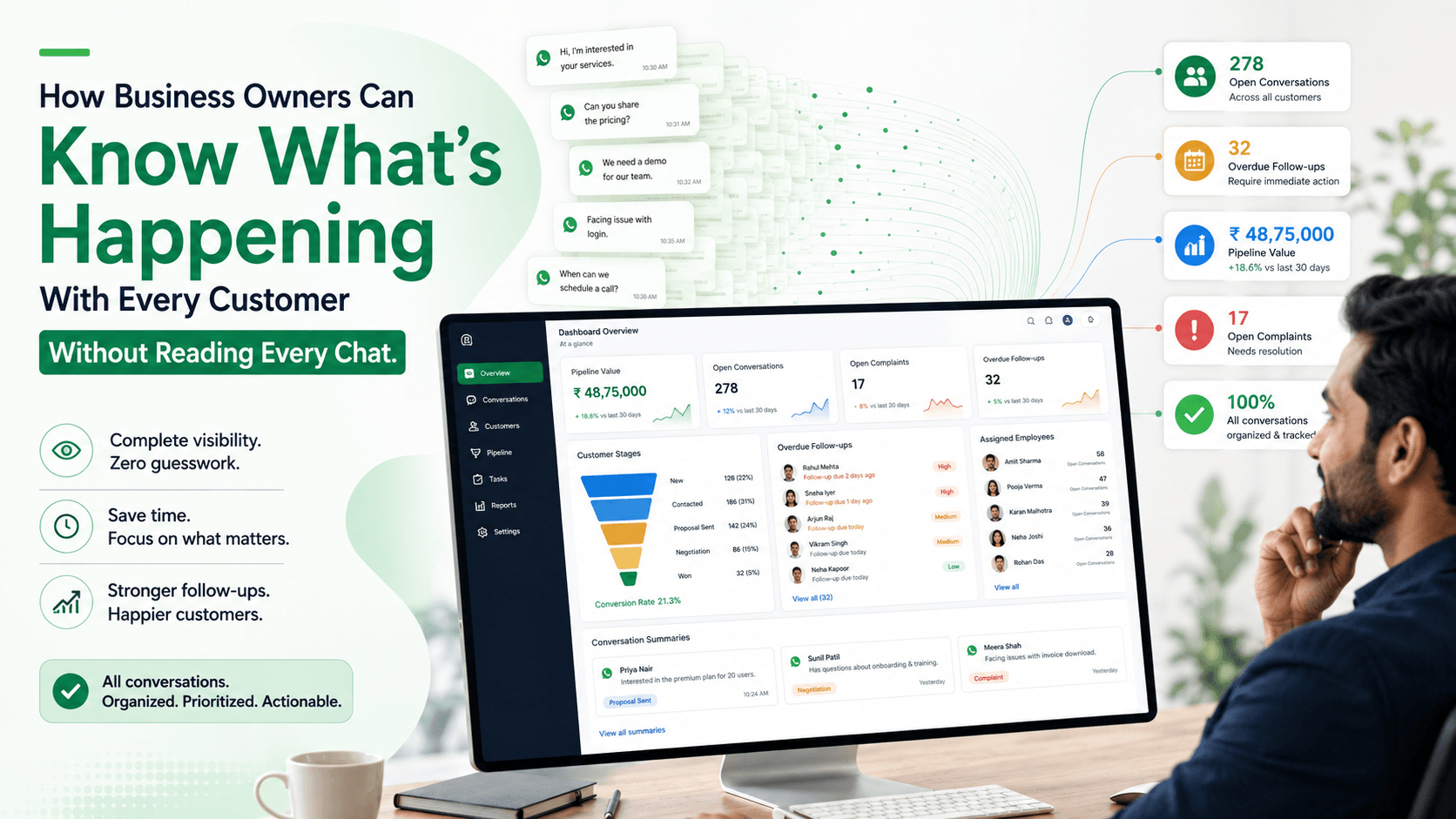
- Build an Owner Dashboard
- Focus on Exceptions
- Set Priority Levels
- Track Promises Made to Customers
- Monitor Unassigned Conversations
- Review Stagnant Customers
- See Team Workload Clearly
- Separate Sales and Support Visibility
- Track Lead Sources and Campaign Results
- Record Lost Reasons
- Use Daily and Weekly Management Views
- Give Managers Appropriate Access
- Keep Customer Preferences Visible
- Avoid Micromanaging Conversations
- Build a Simple Management Workflow
- Measure What Matters
- Common Mistakes to Avoid
- How Voixt.ai Gives Business Owners Customer Visibility
- Final Thoughts
How Business Owners Can Know What's Happening With Every Customer Without Reading Every Chat
As a business grows, owners cannot personally read every WhatsApp conversation.
However, they still need to know:
- How many new enquiries arrived
- Which customers are waiting
- Who owns each conversation
- Which quotations need follow-up
- Which orders are awaiting payment
- Which complaints remain unresolved
- Where sales opportunities are getting stuck
Reading every message is not an effective management system. It consumes time, creates unnecessary involvement in routine work, and still does not provide a clear overview.
Business owners need structured visibility: customer records, conversation ownership, pipeline stages, follow-up dates, priorities, summaries, and exception alerts.
The Difference Between Reading Chats and Managing Customers
Reading chats shows individual messages.
Managing customers requires organised answers to five questions:
- Who is the customer?
- What do they need?
- Who is responsible?
- What is the current status?
- What must happen next?
If these details are recorded properly, the owner can understand the business without opening every conversation.
Why the WhatsApp Inbox Is Not Enough
A WhatsApp inbox is organised mainly by recent activity.
The newest message appears near the top, while older conversations move down.
This does not show:
- Which customer is most important
- Which promise is overdue
- Which quotation has the highest value
- Which employee needs help
- Which complaint requires escalation
- Which customer is close to purchasing
A recent conversation may require no action, while an older conversation may contain an overdue customer commitment.
Create One Customer Record
Each customer should have one organised record connected to their conversations.
The record may include:
- Name
- WhatsApp number
- Location
- Lead source
- Product or service interest
- Purchase history
- Assigned employee
- Current stage
- Priority
- Follow-up date
- Communication preferences
- Relevant internal notes
This prevents customer information from remaining scattered across personal phones, spreadsheets, and employee memory.
Give Every Customer Conversation an Owner
Every active conversation should have one responsible employee.
The owner should be visible without opening the chat.
For example:
Customer: Meera Shah Owner: Arjun Team: Furniture sales Stage: Quotation sent Next action: Follow up on Friday
Clear ownership helps the business owner identify:
- Unassigned customers
- Uneven workloads
- Conversations owned by unavailable employees
- Opportunities without accountability
Shared access without assignment creates visibility but not responsibility.
Use Clear Customer Stages
Stages summarise where every customer stands.
A sales pipeline might include:
- New enquiry
- Requirement identified
- Product or service shared
- Quotation sent
- Follow-up scheduled
- Awaiting decision
- Awaiting payment
- Order confirmed
- Completed
- Lost or not interested
A support pipeline might include:
- Issue received
- Information collected
- Assigned
- Investigation in progress
- Waiting for internal action
- Waiting for customer
- Resolved
- Closed
With stages, the owner can see how many customers are waiting at each point without reading individual messages.
Require One Next Action
A stage describes the current position. A next action explains what must happen.
Examples include:
- Send quotation
- Confirm stock
- Call customer
- Verify payment
- Check delivery status
- Request manager approval
- Follow up on Friday
- Resolve complaint
Every active customer should have one clear next action.
If an opportunity has no next action, it is at risk of being forgotten.
Add Specific Follow-Up Dates
“Follow up later” does not provide useful management visibility.
Every follow-up should include:
- Customer
- Owner
- Reason
- Due date and time
- Required action
For example:
Customer: Rahul Mehta Owner: Priya Due: Today at 4:00 p.m. Reason: Waiting for warehouse confirmation Next action: Send updated delivery date
The owner can then review:
- Due today
- Overdue
- Due this week
- Completed
This is more useful than scanning unread messages.
Use Private Internal Notes
Internal notes help employees summarise important context for the team.
For example:
Customer needs six walnut workstations before 30 August. Quoted ₹78,000, including delivery. Waiting for installation approval. Update promised by 4:00 p.m.
A useful note should include:
- Customer requirement
- Important decision
- Quotation or order context
- Promise made
- Pending action
The owner can review the note instead of reading the complete conversation.
Notes should be concise, factual, and appropriate for a business record.
Use Conversation Summaries
Long conversations can be summarised into a short operational view.
A summary might say:
Meera enquired about two walnut study desks for delivery to Baner. Quotation Q-1842 for ₹26,000 was sent. She requested a follow-up on Friday after discussing the purchase with her partner.
Useful summaries may include:
- Customer intent
- Products discussed
- Current quotation
- Objections
- Decisions
- Outstanding action
- Follow-up commitment
AI can help produce summaries, but employees should verify important details before relying on them.
Build an Owner Dashboard
A business-owner dashboard should present essential information without exposing every message.
Useful sections include:
New enquiries
- Leads received today
- Source
- Assigned or unassigned status
- First-response status
Sales pipeline
- Leads by stage
- Opportunity value
- Quotations awaiting decisions
- Payments pending
- Won and lost opportunities
Follow-ups
- Due today
- Overdue
- Due this week
- Owner
- Priority
Customer support
- Open complaints
- High-priority issues
- Resolution deadlines
- Escalated conversations
Team workload
- Active conversations per employee
- Unassigned conversations
- Oldest unanswered message
- Overdue tasks
The dashboard should help the owner identify where attention is required.
Focus on Exceptions
Business owners should not need alerts for every routine message.
They should be notified when something important happens.
Useful exception alerts include:
- High-value new lead
- Customer waiting beyond the response target
- Serious complaint
- Payment dispute
- Follow-up overdue
- Conversation remains unassigned
- Delivery issue remains unresolved
- Lead has not moved stages for an unusual period
- Customer asks for a manager
This allows the owner to intervene when necessary without becoming part of every conversation.
Set Priority Levels
Not every customer situation requires the same attention.
A practical structure might include:
Urgent
- Security concern
- Suspected fraud
- Safety issue
- Serious complaint
- Time-sensitive service failure
High priority
- Payment problem
- High-value opportunity
- Customer ready to purchase
- Missing order
- Overdue promise
Standard priority
- Product enquiry
- Quotation follow-up
- Appointment request
- Routine support question
Priority should reflect customer impact, risk, and genuine urgency—not only revenue potential.
Track Promises Made to Customers
A customer promise should become a visible task.
Examples include:
- “I’ll send the quotation today.”
- “I’ll confirm stock by 4:00 p.m.”
- “Our support team will update you tomorrow.”
- “I’ll call you on Friday.”
When the promise is recorded with an owner and deadline, managers can see whether it was completed.
This is more reliable than reviewing messages after a customer complains.
Monitor Unassigned Conversations
An unassigned conversation has no clear owner.
The dashboard should show:
- Customer
- First message
- Waiting time
- Enquiry type
- Priority
- Source
New conversations can be routed automatically using:
- Product category
- Location
- Branch
- Language
- Existing account owner
- Employee availability
Any conversation that does not match a rule should remain visible in an unassigned queue.
Review Stagnant Customers
A customer may remain in the same stage for too long.
Examples include:
- New enquiry without qualification
- Quotation sent without follow-up
- Awaiting payment after order confirmation
- Complaint open without an update
- Delivery issue waiting for internal action
Define reasonable time limits for each stage.
When a customer exceeds the limit, create an alert or escalation task.
The objective is not to pressure customers. It is to identify internal delays and forgotten actions.
See Team Workload Clearly
Owners should know whether work is distributed fairly.
Useful workload information includes:
- Active conversations
- High-priority customers
- Follow-ups due
- Overdue actions
- Open complaints
- New leads assigned
If one employee has too many active conversations, the manager can reassign work before service quality falls.
Message count alone is not a reliable workload measure. One complex complaint may require more effort than ten simple enquiries.
Separate Sales and Support Visibility
Sales and support require different management views.
Sales visibility should focus on:
- New leads
- Qualification
- Quotations
- Follow-ups
- Pipeline value
- Conversion
Support visibility should focus on:
- Issue type
- Priority
- Resolution status
- Promised update
- Escalation
- Customer satisfaction
Mixing every conversation into one dashboard makes both areas difficult to understand.
Track Lead Sources and Campaign Results
Owners should know which channels generate useful customers.
Track sources such as:
- Instagram advertisement
- Facebook advertisement
- Website
- QR code
- Referral
- Store visit
- WhatsApp campaign
Connect the source to:
- Qualified leads
- Quotations
- Orders
- Revenue
- Lost reasons
A campaign with many replies may still perform poorly if few customers become qualified opportunities.
Record Lost Reasons
When a sale is lost, record why.
Possible reasons include:
- Price
- Product unavailable
- Delivery timing
- Chose another provider
- Outside service area
- Requirement changed
- No response
- Not qualified
Lost reasons show where the business needs to improve.
The owner can identify whether opportunities are being lost because of pricing, inventory, slow follow-up, or operational limitations.
Use Daily and Weekly Management Views
Daily view
- New unassigned conversations
- Overdue follow-ups
- Urgent support issues
- Payments awaiting verification
- Customers waiting beyond the response target
Weekly view
- Leads by source
- Opportunities by stage
- Sales won and lost
- Pipeline movement
- Follow-up completion
- Team workload
- Common customer issues
- Lost reasons
The daily view supports immediate action. The weekly view supports improvement and planning.
Give Managers Appropriate Access
Not every manager needs to read every private customer detail.
Use role-based permissions for:
- Customer records
- Conversations
- Payments
- Internal notes
- Team reporting
- Campaigns
- Exports
Owners can receive summary-level visibility while sensitive conversations remain available only to authorised employees.
Review access whenever roles change or employees leave.
Keep Customer Preferences Visible
The owner should be able to see whether customers consented to different communication categories.
Possible preferences include:
- Order updates
- Appointment reminders
- Reorder reminders
- New arrivals
- Offers
WhatsApp requires businesses to obtain appropriate opt-in permission before initiating messages and to respect requests to stop communication. WhatsApp Business Messaging Policy
Apply preference changes centrally across employees, automation, and campaigns.
Avoid Micromanaging Conversations
Visibility should help owners manage outcomes—not control every sentence employees send.
Owners should focus on:
- Ownership
- Timeliness
- Accuracy
- Customer outcomes
- Pipeline movement
- Escalations
- Workload
Employees still need room to understand customers, make recommendations, and communicate naturally within approved policies.
Build a Simple Management Workflow
A practical workflow might be:
- New customer message is captured
- Contact record is created or updated
- Conversation is categorised
- Owner is assigned
- Customer stage is updated
- Next action and due date are recorded
- Important context is summarised
- Overdue or high-risk cases trigger alerts
- Completed outcomes update reporting
- Owner dashboard reflects the latest status
The customer receives a normal WhatsApp conversation while the business gains structured visibility behind it.
Measure What Matters
Useful management metrics include:
- New enquiries
- Unassigned conversations
- First-response time
- Leads by stage
- Overdue follow-ups
- Quotations sent
- Orders confirmed
- Conversion rate
- Revenue
- Open complaints
- Resolution time
- Lost reasons
- Team workload
- Customer opt-outs
Metrics should help identify problems and improve the customer experience—not simply increase employee activity.
Common Mistakes to Avoid
Reading Every Chat Manually
Use summaries, stages, owners, and exception alerts.
Tracking Only Unread Messages
Unread status does not show whether action is complete.
Allowing Conversations Without Owners
Assign one responsible employee to every active customer.
Recording Stages Without Next Actions
Every active stage should have a clear next step.
Creating Too Many Alerts
Notify owners about exceptions and risks, not every routine message.
Measuring Only Message Volume
Track outcomes, response quality, conversions, and resolution.
Using Dashboards to Micromanage
Manage commitments and customer outcomes rather than every reply.
How Voixt.ai Gives Business Owners Customer Visibility
Voixt.ai helps business owners understand customer activity without reading every WhatsApp conversation.
Teams can use:
- Shared multi-agent WhatsApp inboxes so customer conversations remain visible to the business
- Conversation assignments so every active customer has one responsible owner
- Automatic contact capture to maintain structured customer records
- Contact tags and filters for stages, priorities, interests, sources, and locations
- Visual CRM pipelines to show where every sales and support conversation stands
- Follow-up reminders with owners, due dates, and next actions
- Private internal notes for promises, decisions, and important customer context
- No-code automation workflows for routing, assignment, stage updates, and escalation
- AI-powered responses and summaries to help teams understand long conversations efficiently
- AI-to-human handovers that preserve customer context
- Campaign management for targeted communication and measurable replies
This gives owners management-level visibility while employees continue handling customer conversations personally.
Final Thoughts
Business owners do not need to read every WhatsApp message to understand what is happening with customers.
They need one organised view of ownership, stage, priority, next action, follow-up date, and outcome.
Use dashboards for visibility, alerts for exceptions, summaries for context, and pipelines for progress. Give employees clear responsibility and allow owners to intervene when a customer is waiting, a promise is overdue, or a valuable opportunity is at risk.
Voixt.ai helps businesses create this structure so owners can manage customer outcomes without becoming part of every chat.