
Festival Offers on WhatsApp: How to Do Them Properly
Learn how to plan relevant WhatsApp festival offers using customer consent, audience segmentation, clear terms, careful timing, personalised messages, and organised follow-ups.
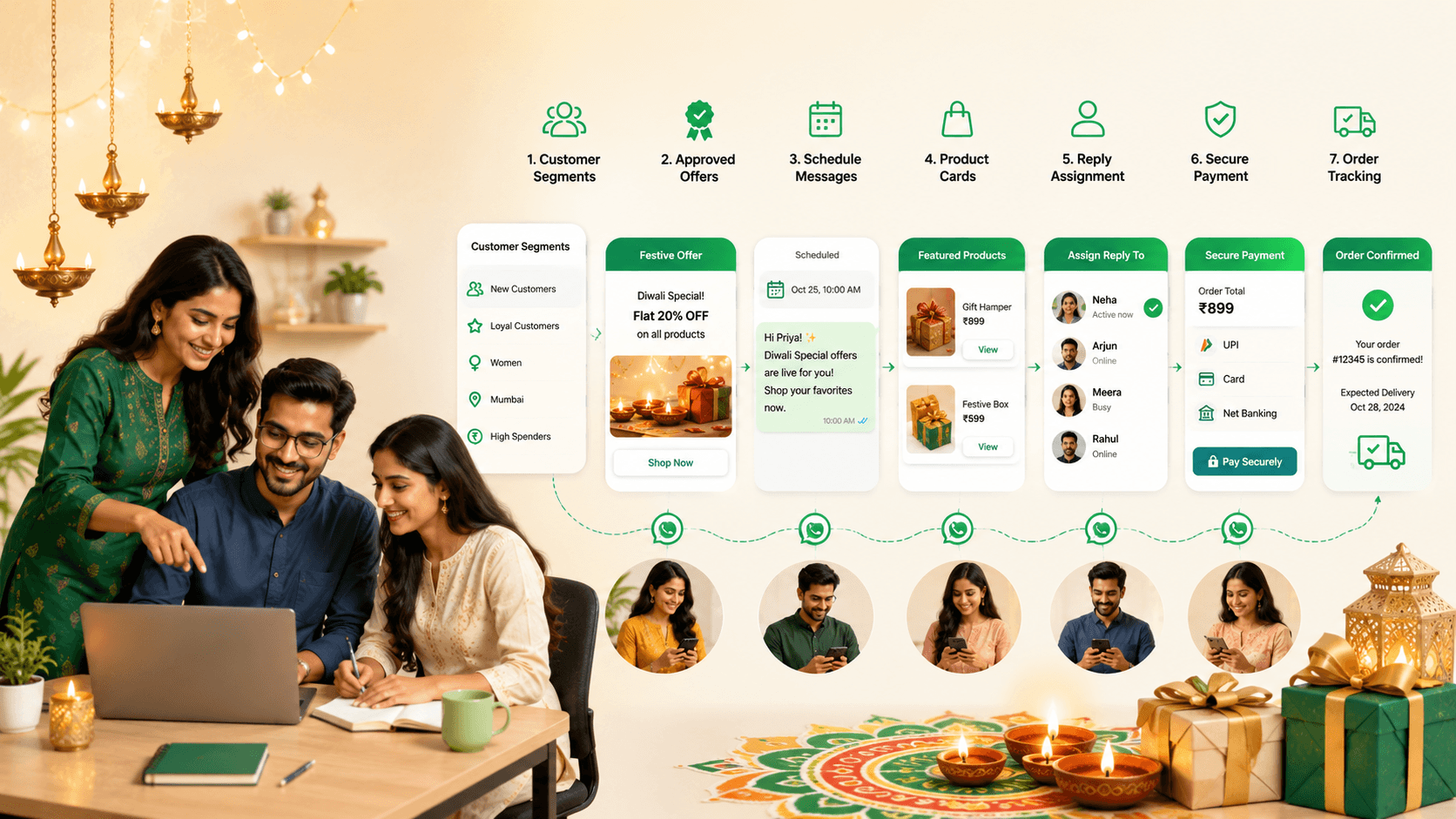
On this page24 sections
- Festival Offers on WhatsApp: How to Do Them Properly
- Start With Permission
- 1. Choose a Clear Campaign Objective
- 2. Select the Right Audience
- 3. Build Exclusion Rules
- 4. Create an Offer Customers Can Understand
- 5. Use Genuine Urgency
- 6. Send the Campaign at the Right Time
- 7. Plan a Short Message Sequence
- 8. Personalise Beyond the Customer’s Name
- 9. Keep the Message Short and Actionable
- 10. Use Media Carefully
- 11. Prepare for Customer Replies
- 12. Give Every Interested Customer an Owner
- 13. Track Replies Through a Sales Pipeline
- 14. Confirm Stock and Delivery Before Payment
- 15. Make Payment Secure
- 16. Communicate Delays Early
- 17. Stop Campaign Messages After Purchase
- Festival Campaign Examples
- Measure the Campaign Properly
- Common Festival Campaign Mistakes
- How Voixt.ai Helps Businesses Manage Festival Campaigns
- Final Thoughts
Festival Offers on WhatsApp: How to Do Them Properly
Festivals create strong opportunities for retailers, restaurants, service businesses, and local stores. Customers may be shopping for gifts, clothing, food, home décor, travel, events, or services connected to the occasion.
WhatsApp allows businesses to reach customers directly, but that access must be handled carefully.
A poorly planned festival campaign can overwhelm customers with generic discounts, repeated countdowns, unclear conditions, and irrelevant products. A well-planned campaign delivers a useful offer to an appropriate customer at the right time.
The objective is not to send the loudest festival message. It is to make purchasing easier for customers who are genuinely interested.
Start With Permission
A previous purchase does not automatically mean a customer wants every future promotional message.
Businesses should obtain appropriate permission before initiating WhatsApp marketing communication. WhatsApp’s Business Messaging Policy states that businesses must receive the person’s phone number and opt-in permission for subsequent messages or calls. It also requires businesses to respect requests to stop communication. WhatsApp Business Messaging Policy
A clear opt-in might say:
Receive festival collections, relevant offers, and up to four promotional messages per month from UrbanStyle on WhatsApp. Reply STOP at any time to unsubscribe.
Explain:
- Which business will send messages
- What kind of messages customers will receive
- How frequently they may receive them
- How they can change preferences or opt out
Maintain a record of consent and follow applicable privacy and marketing requirements.
1. Choose a Clear Campaign Objective
A festival campaign should have one primary purpose.
Possible objectives include:
- Launching a festival collection
- Increasing store visits
- Encouraging advance bookings
- Promoting gift packages
- Increasing repeat purchases
- Clearing selected seasonal inventory
- Rewarding loyal customers
- Generating preorders
- Encouraging early purchases before delivery deadlines
Avoid placing every offer, product category, event, and announcement into one message.
A clear objective makes it easier to choose the audience, offer, timing, and call to action.
2. Select the Right Audience
Do not send the same festival offer to every contact.
Useful segmentation criteria include:
- Product interest
- Previous purchases
- Location
- Preferred branch
- Customer type
- Typical budget
- Purchase frequency
- Loyalty status
- Online or in-store preference
- Previous campaign response
For example, a boutique can send its ethnic-wear collection to customers who previously purchased or enquired about similar styles. A bakery can promote corporate gift boxes to business customers and smaller family boxes to individual buyers.
The audience should be relevant to the offer, not simply large.
3. Build Exclusion Rules
Campaign planning should identify who must not receive the message.
Exclude customers who:
- Asked to stop promotional communication
- Already purchased the promoted product
- Recently received a similar campaign
- Declined the offer
- Live outside the delivery or service area
- Have an unresolved complaint
- Are not interested in the category
- Are at an inappropriate customer stage
Exclusions prevent unnecessary messages and embarrassing customer experiences.
4. Create an Offer Customers Can Understand
Festival promotions often become complicated because businesses combine several discounts, coupon codes, conditions, and product exclusions.
A customer should quickly understand:
- What the offer is
- Which products or services are eligible
- When it begins and ends
- Whether a minimum purchase applies
- Whether stock or appointments are limited
- How to redeem it
- Whether it applies online, in-store, or both
- Important exclusions
Instead of:
Diwali mega sale! Up to 50% off. Terms apply. Hurry!
Use:
Get 15% off selected Diwali home-décor sets from 20 to 27 October. The offer applies to orders above ₹2,000 while stock lasts. Reply CATALOGUE to see the eligible products and complete terms.
The second message gives customers enough information to decide whether the offer is relevant.
5. Use Genuine Urgency
Festival campaigns often use countdowns and scarcity claims to encourage quick decisions.
Urgency should be accurate.
Valid reasons may include:
- A confirmed offer expiry
- Final order date for delivery before the festival
- Limited appointment capacity
- Genuine stock limitations
- An early-booking period
- A defined event date
Avoid repeating “last chance” for several days or claiming that only a few products remain without verified information.
Artificial urgency may generate a short-term response but reduces long-term trust.
6. Send the Campaign at the Right Time
Customers need enough time to consider, order, and receive the product or service.
Work backwards from:
- Festival date
- Production time
- Customisation requirements
- Delivery deadlines
- Appointment availability
- Store operating hours
- Expected response volume
A customised gift business may need to start several weeks in advance. A restaurant offering festival meals may communicate closer to the event but still needs time to manage preorders.
Avoid sending the first campaign too late and compensating with several messages in a short period.
7. Plan a Short Message Sequence
One carefully structured sequence is often better than repeated copies of the same offer.
A campaign might include:
Message 1: Announcement
Introduce the collection or offer and explain its relevance.
Message 2: Helpful reminder
Send only to customers who have not purchased. Add useful information such as a delivery deadline, product guide, or availability update.
Message 3: Genuine final reminder
Send close to the actual deadline and exclude customers who already purchased, declined, or opted out.
The sequence should stop once the customer completes the intended action.
8. Personalise Beyond the Customer’s Name
Adding a name to a generic promotion does not make it personal.
Useful personalisation can reference:
- Product category
- Previous enquiry
- Requested restock alert
- Preferred branch
- Customer location
- Purchase history
- Loyalty status
For example:
Hi Meera, our new pastel festive collection has arrived. Since you previously preferred lighter embroidery, we selected four styles between ₹3,000 and ₹6,000. Reply STYLES to view them.
This message is more useful than sending the complete collection to every customer.
Avoid sensitive inferences or information customers would not reasonably expect the business to use.
9. Keep the Message Short and Actionable
A festival message should be easy to understand on a phone screen.
Use this structure:
- Identify the business.
- State the relevant offer.
- Include essential conditions.
- Give one clear next action.
- Provide an opt-out option.
For example:
Hi Arjun, GreenHome’s Diwali lighting collection is now available with 10% off selected sets until 25 October. Delivery before Diwali is available for confirmed orders placed by 22 October. Reply LIGHTS to view the collection or STOP to opt out of promotions.
Do not bury the offer beneath a long festival greeting, excessive emojis, or several links.
10. Use Media Carefully
Images and videos can improve festival campaigns, but too many files can overwhelm customers.
Use:
- One strong campaign image
- A small curated selection
- Clear product cards
- A short relevant video
- A catalogue link
Avoid sending twenty product images in the first message. Allow interested customers to request the relevant collection.
Ensure images accurately represent the products and do not contain unreadable prices or important conditions in tiny text.
11. Prepare for Customer Replies
A successful campaign may generate many conversations within minutes.
Before sending, confirm:
- Which employees will handle replies
- How conversations will be assigned
- Whether stock is updated
- Whether prices and discounts are approved
- Which payment options are available
- How orders will be recorded
- Which delivery dates can be promised
- How opt-outs will be processed
Do not launch a large campaign when the team cannot answer the resulting enquiries.
12. Give Every Interested Customer an Owner
Campaign replies should be assigned to a responsible employee.
This prevents:
- Duplicate responses
- Conflicting prices
- Missed questions
- Forgotten follow-ups
- Unclear accountability
Assignment may be based on location, product category, customer language, branch, or employee availability.
The customer should experience one continuous conversation even when a team works behind it.
13. Track Replies Through a Sales Pipeline
A customer who replies to a festival campaign should become a trackable sales opportunity.
A simple pipeline may include:
- Campaign reply received
- Requirement identified
- Products shared
- Order summary sent
- Awaiting decision
- Awaiting payment
- Order confirmed
- Fulfilment in progress
- Completed
- Lost or not interested
Every active opportunity should have a next action and follow-up date.
For example:
Follow up tomorrow because the customer wants to confirm the gift quantity with the office manager.
14. Confirm Stock and Delivery Before Payment
Festival demand can change availability quickly.
Before requesting payment, confirm:
- Product and variant
- Quantity
- Current price
- Discount
- Stock availability
- Delivery charge
- Delivery or pickup date
- Customisation details
Send a complete order summary:
Festival order summary
Product: Diwali gift box DG-12 Quantity: 10 Unit price after discount: ₹1,350 Delivery: ₹500 Total: ₹14,000 Delivery date: 24 October
Please reply CONFIRM if these details are correct.
Do not accept more orders than the business can fulfil reliably.
15. Make Payment Secure
After order confirmation, share an approved payment method supported by the business.
Never ask customers to share passwords, card PINs, or one-time passwords through chat.
Verify the transaction through the authorised payment system instead of relying only on a screenshot. Send a receipt, order reference, and fulfilment timeline after verification.
16. Communicate Delays Early
Festival periods can create inventory, production, and delivery pressure.
If a delay occurs:
- Inform the customer promptly
- Explain the revised timeline
- Offer a suitable alternative when possible
- Allow cancellation where required by policy or law
- Avoid making new promises that cannot be kept
Proactive communication protects trust more effectively than waiting for customers to complain.
17. Stop Campaign Messages After Purchase
Customers who have already purchased should not continue receiving reminders to buy the same offer.
Update their status immediately and exclude them from the remaining campaign sequence.
They can instead receive relevant transactional updates such as payment confirmation, preparation status, collection instructions, or delivery information.
Festival Campaign Examples
Boutique
Hi Kavya, Noor Boutique’s festive collection is now available. We selected five pastel styles based on your previous preference, starting at ₹3,499. Orders requiring alterations should be confirmed by 18 October. Reply STYLES to view them or STOP to opt out.
Bakery
SweetHouse Diwali gift boxes are open for preorder until 20 October. Boxes start at ₹799, with local delivery available on selected dates. Reply MENU to view options or CORPORATE for bulk-order assistance.
Home décor store
GreenHome’s Diwali lighting offer includes 10% off selected lamp sets until 25 October. Reply LIGHTS to see eligible products and delivery availability for your location.
Appointment-based business
Festival grooming appointments are now open for 18–26 October at our Bandra branch. Reply BOOK with your preferred date, and our team will share available times.
Measure the Campaign Properly
Track more than delivery volume.
Useful metrics include:
- Reply rate
- Qualified enquiries
- Catalogue requests
- Store visits
- Appointments booked
- Orders confirmed
- Revenue
- Average order value
- Conversion by segment
- Opt-outs
- Blocks and complaints
- Products requested but unavailable
- Fulfilment delays
Compare segments and messages to understand what customers found useful.
Common Festival Campaign Mistakes
Sending the same offer to everyone
Segment customers based on relevant interests and behaviour.
Starting too late
Plan around production and delivery deadlines.
Using unclear discounts
State eligible products, validity, and important conditions.
Repeating false urgency
Use deadlines only when they are genuine.
Sending too many images
Share a curated selection or catalogue link.
Failing to prepare for replies
Assign employees and confirm stock before sending.
Continuing after purchase or opt-out
Update customer status and preferences immediately.
Accepting more orders than the team can fulfil
Protect service quality by using realistic capacity limits.
How Voixt.ai Helps Businesses Manage Festival Campaigns
Voixt.ai helps businesses plan relevant WhatsApp campaigns and manage the customer conversations they generate.
Teams can use:
- Contact tags and filters to create segments based on products, locations, purchases, and customer stages
- Campaign management to organise festival messages and responses
- Shared multi-agent WhatsApp inboxes so employees can manage replies together
- Automatic contact capture to maintain organised customer records
- Conversation assignments so every enquiry has an owner
- Visual CRM pipelines to track campaign replies from interest to completed order
- Follow-up reminders so potential purchases are not forgotten
- No-code automation workflows for tagging, routing, confirmations, and fulfilment updates
- AI-powered responses to help teams answer common campaign questions
- Private internal notes for coordinating stock, customisation, and delivery
- AI-to-human handovers when customers need personal assistance
This allows businesses to run festival campaigns without losing customer context, replies, or orders.
Final Thoughts
A successful festival campaign is not defined by how many messages the business sends. It is defined by how relevant, clear, timely, and useful those messages are.
Start with appropriate permission, choose a specific audience, explain the offer properly, prepare the team for replies, and stop promotional messages when the customer purchases or opts out.
Voixt.ai helps businesses organise this process so festival demand can be managed without sacrificing customer experience.