
How Customers Can Discover, Order and Pay Through WhatsApp
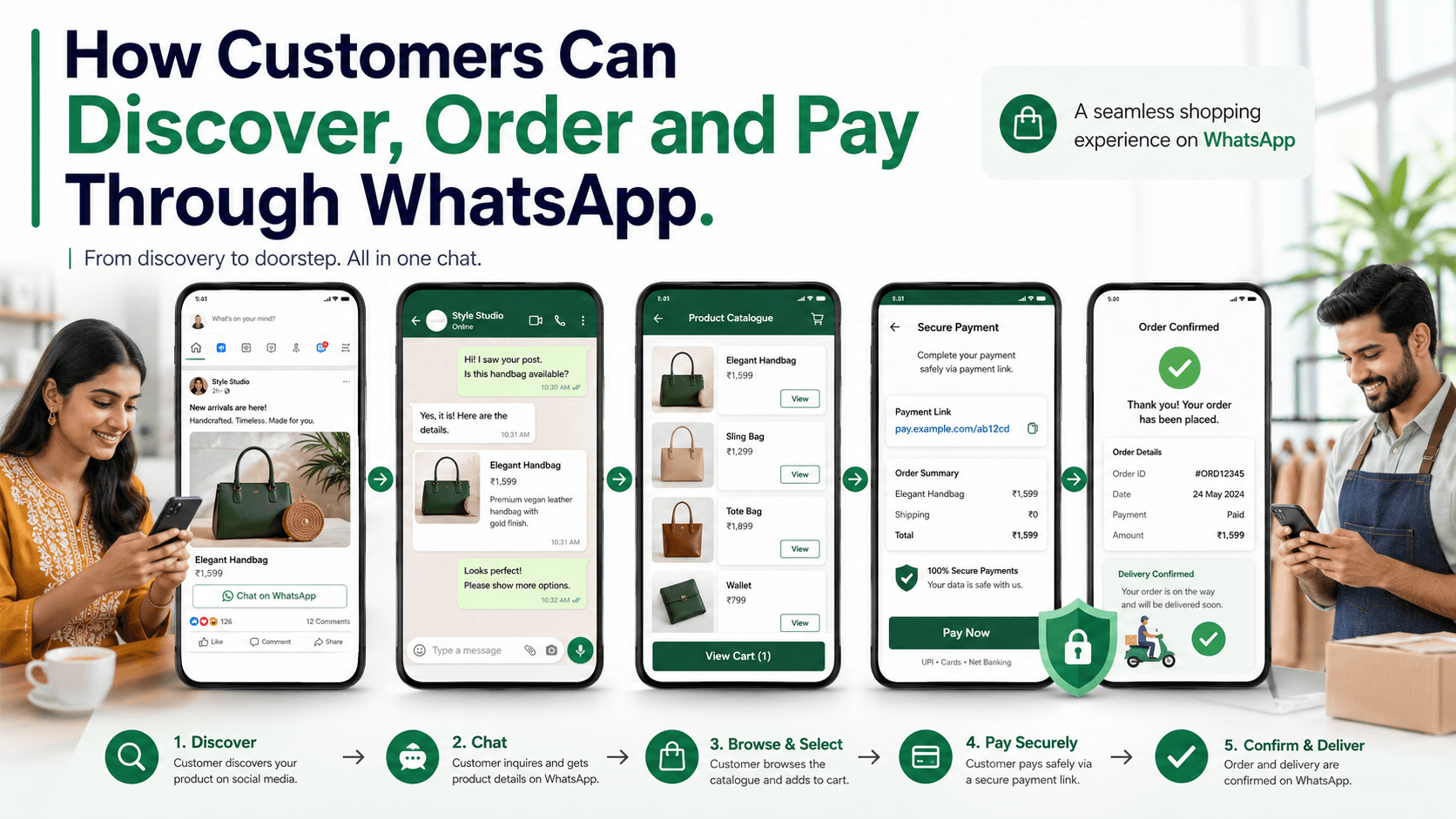
Learn how businesses can help customers discover products, ask questions, place orders, make payments, and receive updates through a simple WhatsApp shopping journey.
On this page17 sections
- How Customers Can Discover, Order and Pay Through WhatsApp
- 1. Help Customers Discover Your WhatsApp Channel
- 2. Connect Each Entry Point to the Right Context
- 3. Acknowledge New Enquiries Quickly
- 4. Make Products Easy to Browse
- 5. Answer Questions Before Asking for the Order
- 6. Capture the Information Needed for the Order
- 7. Confirm the Complete Order Before Payment
- 8. Provide a Secure Payment Option
- 9. Confirm the Payment and Order
- 10. Send Relevant Order Updates
- 11. Keep Human Assistance Available
- 12. Organise Orders Beyond the Chat
- 13. Make Repeat Purchases Easier
- Common WhatsApp Selling Mistakes
- How Voixt.ai Supports WhatsApp Commerce
- Final Thoughts
How Customers Can Discover, Order and Pay Through WhatsApp
Customers do not always want to visit a complicated website, create an account, remember a password, and complete a long checkout process before buying something.
Many prefer a simpler journey: discover a product, ask a question, confirm the order, pay, and receive updates through a familiar conversation.
WhatsApp can support this journey, especially for small businesses, local retailers, service providers, and companies selling products that require some explanation before purchase.
However, receiving orders through WhatsApp involves more than sharing a phone number. Businesses need a structured process that helps customers move smoothly from discovery to payment without confusion or unnecessary delays.
Here is how customers can discover, order, and pay through WhatsApp.
1. Help Customers Discover Your WhatsApp Channel
The first step is making it easy for customers to begin a conversation.
A business can promote its WhatsApp contact through:
- Social media profiles
- Click-to-chat advertisements
- Website buttons
- Google Business Profile
- QR codes displayed in stores
- Product packaging
- Bills and receipts
- Business cards
- Posters and brochures
- Email signatures
- Online marketplace profiles, where permitted
- Customer referrals
Customers should not have to manually save a number and type a general message. A direct link or QR code can open a conversation with a useful pre-filled enquiry.
For example:
Hi, I would like to view your new summer collection.
A campaign-specific message gives the business immediate context and helps identify which advertisement, product, branch, or promotion generated the enquiry.
2. Connect Each Entry Point to the Right Context
A customer clicking an advertisement for office chairs should not receive a generic welcome message asking what they need.
The business should preserve the source and product context whenever possible.
Useful context includes:
- Advertisement or campaign name
- Product or service
- Category
- Branch or location
- Promotion
- Customer language
- Source platform
With this information, the conversation can begin more naturally:
Hi Rahul, thanks for your interest in our ergonomic office chairs. Are you looking for one chair or furniture for a team?
This is more helpful than:
Hello. How can we help you?
Context reduces repeated questions and helps the customer reach the right product faster.
3. Acknowledge New Enquiries Quickly
Customers often contact several businesses when comparing products. If a message remains unanswered, they may purchase elsewhere.
An automatic acknowledgement can confirm that the enquiry has been received and explain what happens next.
For example:
Hi! Thanks for contacting UrbanHome. We’ve received your enquiry, and a product specialist will reply shortly. Meanwhile, please share the product name, link, or photo so we can check availability.
An acknowledgement should:
- Identify the business
- Confirm receipt
- Set a realistic response expectation
- Ask one useful question
- Provide business hours when relevant
Automation should support the conversation, not pretend that a customer has received complete assistance.
4. Make Products Easy to Browse
Customers need a clear way to understand what the business sells.
Depending on the tools available to the business and customer, products can be presented through:
- A WhatsApp catalogue
- Curated product cards
- A digital catalogue
- A short product list
- Images and videos
- Links to product pages
- Personalised recommendations
Do not send a large catalogue when the customer has already described what they need. Narrow the choices first.
For example:
We have three study tables within your ₹8,000 budget. Would you prefer a compact design, extra storage, or a larger work surface?
After the customer answers, share only the most suitable options.
Each product presentation should clearly mention:
- Product name
- Price
- Important features
- Available variants
- Stock status
- Delivery options
- Relevant terms
- Next step
Avoid overwhelming customers with dozens of images, long PDFs, or unrelated items.
5. Answer Questions Before Asking for the Order
Customers frequently use WhatsApp because they want reassurance before purchasing.
They may ask about:
- Size
- Colour
- Material
- Availability
- Delivery time
- Installation
- Warranty
- Return policy
- Customisation
- Payment options
- Product suitability
Responses should be accurate, concise, and connected to the customer’s requirement.
Instead of replying:
Available.
Use:
Yes, the blue model is available in medium and large. Delivery to Pune normally takes two to three business days after order confirmation. Which size would you like?
The second response answers the question and guides the conversation towards the next action.
6. Capture the Information Needed for the Order
Once the customer chooses a product or service, collect only the information required to complete the order.
This may include:
- Customer name
- Product and variant
- Quantity
- Delivery or service location
- Preferred date or time
- Billing details
- Delivery instructions
- Payment method
Avoid asking customers to repeat details they have already shared.
For sensitive information, use secure and appropriate collection methods. Do not request passwords, card PINs, one-time passwords, or other credentials through chat.
Businesses should also follow applicable privacy, payment, consumer-protection, and record-keeping requirements.
7. Confirm the Complete Order Before Payment
Before requesting payment, send a clear order summary.
For example:
Order summary
Product: Oak study table with two drawers Quantity: 1 Price: ₹7,500 Delivery: ₹400 Total: ₹7,900 Delivery location: Baner, Pune Estimated delivery: 22–24 August
Please reply CONFIRM if these details are correct.
The summary should include:
- Product or service
- Variant
- Quantity
- Unit price
- Taxes, where applicable
- Delivery or additional charges
- Discounts
- Final amount
- Fulfilment details
- Important terms
This step prevents disputes and gives the customer an opportunity to correct mistakes before paying.
8. Provide a Secure Payment Option
After the customer confirms the order, the business can share an approved payment method.
Depending on the business, provider, and location, options may include:
- Secure payment links
- UPI payment requests
- Payment gateway checkout pages
- Bank transfer instructions
- Cash on delivery
- Payment at the store
A payment message should clearly state:
- Business name
- Order reference
- Amount payable
- Payment purpose
- Secure payment link or approved instructions
- Link validity, when relevant
- What happens after payment
For example:
Your order total is ₹7,900. Please use this secure payment link to complete the payment. Once confirmed, we will send your receipt and delivery update here.
Never ask customers to share card details, passwords, PINs, or one-time passwords in the conversation.
Businesses should verify payments through their authorised payment system rather than relying only on screenshots sent by customers.
9. Confirm the Payment and Order
After successful payment verification, send a confirmation immediately.
A useful confirmation includes:
- Order number
- Amount received
- Product or service confirmed
- Delivery or appointment details
- Expected next update
- Support contact instructions
For example:
Payment received—thank you, Meera. Your order number is UH1048. Your study table is scheduled for delivery between 22 and 24 August. We’ll send another message when it is dispatched.
This reassures the customer that the transaction was completed correctly.
10. Send Relevant Order Updates
Customers should not need to ask repeatedly, “Where is my order?”
Send updates when the order reaches meaningful stages, such as:
- Order confirmed
- Payment verified
- Order being prepared
- Item dispatched
- Out for delivery
- Delivered
- Appointment confirmed
- Service completed
- Delay or exception identified
Each update should contain useful information rather than a vague status.
For example:
Your order UH1048 has been dispatched and is expected to arrive tomorrow between 2:00 p.m. and 6:00 p.m. Reply HELP if you need to update the delivery instructions.
If there is a delay, communicate it proactively and provide the revised expectation.
11. Keep Human Assistance Available
Some customers can complete a simple order through structured messages. Others need help choosing an option, understanding a policy, changing an order, or resolving a payment issue.
Customers should always have a clear way to reach a person.
Human assistance is particularly important when:
- The requirement is unclear
- The order is customised
- The purchase value is high
- Payment fails
- Stock information is uncertain
- The customer wants to negotiate
- A complaint or exception occurs
- The automated workflow cannot understand the request
A smooth handover should give the employee the complete conversation context so the customer does not have to start again.
12. Organise Orders Beyond the Chat
A WhatsApp conversation alone is not an order-management system.
Businesses should record important information in a structured workflow, including:
- Customer details
- Products discussed
- Order value
- Payment status
- Assigned employee
- Fulfilment status
- Delivery details
- Follow-up date
- Conversation history
A simple sales pipeline might include:
- New enquiry
- Product recommended
- Order details collected
- Awaiting confirmation
- Awaiting payment
- Paid
- Processing
- Dispatched
- Completed
- Cancelled or lost
This gives the team visibility into every order and reduces dependence on individual memory.
13. Make Repeat Purchases Easier
Once a customer has purchased, future orders should require less effort.
With appropriate consent and accurate purchase records, businesses can send relevant messages about:
- Reordering a frequently purchased product
- Back-in-stock availability
- Compatible accessories
- Service renewals
- Maintenance reminders
- New versions of previously purchased items
For example:
Hi Arjun, would you like to reorder your usual pack of printer paper? The current price is ₹1,150, with delivery available tomorrow. Reply REORDER to confirm.
Do not assume that every customer wants reminders. Provide preference controls and stop promotional messages when requested.
Common WhatsApp Selling Mistakes
Sending too many products
Customers are more likely to decide when they receive a small number of suitable options.
Quoting only the price
Explain what the price includes, along with delivery, availability, warranty, or other relevant details.
Requesting payment before confirming the order
Always provide a complete summary first.
Depending on payment screenshots
Verify transactions through an authorised payment system.
Losing conversations after payment
Track fulfilment and send proactive updates until the order is completed.
Mixing customer orders with personal chats
Use an organised business system so conversations remain accessible to authorised employees.
Sending promotions without permission
Obtain appropriate consent and respect customer communication preferences.
How Voixt.ai Supports WhatsApp Commerce
Voixt.ai helps businesses manage the conversations and workflows behind WhatsApp-based selling.
With Voixt.ai, businesses can use:
- Shared multi-agent WhatsApp inboxes so sales and support teams can manage conversations together
- Automatic contact capture to create organised customer records
- Conversation assignments so each enquiry and order has a responsible employee
- Visual CRM pipelines to track customers from enquiry to payment and fulfilment
- Contact tags and filters for product interests, locations, order stages, and customer groups
- Follow-up reminders so quotations, pending payments, and repeat orders are not forgotten
- No-code automation workflows for acknowledgements, order confirmations, assignments, and status updates
- AI-powered responses to help employees answer common product and order questions
- Private internal notes for coordination between sales, payments, and fulfilment teams
- AI-to-human handovers when customers require personal assistance
- Campaign management for relevant product announcements and repeat-purchase reminders
This structure allows the customer to enjoy a simple conversation while the business maintains an organised sales process behind it.
Final Thoughts
WhatsApp can support the complete customer journey—from discovery and product questions to order confirmation, payment, and fulfilment updates.
The experience works best when every step is clear. Customers should be able to find the business easily, receive relevant recommendations, understand the total price, use a secure payment method, and know what will happen after paying.
Businesses should combine conversational convenience with structured order management, secure payment practices, clear consent, and timely human support.
Voixt.ai helps teams organise these conversations so customers can move from discovery to purchase without unnecessary friction.