
How Local Stores Can Start Selling Online Without Building a Complicated Website
Learn how local stores can begin selling online using WhatsApp, social media, digital catalogues, payment links, and local delivery—without building a complicated ecommerce website.
On this page20 sections
- How Local Stores Can Start Selling Online Without Building a Complicated Website
- Start With the Customer Journey
- 1. Make the Store Easy to Discover
- 2. Create a Simple Digital Catalogue
- 3. Use Clear Product Photography
- 4. Turn WhatsApp Into the Sales Conversation
- 5. Acknowledge Enquiries Quickly
- 6. Organise Customer Conversations
- 7. Confirm Stock Before Accepting the Order
- 8. Send a Complete Order Summary
- 9. Offer Secure Payment Options
- 10. Provide Pickup and Local Delivery Choices
- 11. Send Proactive Order Updates
- 12. Create a Simple Sales Pipeline
- 13. Automate Repetitive Tasks
- 14. Encourage Repeat Purchases Carefully
- When Does a Store Need a Website?
- Common Mistakes to Avoid
- How Voixt.ai Helps Local Stores Sell Online
- Final Thoughts
How Local Stores Can Start Selling Online Without Building a Complicated Website
A local store does not need a large ecommerce website to begin selling online.
Many customers already discover products through social media, Google, referrals, and local advertisements. They often prefer to ask questions, confirm availability, and place orders through WhatsApp rather than navigate a complex checkout process.
This gives neighbourhood retailers a practical way to start online selling with tools they may already use.
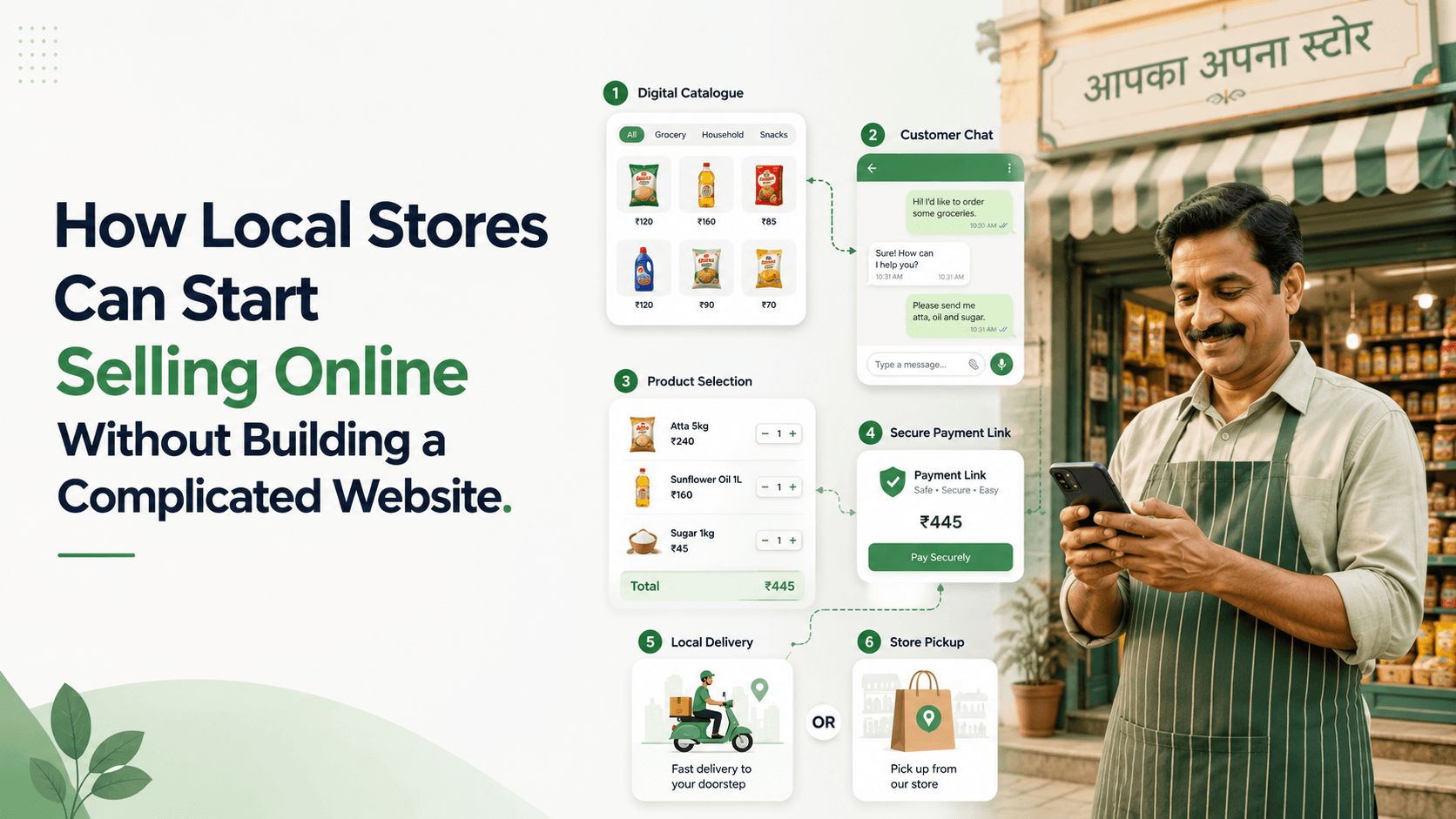
A simple journey can look like this:
- The customer discovers the store online.
- They view a digital catalogue or product post.
- They contact the store through WhatsApp.
- An employee confirms the product, price, and availability.
- The customer approves the order.
- The store shares a secure payment option.
- The customer receives pickup or delivery updates.
The business can add a website later when its needs become more complex. The first priority is creating a clear and reliable buying process.
Start With the Customer Journey
Before choosing tools, decide how customers should move from discovery to fulfilment.
Answer these questions:
- Where will customers discover the store?
- How will they view products?
- Where will they ask questions?
- How will employees confirm availability?
- How will orders be recorded?
- Which payment methods will be offered?
- Will customers collect orders or receive delivery?
- How will order updates be sent?
- Who will handle complaints and returns?
The process should be documented so every employee follows the same steps.
1. Make the Store Easy to Discover
Customers must be able to find accurate information about the business.
Useful discovery channels include:
- Google Business Profile
- Local directories
- Online marketplaces
- Community groups, where appropriate
- Printed QR codes
- Product packaging
- Bills and receipts
- Customer referrals
Keep essential details consistent across channels:
- Store name
- Location
- Business hours
- WhatsApp contact
- Product categories
- Delivery area
- Pickup availability
A direct WhatsApp link or QR code makes it easier for customers to begin a conversation without manually saving the number.
2. Create a Simple Digital Catalogue
Customers need a convenient way to understand what the store sells.
The catalogue does not need to include every item immediately. Begin with:
- Popular products
- New arrivals
- High-margin items
- Frequently requested products
- Products suitable for delivery
- Seasonal collections
Each product should have:
- A clear name
- Product code
- Good photographs
- Current price
- Short description
- Available variants
- Stock status
- Delivery or pickup information
Depending on the tools available, the store can use a WhatsApp catalogue, a simple product page, a shared digital catalogue, social media collections, or a marketplace listing.
The important point is consistency. Customers and employees should be working from the same current information.
3. Use Clear Product Photography
Customers cannot inspect online products in the same way they can in a store.
Use photographs that show:
- The complete product
- Important details
- Size or scale
- Available colours
- Packaging, when relevant
- How the product is used
Use consistent backgrounds and lighting so the catalogue looks organised. Avoid blurry photographs, screenshots containing unrelated information, and images that do not match the actual product.
Where appropriate, include a short video to demonstrate movement, texture, dimensions, or functionality.
4. Turn WhatsApp Into the Sales Conversation
Customers often use WhatsApp because they want answers before buying.
They may ask:
- Is this available?
- What is the final price?
- Do you deliver to my location?
- Which size should I choose?
- Can I collect it today?
- Is another colour available?
- What are the return terms?
Employees should respond with complete information and a clear next step.
Instead of:
Available.
Use:
Yes, the blue model is available. It costs ₹1,499, and delivery to Indiranagar is available tomorrow for ₹80. Would you like one unit reserved?
This helps the customer move closer to confirming the order.
5. Acknowledge Enquiries Quickly
Local stores may receive WhatsApp enquiries while employees are helping customers in person.
An automatic acknowledgement can confirm receipt:
Hi! Thanks for contacting GreenMart. We’ve received your message and will reply shortly. Please share the product name, code, or photo so we can check availability.
For after-hours conversations, state when the store will respond.
Avoid promising unrealistic response times. The purpose of the message is to reassure the customer and collect useful context.
6. Organise Customer Conversations
When enquiries are managed through one personal phone, messages can be missed during busy periods.
A shared inbox allows authorised employees to:
- View incoming messages
- Access conversation history
- Assign enquiries
- Add private notes
- Check conversation status
- Continue conversations when another employee is unavailable
Every active enquiry should have one owner. This prevents duplicate replies and ensures accountability.
7. Confirm Stock Before Accepting the Order
Online customers expect accurate availability.
A local store should have a simple process for checking whether an item is:
- In stock
- Low in stock
- Reserved
- Available at another branch
- Available for preorder
- Sold out
- Discontinued
Do not promise an item based only on an old photograph or message. Confirm current availability before requesting payment.
When stock changes frequently, keep product records updated and train employees to verify inventory before confirming an order.
8. Send a Complete Order Summary
Before payment, provide a written summary:
Order summary
Product: Stainless-steel water bottle WB-24 Colour: Blue Quantity: 2 Product total: ₹1,198 Delivery: ₹80 Final amount: ₹1,278 Delivery location: Indiranagar, Bengaluru Estimated delivery: Tomorrow, 2:00–6:00 p.m.
Please reply CONFIRM if these details are correct.
The summary should include:
- Product
- Variant
- Quantity
- Price
- Taxes, where applicable
- Delivery or service charges
- Discount
- Final amount
- Fulfilment details
This reduces mistakes and disputes.
9. Offer Secure Payment Options
After the customer confirms the order, share an approved payment method supported by the store.
Possible options may include:
- Secure payment links
- Authorised UPI requests
- Bank transfer instructions
- Cash on delivery
- Payment during collection
Never ask customers to share passwords, PINs, card credentials, or one-time passwords through chat.
Verify transactions through the authorised payment system rather than relying only on screenshots. Follow applicable payment, tax, consumer-protection, and privacy requirements.
10. Provide Pickup and Local Delivery Choices
Convenient fulfilment is one of the main advantages local stores can offer.
Store pickup
Confirm:
- Order number
- Collection address
- Pickup time
- Contact person
- Identification or receipt requirement
Local delivery
Confirm:
- Delivery address
- Landmark
- Contact number
- Delivery charge
- Expected window
- Special instructions
Do not promise exact delivery times unless the store can reliably maintain them.
11. Send Proactive Order Updates
Customers should not have to repeatedly ask where their order is.
Send updates when the order is:
- Confirmed
- Being prepared
- Ready for collection
- Dispatched
- Out for delivery
- Delivered
- Delayed
For example:
Your order GM1052 is packed and ready for collection after 4:00 p.m. today. Please show this message at the counter.
If an item becomes unavailable or delivery is delayed, communicate the change quickly and offer suitable alternatives.
12. Create a Simple Sales Pipeline
WhatsApp messages should be connected to an organised order process.
A basic pipeline may include:
- New enquiry
- Product identified
- Availability confirmed
- Order summary sent
- Awaiting payment
- Paid
- Preparing order
- Ready for pickup or delivery
- Completed
- Cancelled
Each order should have an owner, status, value, and next action.
This helps the store manage online enquiries without depending on memory or scattered notebooks.
13. Automate Repetitive Tasks
Automation can save time when a task follows a predictable rule.
Useful automations include:
- Acknowledging new enquiries
- Asking customers to share a product code
- Assigning conversations
- Applying product-interest tags
- Creating follow-up reminders
- Sending order confirmations
- Sharing pickup instructions
- Sending delivery updates
- Requesting human assistance when needed
Employees should remain involved when customers need recommendations, stock confirmation, complaint resolution, or help with a complex order.
14. Encourage Repeat Purchases Carefully
Once a customer has purchased, the store may use relevant information to make future buying easier.
Examples include:
- Reorder reminders
- Back-in-stock alerts
- New arrivals in a preferred category
- Seasonal products
- Loyalty benefits
- Compatible accessories
These messages should be based on appropriate permission and customer preferences.
Avoid sending every promotion to every contact. A useful message might say:
Hi Meera, the organic coffee you purchased last month is available again. Reply REORDER if you would like the same quantity delivered this weekend.
When Does a Store Need a Website?
A simple WhatsApp-led process may be enough when:
- The catalogue is small
- Customers usually ask questions before purchasing
- Sales are mainly local
- Orders require personal assistance
- The business is testing online demand
A website becomes more useful when the store needs:
- A large searchable catalogue
- Real-time inventory
- Self-service checkout
- Search-engine visibility
- Customer accounts
- Complex shipping rules
- Detailed integrations
- High-volume ordering without employee involvement
Starting without a complicated website does not mean avoiding one forever. It allows the business to validate its process before investing in more infrastructure.
Common Mistakes to Avoid
Uploading every product immediately
Start with popular and manageable categories.
Using personal accounts for all orders
Keep business conversations accessible to authorised team members.
Accepting payment before confirming stock
Verify availability and send an order summary first.
Sending unclear payment instructions
State the business name, order reference, amount, and approved method.
Forgetting after-sales updates
Continue communication until delivery or collection is complete.
Sending mass promotions without permission
Respect customer preferences and applicable messaging requirements.
Measuring messages instead of sales
Track enquiries, payments, orders, fulfilment, and repeat purchases.
How Voixt.ai Helps Local Stores Sell Online
Voixt.ai helps local retailers organise WhatsApp-based selling without requiring a complicated ecommerce setup.
Teams can use:
- Shared multi-agent WhatsApp inboxes to manage customer conversations together
- Automatic contact capture to create organised customer records
- Conversation assignments so every enquiry and order has an owner
- Visual CRM pipelines to track customers from enquiry to fulfilment
- Contact tags and filters for product interests, locations, and order stages
- Follow-up reminders so quotations and pending orders are not forgotten
- No-code automation workflows for acknowledgements, routing, confirmations, and updates
- AI-powered responses to help answer common questions efficiently
- Private internal notes for coordination between sales and fulfilment teams
- AI-to-human handovers when customers need personal assistance
- Campaign management for relevant new-arrival, restock, and repeat-purchase communication
This gives the customer a simple buying experience while the store maintains an organised process behind the conversation.
Final Thoughts
Local stores can start selling online without waiting for a large ecommerce website.
A practical system combines online discovery, a clear digital catalogue, helpful WhatsApp conversations, verified stock, secure payments, and reliable pickup or delivery updates.
The most important requirement is not complex technology. It is a consistent process that makes buying easy and prevents customer enquiries or orders from getting lost.
Voixt.ai helps local stores organise this process so they can serve online customers while preserving the personal service that makes local retail valuable.