
Instagram Brings the Customer. WhatsApp Can Close the Sale.
Learn how businesses can turn Instagram interest into WhatsApp sales using faster replies, contextual conversations, personalised recommendations, follow-ups, and organised lead management.
On this page17 sections
- Instagram Brings the Customer. WhatsApp Can Close the Sale.
- 1. Make It Easy to Move From Instagram to WhatsApp
- 2. Preserve the Product and Campaign Context
- 3. Acknowledge Every Enquiry Quickly
- 4. Understand What the Customer Needs
- 5. Give More Than the Price
- 6. Recommend a Few Relevant Options
- 7. Assign Every Enquiry to One Person
- 8. Track the Lead Beyond the Chat
- 9. Follow Up With Useful Context
- 10. Confirm the Order Clearly
- 11. Share a Secure Payment Option
- 12. Continue Communicating After the Sale
- Measure the Complete Journey
- Common Mistakes to Avoid
- How Voixt.ai Helps Convert Instagram Interest Into WhatsApp Sales
- Final Thoughts
Instagram Brings the Customer. WhatsApp Can Close the Sale.
Instagram helps customers discover businesses, products, and offers. A reel can demonstrate a product, a story can announce a new collection, and a targeted advertisement can attract people who are already interested in buying.
Discovery, however, does not guarantee a sale.
Customers may still need to ask about prices, sizes, availability, delivery, payment, customisation, or suitability. Moving the conversation to WhatsApp gives the business an opportunity to answer those questions personally and guide the customer towards a purchase.
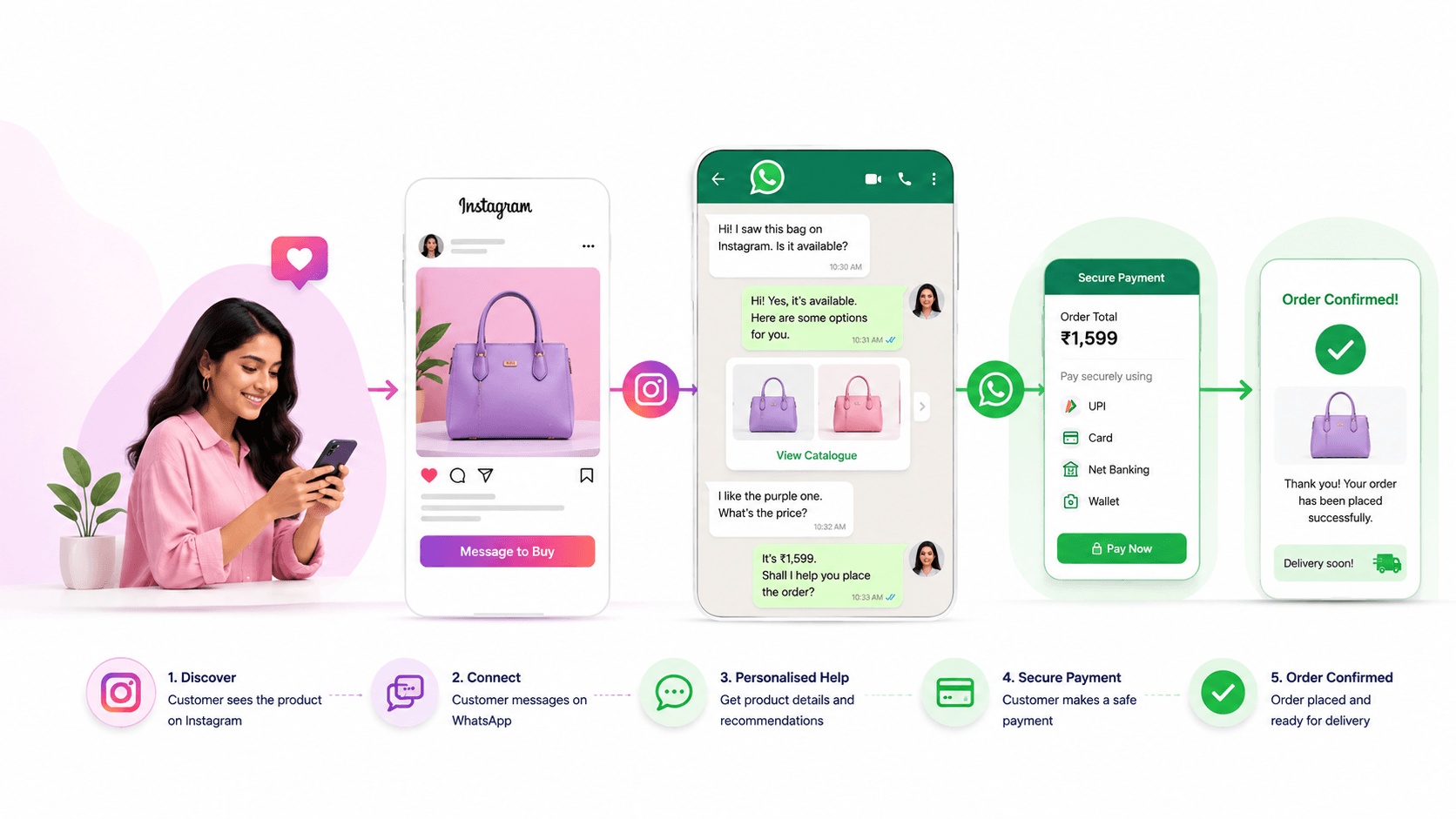
A successful journey may look like this:
- The customer discovers a product on Instagram.
- They start a WhatsApp conversation.
- The business identifies the product and requirement.
- A sales representative provides relevant information.
- The customer confirms the order.
- The business shares a secure payment option.
- The customer receives order updates.
Here is how businesses can manage that journey effectively.
1. Make It Easy to Move From Instagram to WhatsApp
Customers should not have to search for a phone number, save it manually, and explain where they found the business.
Use a clear WhatsApp call to action in suitable places, such as:
- Instagram profile links
- Stories
- Product posts
- Advertisements
- Campaign landing pages
- Highlight sections
Explain what customers can do after starting the conversation.
Instead of:
Contact us on WhatsApp.
Use:
Message us on WhatsApp to check prices, sizes, availability, and delivery.
A specific call to action sets the right expectation and attracts customers who want help purchasing.
2. Preserve the Product and Campaign Context
When a customer arrives from a particular Instagram post, the WhatsApp conversation should retain that context whenever possible.
A general message such as “Hi” forces the employee to ask which product the customer viewed. This creates unnecessary friction.
Use campaign-specific links, product codes, or pre-filled messages such as:
Hi, I’m interested in the blue linen dress from your summer collection.
Useful information to capture includes:
- Instagram campaign
- Post or advertisement
- Product code
- Collection
- Offer
- Customer location
- Creator or referral source
This allows the team to respond faster and measure which Instagram activities generate real enquiries and sales.
3. Acknowledge Every Enquiry Quickly
Instagram customers may contact several sellers before making a decision. A delayed reply gives competitors time to answer first.
If an employee cannot respond immediately, send an automatic acknowledgement:
Hi! Thanks for contacting UrbanStyle about our summer collection. We’ve received your message, and a stylist will respond shortly. Meanwhile, please share your preferred size and delivery city.
The acknowledgement should:
- Identify the business
- Confirm receipt
- Set a realistic response expectation
- Ask one relevant question
- State business hours when necessary
Automation should prepare the conversation, not replace meaningful assistance.
4. Understand What the Customer Needs
The customer has already seen the Instagram content. Do not simply resend the same image or caption.
Ask a short question that helps identify the right option:
The kurta you viewed is available in green and maroon. Are you looking for an everyday style or something for a festival?
Depending on the product or service, useful questions may cover:
- Preferred size or quantity
- Budget
- Colour or style
- Delivery location
- Intended use
- Required date
- Online or in-store preference
Ask only what is necessary. A long list of questions can make a simple purchase feel complicated.
5. Give More Than the Price
A price-only response rarely answers everything the customer needs to know.
Instead of:
₹2,499.
Use:
The dress is ₹2,499 and is available in sizes S to XL. It uses a linen-blend fabric, and delivery to Bengaluru usually takes three to four business days. Which size would you like me to check?
A helpful reply may include:
- Price
- Availability
- Variants
- Important features
- Delivery estimate
- Additional charges
- Exchange or return terms
- A clear next step
The purpose is to remove uncertainty and make continuing easy.
6. Recommend a Few Relevant Options
Sending an entire catalogue can overwhelm the customer. Use the information already provided to narrow the selection.
For example:
Based on your ₹5,000 budget and preference for compact tables, these three models are the best match. The first offers more storage, while the second is easier to move. Would you like the dimensions?
A curated recommendation feels personal and helps the customer compare options quickly.
7. Assign Every Enquiry to One Person
When several employees handle WhatsApp without clear ownership, customers may receive duplicate replies or conflicting information.
Every Instagram enquiry should have one responsible owner.
Assignment can be based on:
- Product category
- Customer location
- Language
- Branch
- Campaign
- Employee availability
- Enquiry value
The assigned employee should respond, record important information, and complete the next follow-up.
8. Track the Lead Beyond the Chat
A WhatsApp enquiry should have a visible sales status.
A simple pipeline may include:
- New Instagram enquiry
- Contacted
- Requirement identified
- Product recommended
- Awaiting decision
- Awaiting payment
- Order confirmed
- Lost or not interested
Each record should include:
- Customer name
- Instagram source
- Product interest
- Assigned employee
- Last conversation date
- Next action
- Follow-up date
- Potential order value
This prevents promising conversations from disappearing beneath newer messages.
9. Follow Up With Useful Context
Some customers need time to compare options, arrange payment, or discuss the purchase with someone else.
Avoid a generic follow-up such as:
Any update?
Use a relevant message instead:
Hi Meera, I’m following up on the green kurta you viewed on Instagram. Size M is available, and I can also share a similar option at a lower price. Would you like to see it?
A valuable follow-up can provide:
- Updated availability
- An alternative product
- A comparison
- Delivery information
- Clarification about price
- An answer to an earlier concern
- A genuine deadline
If the customer declines or asks not to receive further messages, update the record and respect that preference.
10. Confirm the Order Clearly
Before requesting payment, send a complete order summary.
Order summary
Product: Green linen kurta Size: M Quantity: 1 Price: ₹2,499 Delivery: ₹100 Total: ₹2,599 Delivery city: Bengaluru Estimated delivery: 3–4 business days
Please reply CONFIRM if these details are correct.
Include the product, variant, quantity, price, applicable charges, fulfilment details, and final amount.
This gives the customer an opportunity to correct mistakes before paying.
11. Share a Secure Payment Option
After order confirmation, provide an approved payment method supported by the business. This may include a secure payment link, authorised UPI request, bank transfer instructions, cash on delivery, or in-store payment.
Never ask customers to share passwords, card PINs, or one-time passwords through chat.
Verify the transaction through the authorised payment system instead of relying only on a screenshot. Once verified, send an order number, payment confirmation, and expected fulfilment timeline.
12. Continue Communicating After the Sale
The customer experience does not end when payment is completed.
Send useful updates when the order is:
- Confirmed
- Being prepared
- Dispatched
- Out for delivery
- Delivered
If a delay occurs, explain it proactively and provide a revised expectation.
After fulfilment, the business may request feedback or share relevant repeat-purchase information with appropriate permission.
Measure the Complete Journey
Instagram engagement metrics show attention, but businesses should also measure sales outcomes.
Track:
- WhatsApp enquiries by Instagram campaign
- First-response time
- Qualified leads
- Follow-ups completed
- Payments received
- Confirmed orders
- Average order value
- Conversion rate by post or advertisement
- Lost-sale reasons
A post with fewer likes may produce more sales than a popular reel. Connecting Instagram sources to WhatsApp conversions reveals which content attracts genuine buyers.
Common Mistakes to Avoid
Losing the Instagram context
Employees should know which product, post, or campaign generated the enquiry.
Replying with only the price
Include availability, relevant details, and a clear next step.
Sending too many options
Recommend a small selection based on the customer’s requirement.
Allowing multiple employees to reply
Assign one owner to prevent confusion.
Forgetting follow-ups
Record a specific follow-up date and purpose.
Asking customers to repeat information
Maintain complete conversation and customer history.
Measuring clicks without measuring sales
Connect campaign sources to enquiries, payments, and orders.
Sending promotions without permission
Respect customer preferences and applicable messaging requirements.
How Voixt.ai Helps Convert Instagram Interest Into WhatsApp Sales
Voixt.ai helps businesses organise the WhatsApp conversations generated by Instagram.
Teams can use:
- Shared multi-agent WhatsApp inboxes to manage enquiries together
- Automatic contact capture to create organised customer records
- Conversation assignments so every lead has an owner
- Visual CRM pipelines to track customers from enquiry to purchase
- Contact tags and filters for campaigns, products, locations, and interests
- Follow-up reminders so promising customers are not forgotten
- No-code automation workflows for acknowledgements, routing, and updates
- AI-powered responses to answer common questions efficiently
- Private internal notes for team coordination
- AI-to-human handovers when personal assistance is required
- Campaign management for relevant follow-up communication
Instagram can remain the discovery channel while Voixt.ai helps turn the resulting WhatsApp conversations into an organised sales process.
Final Thoughts
Instagram can bring customers to the business, but attention alone does not create revenue.
Customers still need quick answers, relevant recommendations, clear order details, secure payment options, and reliable follow-ups. WhatsApp can support these conversations when the business has a structured process behind them.
By preserving campaign context, assigning every enquiry, tracking each opportunity, and providing a clear next step, businesses can turn more Instagram interest into confirmed sales.