
From New Lead to Won Customer: A Simple WhatsApp Sales Process
Learn how to move WhatsApp leads from first enquiry to completed purchase using qualification, ownership, pipeline stages, quotations, and timely follow-ups.
On this page26 sections
- From New Lead to Won Customer: A Simple WhatsApp Sales Process
- The Basic WhatsApp Sales Pipeline
- Stage 1: Capture the New Lead
- Stage 2: Acknowledge the Enquiry Quickly
- Stage 3: Assign One Sales Owner
- Stage 4: Qualify the Requirement
- Stage 5: Record Useful Customer Context
- Stage 6: Recommend Relevant Options
- Stage 7: Answer Questions Clearly
- Stage 8: Send a Complete Quotation
- Stage 9: Schedule the Follow-Up
- Stage 10: Follow Up With Value
- Stage 11: Handle Objections
- Stage 12: Confirm the Final Order
- Stage 13: Share an Approved Payment Option
- Stage 14: Mark the Customer as Won
- Stage 15: Send Order and Fulfilment Updates
- Stage 16: Follow Up After Completion
- Record Lost Opportunities
- Use Automation at the Right Stages
- Keep One Owner and One Next Action
- Respect Customer Preferences
- Measure the Sales Process
- Common Mistakes to Avoid
- How Voixt.ai Supports the Complete WhatsApp Sales Process
- Final Thoughts
From New Lead to Won Customer: A Simple WhatsApp Sales Process
A customer sees an advertisement, taps a WhatsApp button, and sends:
Hi, can you share the price?
That message is a lead—but it is not yet a sale.
The business still needs to understand the requirement, recommend the right option, answer questions, confirm availability, provide a clear quotation, follow up appropriately, collect payment, and confirm the order.
Without a defined process, conversations remain inside the inbox until employees forget them or customers lose interest.
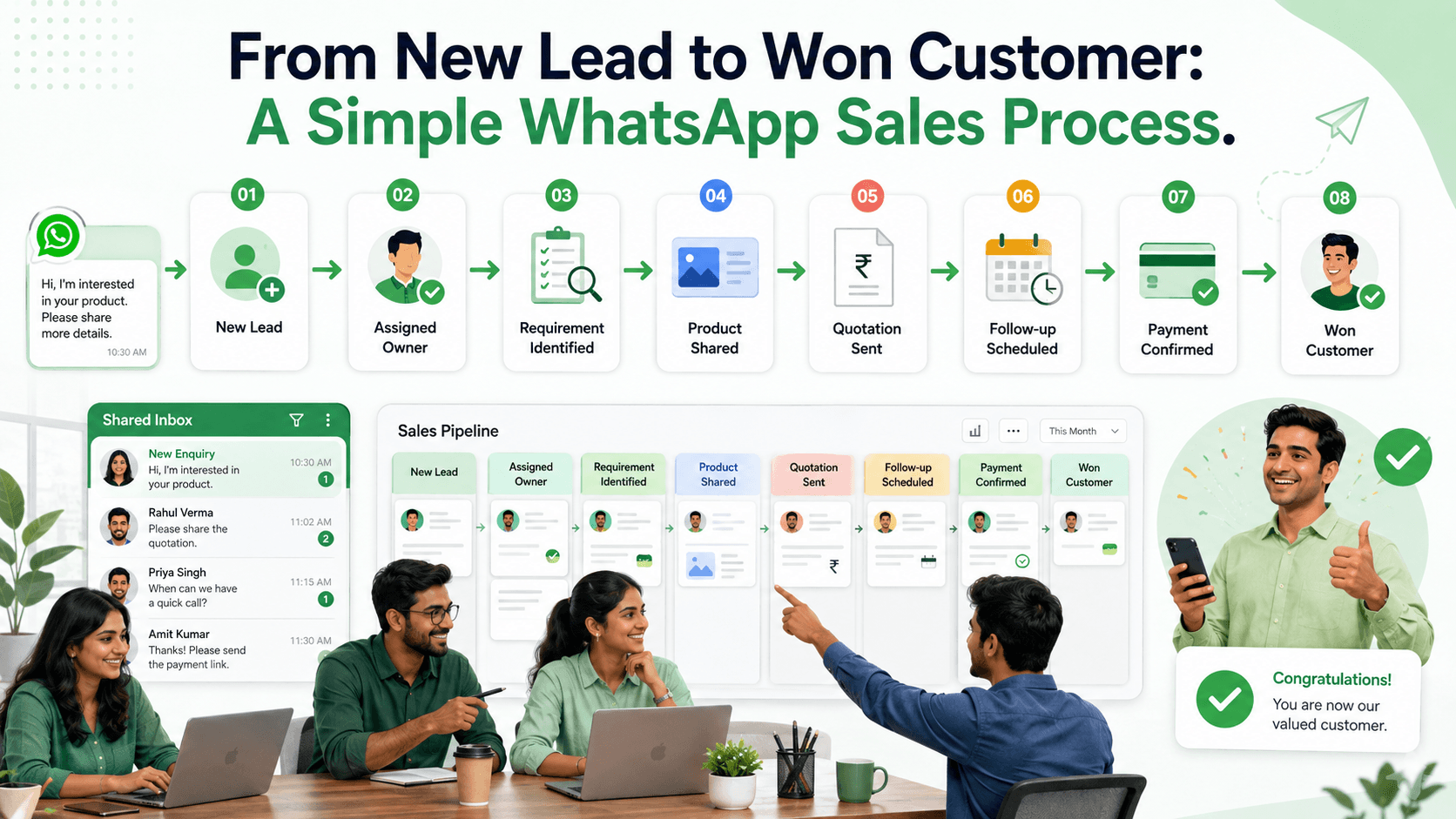
A simple WhatsApp sales process gives every lead an owner, stage, next action, and follow-up date.
The Basic WhatsApp Sales Pipeline
A practical pipeline can include:
- New lead
- Lead assigned
- Requirement identified
- Product or service shared
- Quotation sent
- Follow-up scheduled
- Awaiting decision
- Awaiting payment
- Order confirmed
- Won or lost
The stages should describe meaningful customer progress—not every message exchanged.
Stage 1: Capture the New Lead
A new lead may come from:
- Website
- Click-to-WhatsApp advertisement
- QR code
- Referral
- Store visit
- WhatsApp campaign
- Existing customer
Create or update the customer record as soon as the message arrives.
Capture:
- Name when available
- WhatsApp number
- First-contact date
- Lead source
- Initial enquiry
- Relevant campaign
- Assigned salesperson
- Current stage
For example:
Name: Meera Shah Source: Instagram advertisement Interest: Office furniture Stage: New lead Location: Pune
Automatic contact capture prevents employees from copying every phone number into spreadsheets manually.
Stage 2: Acknowledge the Enquiry Quickly
An immediate acknowledgement reassures the customer that the message was received.
For example:
Hi! Thanks for contacting UrbanHome. We can help you find the right office desk. Are you buying for a home office or a larger team?
The message should:
- Acknowledge the enquiry
- Refer to the relevant product or service
- Ask one useful question
- Set a clear next step
If employees are unavailable, state the expected response time honestly:
Thanks for contacting UrbanHome. Our sales team is currently offline and will reply tomorrow between 9:00 and 10:00 a.m. You can share your preferred product and location now.
Do not pretend that a person is actively reviewing the message when the reply is automated.
Stage 3: Assign One Sales Owner
Every new lead should have one responsible employee.
The owner should:
- Understand the requirement
- Share relevant options
- Record important context
- Prepare the quotation
- Schedule follow-ups
- Move the lead through the pipeline
Assignments can use:
- Product category
- Location
- Branch
- Language
- Existing account owner
- Employee availability
- Current workload
Visible ownership prevents duplicate replies and missed enquiries.
Stage 4: Qualify the Requirement
Qualification means understanding enough about the customer to recommend a useful next step.
Possible questions include:
- What product or service do you need?
- What quantity is required?
- Which location should we serve?
- What size or variant do you prefer?
- What is your broad budget?
- When do you need it?
- Is this for personal or business use?
Do not ask every question at once.
For example:
Are you looking for a compact desk for one person or several workstations for a team?
After the customer answers:
What approximate room size and budget range should we consider?
Use only information required for the customer’s request. Avoid unnecessary or sensitive profiling.
Stage 5: Record Useful Customer Context
Important information should not remain only in one employee’s memory.
Record:
- Product interest
- Preferred variant
- Quantity
- Location
- Budget shared by the customer
- Required date
- Previous option rejected
- Decision-maker status when relevant
- Special requirements
A private internal note might say:
Customer needs six walnut workstations before 30 August. Budget is ₹80,000. Prefers delivery and installation together.
This allows another employee to continue the conversation if ownership changes.
Stage 6: Recommend Relevant Options
Do not overwhelm the customer with the entire catalogue.
Use the collected requirement to share a small number of suitable choices.
For example:
Based on your room size and ₹20,000 budget, these two desks may suit your requirement:
- Compact Desk CD-108 — ₹16,500
- Storage Desk SD-204 — ₹19,800
Both are available in the walnut finish. Would you like dimensions or delivery details?
Each recommendation should include:
- Product name or code
- Price
- Relevant features
- Available variants
- Stock status
- Delivery information
Explain why the option is relevant without claiming it is perfect when the business lacks enough information.
Stage 7: Answer Questions Clearly
Customers may ask about:
- Price
- Material
- Size
- Compatibility
- Warranty
- Delivery
- Installation
- Payment
- Returns
- Availability
Use approved and current information.
If an employee does not know the answer, use:
I need to confirm that detail with our product team. I’ll update you by 4:00 p.m. today.
Create a follow-up reminder immediately.
Do not guess prices, stock, policies, specifications, or delivery dates.
Stage 8: Send a Complete Quotation
Once the requirement is clear, send one structured quotation.
For example:
Quotation Q-1842
Product: Walnut workstation WS-304 Quantity: 6 Product total: ₹72,000 Delivery and installation: ₹6,000 Final amount: ₹78,000 Estimated delivery: 25–28 August Quotation valid until: 22 August
Reply ACCEPT if these details are correct or CHANGE to request an update.
The quotation should include:
- Reference number
- Product or service
- Quantity
- Price
- Taxes when applicable
- Delivery or service charges
- Final amount
- Fulfilment estimate
- Validity period
- Relevant terms
Store the latest version with the lead record.
Stage 9: Schedule the Follow-Up
A quotation should not disappear inside the inbox.
Every follow-up needs:
- Customer
- Owner
- Reason
- Due date and time
- Next action
For example:
Follow up with Meera on Friday at 11:00 a.m. regarding quotation Q-1842 and delivery timing.
Choose timing based on:
- Customer’s requested date
- Purchase complexity
- Quotation validity
- Product availability
- Genuine decision timeline
Do not follow every lead on the same schedule.
Stage 10: Follow Up With Value
Avoid:
Any update?
Use relevant context:
Hi Meera, I’m following up on quotation Q-1842 for six walnut workstations. Delivery before 30 August is still available, and the quotation remains valid until Friday. Would you like any detail clarified?
A useful follow-up may provide:
- Confirmed stock
- Revised delivery date
- Relevant alternative
- Product comparison
- Updated quotation
- Genuine deadline
- Answer to a previous question
If the customer asks to be contacted later, respect the requested date.
Stage 11: Handle Objections
A customer may hesitate because of:
- Price
- Delivery timing
- Product fit
- Payment conditions
- Trust
- Approval from another decision-maker
- Comparison with another option
Ask a useful question before responding.
For example:
Is the main concern the total price or the delivery timing?
If price is the concern, the salesperson can:
- Explain included value
- Offer a suitable lower-priced option
- Adjust quantity or scope
- Request an authorised discount
Do not create false urgency or promise unauthorised terms.
Stage 12: Confirm the Final Order
Before requesting payment, send a complete order summary.
For example:
Order summary
Product: Walnut workstation WS-304 Quantity: 6 Product total: ₹72,000 Delivery and installation: ₹6,000 Final amount: ₹78,000 Delivery location: Baner, Pune Estimated delivery: 25–28 August
Reply CONFIRM if these details are correct or CHANGE to edit the order.
Confirm:
- Product
- Variant
- Quantity
- Price
- Charges
- Final amount
- Delivery location
- Fulfilment date
This gives the customer an opportunity to correct errors before payment.
Stage 13: Share an Approved Payment Option
After order confirmation, share the business’s approved payment method.
The message should include:
- Order number
- Final amount
- Payment method
- Approved link or instructions
- Expiry when applicable
- Help option
For example:
Payment for order VH-4821
Final amount: ₹78,000 Payment option: [Approved Payment Link]
Reply HELP if you experience any problem.
Never ask customers to share passwords, card PINs, or one-time passwords through WhatsApp.
Verify payments through the authorised payment system rather than relying only on screenshots.
Stage 14: Mark the Customer as Won
A lead should move to Won only when the business’s defined success condition is complete.
This may be:
- Payment confirmed
- Purchase order received
- Contract signed
- Booking deposit paid
- Order approved
Record:
- Final order value
- Product or service
- Payment status
- Owner
- Source
- Order number
- Confirmed date
Moving the opportunity to Won should stop unnecessary sales follow-ups.
Stage 15: Send Order and Fulfilment Updates
After the sale, communication should change from persuasion to fulfilment.
Useful updates include:
- Order confirmation
- Payment confirmation
- Processing update
- Dispatch notification
- Tracking details
- Delivery delay
- Out-for-delivery alert
- Completion confirmation
For example:
Order VH-4821 has been dispatched and is expected to arrive on Friday. Reply TRACK for the tracking link or HELP if the information appears incorrect.
Do not continue sending “Complete your purchase” messages after payment.
Stage 16: Follow Up After Completion
Post-purchase communication may include:
- Delivery confirmation
- Setup guidance
- Service instructions
- Receipt
- Feedback request
- Relevant reorder reminder
- Customer-support option
For example:
Hi Meera, we hope your workstations were delivered and installed correctly. Reply SUPPORT if you need assistance or FEEDBACK to share your experience.
Future marketing or reorder messages should follow the customer’s preferences and appropriate permission requirements.
Record Lost Opportunities
Not every lead becomes a customer.
Use clear lost reasons such as:
- Price
- Product unavailable
- Delivery timing
- Chose another provider
- Requirement changed
- No response
- Outside service area
- Duplicate enquiry
- Not qualified
Lost reasons help the business improve products, pricing, fulfilment, and follow-up processes.
Do not mark a lead as lost only because the customer did not reply immediately.
Use Automation at the Right Stages
Automation can handle:
- Contact capture
- Initial acknowledgement
- Basic qualification
- Conversation routing
- Tagging
- Stage updates
- Follow-up reminders
- Appointment reminders
- Order updates
- Campaign exclusions after purchase
Employees should handle:
- Product recommendations
- Complex questions
- Negotiation
- Objections
- Exceptions
- Complaints
- High-value decisions
Automation should prepare and organise the conversation—not trap customers inside a rigid workflow.
Keep One Owner and One Next Action
At every stage, the business should know:
- Who owns the lead?
- What is the current stage?
- What must happen next?
- When is the next action due?
If any answer is missing, the lead is at risk of being forgotten.
Respect Customer Preferences
A WhatsApp enquiry should not automatically subscribe the customer to every campaign.
WhatsApp requires businesses to obtain appropriate opt-in permission before initiating messages and to respect requests to stop communication. WhatsApp Business Messaging Policy
Maintain preferences for:
- Order updates
- New arrivals
- Offers
- Reorder reminders
- Appointment reminders
Apply opt-outs immediately and consistently.
Measure the Sales Process
Track:
- New leads
- Lead source
- First-response time
- Qualified leads
- Quotations sent
- Follow-ups completed
- Orders confirmed
- Revenue
- Conversion rate
- Average order value
- Average sales cycle
- Lost reasons
- Performance by stage
- Performance by salesperson
A pipeline should help the business understand where leads slow down or disappear.
Common Mistakes to Avoid
Replying Without Assigning an Owner
Give every lead one responsible salesperson.
Asking Too Many Questions at Once
Qualify the customer through a natural conversation.
Sending the Entire Catalogue
Share a small selection based on the customer’s requirement.
Leaving Quotations Inside Chat History
Store the current quotation and its status with the lead.
Following Up Without Context
Refer to the specific product, quotation, or requested action.
Requesting Payment Before Confirmation
Send a complete order summary first.
Continuing Sales Messages After Purchase
Move the customer to fulfilment communication.
Measuring Only Message Volume
Track conversions, revenue, stages, and lost reasons.
How Voixt.ai Supports the Complete WhatsApp Sales Process
Voixt.ai helps businesses organise the journey from new WhatsApp lead to won customer.
Teams can use:
- Automatic contact capture to create organised customer records
- Shared multi-agent WhatsApp inboxes so employees can work together
- Conversation assignments so every lead has one responsible owner
- Contact tags and filters for sources, interests, locations, stages, and priorities
- Visual CRM pipelines to track every opportunity from new enquiry to completed purchase
- Follow-up reminders with clear due dates and next actions
- No-code automation workflows for qualification, routing, assignments, tagging, and stage updates
- AI-powered responses to help employees answer and follow up efficiently
- AI-to-human handovers for recommendations, negotiation, and exceptions
- Private internal notes for quotations, promises, and customer requirements
- Campaign management for targeted communication and organised replies
This gives businesses a visible and repeatable sales process without removing the convenience of WhatsApp conversations.
Final Thoughts
Turning a WhatsApp enquiry into a won customer requires more than fast replies.
Capture the lead, assign one owner, understand the requirement, recommend relevant options, send a clear quotation, schedule the next action, confirm the order, and verify payment.
Every lead should have a stage, owner, and next step.
Voixt.ai helps businesses connect these stages in one organised system so WhatsApp conversations move forward instead of disappearing inside the inbox.