
How to Organize Hundreds of Customer Conversations Without Losing Leads
Learn how to organize high volumes of WhatsApp customer conversations using shared inboxes, assignments, CRM pipelines, automation, and structured follow-ups.
On this page17 sections
- How to Organize Hundreds of Customer Conversations Without Losing Leads
- 1. Use a Shared Team Inbox
- 2. Capture Every Genuine Enquiry
- 3. Assign One Owner to Each Conversation
- 4. Organize Leads by Pipeline Stage
- 5. Use Tags and Filters
- 6. Separate Sales, Support, and Other Requests
- 7. Prioritize Conversations by Intent
- 8. Add Internal Notes
- 9. Schedule Every Follow-Up
- 10. Use Automation for Repetitive Work
- 11. Create Clear Team Rules
- 12. Monitor the Right Metrics
- Example Conversation Workflow
- Conversation Management Checklist
- How Voixt.ai Helps
- Final Thoughts
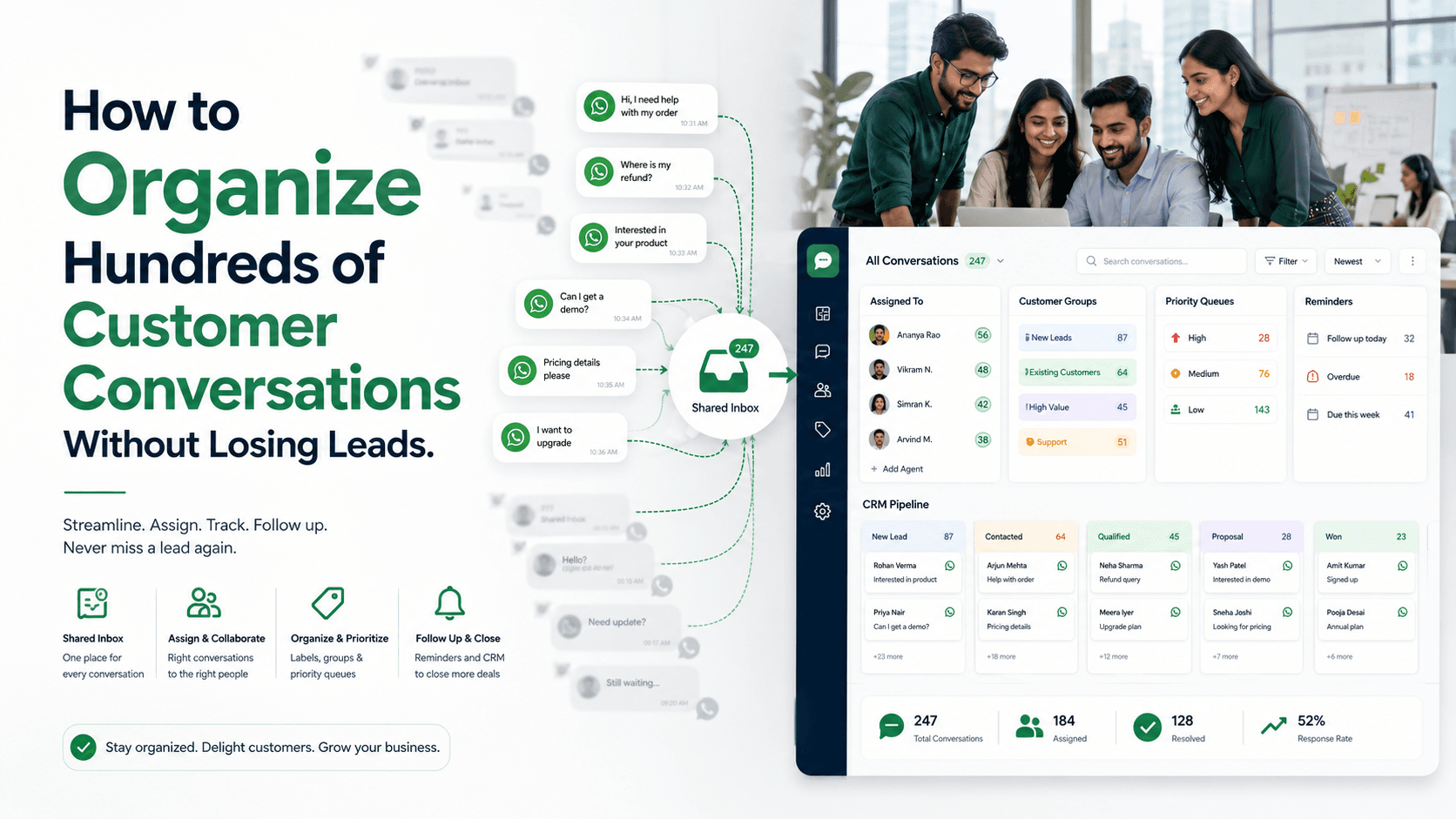
How to Organize Hundreds of Customer Conversations Without Losing Leads
As a business grows, customer conversations can quickly become difficult to manage.
New enquiries, quotation requests, support questions, payment discussions, and follow-ups may arrive simultaneously. When these conversations remain scattered across personal phones, spreadsheets, and disconnected systems, valuable leads can easily be overlooked.
Organizing hundreds of conversations requires more than replying quickly. Businesses need clear ownership, structured lead stages, complete customer context, and reliable follow-up processes.
Here is how to manage high conversation volumes without losing sales opportunities.
1. Use a Shared Team Inbox
When employees manage customers through separate WhatsApp accounts or personal devices, the business cannot easily see which conversations require attention.
A shared inbox brings customer conversations into one workspace where authorized employees can:
- View incoming messages
- Access previous conversations
- Assign enquiries
- Add internal notes
- Check conversation status
- Collaborate without forwarding screenshots
- Continue conversations when another employee is unavailable
This creates visibility across the team and reduces dependence on individual devices.
A shared inbox does not mean everyone should reply to every message. Each conversation should still have one clear owner.
2. Capture Every Genuine Enquiry
A customer conversation should become a structured lead record as soon as genuine interest is identified.
Useful information includes:
- Customer name
- WhatsApp number
- Product or service
- Enquiry source
- Location
- Requirement
- Budget
- Purchase timeline
- Assigned employee
- Lead stage
- Next action
- Follow-up date
- Conversation history
Automatic contact creation reduces manual work and ensures that leads do not remain hidden inside chat threads.
If an existing customer contacts the business again, update the current record instead of creating unnecessary duplicates.
3. Assign One Owner to Each Conversation
Every active conversation should have one responsible employee.
Without clear ownership:
- Messages may remain unanswered
- Several employees may send conflicting replies
- Follow-ups may be missed
- Customers may need to repeat information
- Nobody knows who should take the next action
Assignments can be based on:
- Department
- Product or service
- Customer location
- Preferred language
- Campaign source
- Lead value
- Employee availability
- Existing customer relationship
When ownership changes, the new employee should receive the complete conversation history and internal context.
4. Organize Leads by Pipeline Stage
A structured CRM pipeline makes it easier to understand what has happened and what should happen next.
A typical WhatsApp sales pipeline may include:
- New Enquiry
- Responded
- Requirement Identified
- Qualified
- Quotation Sent
- Follow-Up Required
- Payment Pending
- Won
- Lost
Each lead should have:
- A current stage
- An assigned owner
- A next action
- A deadline
For example, a lead in the “Quotation Sent” stage may require a follow-up within three business days. A lead in “Payment Pending” may require confirmation that the payment link was received.
Pipeline stages prevent active opportunities from becoming indistinguishable from completed or irrelevant conversations.
5. Use Tags and Filters
Tags help teams group and retrieve conversations quickly.
Examples include:
- New lead
- Existing customer
- High priority
- Quotation requested
- Payment pending
- Follow-up required
- Complaint
- Product category
- Campaign source
- Customer location
Filters can then show employees only the conversations requiring attention.
For example, a sales manager could view all unassigned high-priority leads, while a support employee could view open complaints assigned to their department.
Use a controlled tagging system. Too many inconsistent tags can create more confusion than clarity.
6. Separate Sales, Support, and Other Requests
Not every incoming message is a sales lead.
Conversations may involve:
- New sales enquiries
- Existing orders
- Technical support
- Billing questions
- Delivery updates
- Complaints
- Partnership requests
- Job applications
- Spam
Identifying the conversation type helps route it to the correct team and prevents sales enquiries from becoming buried under unrelated messages.
A customer asking about a delayed order should reach support, while someone requesting pricing should reach sales. Correct routing improves both response time and customer experience.
7. Prioritize Conversations by Intent
When hundreds of messages arrive, employees need to know which conversations require immediate attention.
High-intent messages may include:
- I want to place an order.
- Please send the payment link.
- Is this available today?
- Can we schedule a demonstration?
- I approve the quotation.
- I need 100 units.
- Can you deliver this week?
These conversations should be prioritized over low-intent or general enquiries.
Priority may also depend on customer value, urgency, complaint severity, promised response time, or how long the conversation has remained unanswered.
Prioritization helps employees focus on the opportunities and issues most likely to affect revenue or customer trust.
8. Add Internal Notes
Internal notes allow employees to share important context without sending it to the customer.
A useful note might say:
Customer needs access for eight users and requires approval from the finance manager. Follow up Friday with the revised annual quotation.
Notes can record:
- Customer preferences
- Budget limitations
- Previous objections
- Special pricing approval
- Promised information
- Internal decisions
- Handover details
- Escalation reasons
Keep notes factual, relevant, and professional. Employees should not need to read the entire conversation to understand the current situation.
9. Schedule Every Follow-Up
Many leads are lost because employees rely on memory.
Every conversation that requires future action should have a scheduled follow-up containing:
- Follow-up date
- Reason
- Responsible employee
- Promised information
- Preferred communication time
- Expected next step
For example:
Follow up on Thursday afternoon after the customer discusses the quotation with their business partner.
The follow-up message should add value:
Hi Neha, I’m following up on the quotation as agreed. I’ve also included a lower-cost option based on the budget you shared. Would you like me to send the comparison?
Avoid repeatedly sending generic messages such as “Any update?”
10. Use Automation for Repetitive Work
Automation can help teams organize large conversation volumes without manually processing every message.
It can:
- Send instant acknowledgements
- Identify customer intent
- Collect basic requirements
- Create contact records
- Apply tags
- Assign conversations
- Update pipeline stages
- Schedule follow-up tasks
- Send notifications
- Escalate overdue conversations
For example, a customer selecting “Product enquiry” could automatically receive a relevant question and be assigned to the sales team.
Automation should stop or adjust when the customer replies, completes payment, changes their requirement, or requests human assistance.
Complex enquiries, negotiations, complaints, and payment problems should be transferred to an employee with the complete conversation history.
11. Create Clear Team Rules
Technology alone cannot organize conversations if employees follow different processes.
Define rules for:
- Expected response times
- Conversation assignment
- Lead-stage updates
- Internal notes
- Follow-up scheduling
- Escalation
- Conversation closure
- Duplicate contacts
- Lost-lead reasons
- Employee handovers
For example, the team may require every qualified lead to have an owner, pipeline stage, and next action before the conversation is closed.
Simple and consistent rules make reporting more reliable and help new employees understand the workflow.
12. Monitor the Right Metrics
Managers need visibility into both conversation volume and team performance.
Useful metrics include:
- New enquiries
- First-response time
- Unanswered conversations
- Unassigned conversations
- Active leads
- Overdue follow-ups
- Qualification rate
- Quotation rate
- Conversion rate
- Average resolution time
- Lost-lead reasons
- Agent workload
These metrics reveal where leads are being lost.
For example, many unassigned conversations may indicate a routing problem. A high quotation rate with few purchases may indicate weak follow-up, unclear pricing, or customer objections that are not being addressed.
Example Conversation Workflow
Customer
Hi, I’m interested in your business plan. Can you share the price?
Automated response
Hi! Thanks for contacting Voixt.ai. Plans start at ₹1,349 per month. How many team members need WhatsApp access?
Customer
We have eight people.
System actions
The conversation is automatically:
- Added to the CRM
- Tagged as a new sales lead
- Linked to its campaign source
- Assigned to a sales employee
- Moved to the Qualification stage
Employee response
Hi, I’m Ananya from Voixt.ai. For eight users, the most suitable plan depends on whether you need only a shared inbox or also CRM and automation. Would you like a short comparison?
The employee can then record the requirement, recommend a plan, schedule a demonstration, and set a follow-up task.
Every action remains connected to the same customer record.
Conversation Management Checklist
For every genuine customer conversation, confirm that:
- The contact has been captured.
- The enquiry type is identified.
- One employee owns the conversation.
- The correct tags are applied.
- The lead stage is accurate.
- Customer context is available.
- Internal notes are updated.
- One clear next action is recorded.
- Follow-ups have deadlines.
- Overdue conversations are visible.
- Automation stops after a response or opt-out.
- The final outcome is recorded.
How Voixt.ai Helps
Voixt.ai helps businesses organize large volumes of WhatsApp conversations through:
- Shared multi-agent inboxes
- Automatic contact capture
- Conversation assignments
- Contact tags and filters
- Visual CRM pipelines
- Private internal notes
- No-code automation workflows
- Follow-up reminders
- AI-powered responses
- AI-to-human handovers
- Campaign and contact management
Instead of allowing customer conversations to remain scattered across phones and spreadsheets, businesses can manage enquiries, responsibilities, follow-ups, and outcomes from one workspace.
Final Thoughts
Hundreds of customer conversations become manageable when every enquiry has context, ownership, a clear stage, and a next action.
Businesses should centralize conversations, assign responsibility, organize leads through CRM pipelines, automate repetitive tasks, and monitor unresolved enquiries.
Start using Voixt.ai to organize customer conversations, prevent missed follow-ups, and ensure valuable leads receive the attention they need.