
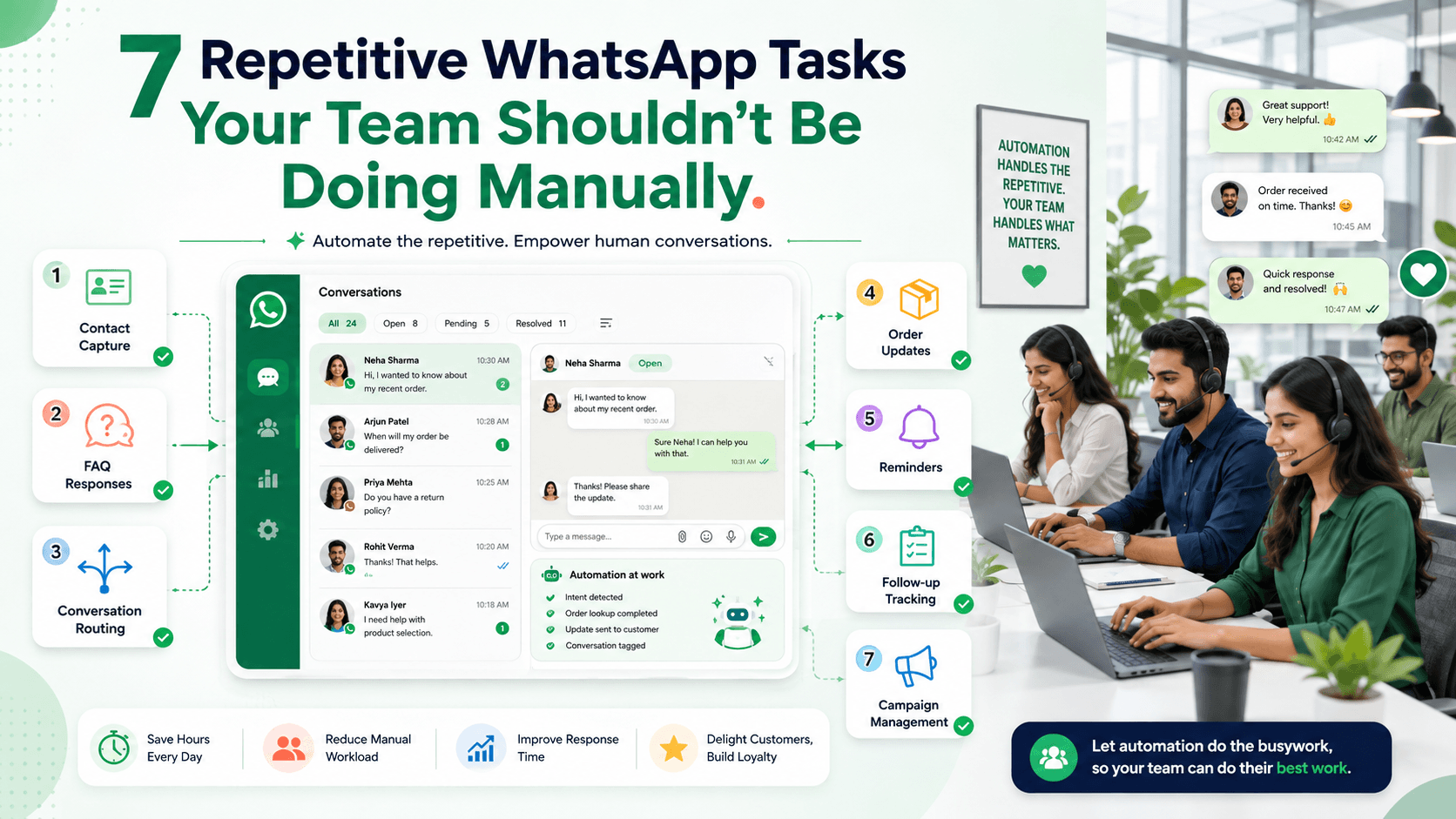
7 Repetitive WhatsApp Tasks Your Team Shouldn't Be Doing Manually
Discover seven repetitive WhatsApp tasks businesses can automate, including contact capture, routing, FAQs, updates, reminders, follow-ups, and campaigns.
On this page17 sections
- 7 Repetitive WhatsApp Tasks Your Team Shouldn't Be Doing Manually
- 1. Capturing and Organising Contact Information
- 2. Answering Common Questions
- 3. Routing and Assigning Conversations
- 4. Sending Routine Order, Payment, and Delivery Updates
- 5. Sending Appointment, Reorder, and Renewal Reminders
- 6. Creating and Tracking Follow-Ups
- 7. Sending and Managing Targeted Campaigns
- Other Background Tasks Worth Automating
- How to Decide Whether a Task Should Be Automated
- Start With the Highest-Volume Task
- Preserve Human Control
- Confirm Important Actions
- Measure the Results
- Common Automation Mistakes
- How Voixt.ai Automates Repetitive WhatsApp Work
- Final Thoughts
7 Repetitive WhatsApp Tasks Your Team Shouldn't Be Doing Manually
Many teams spend hours every week copying phone numbers, answering the same questions, assigning conversations, sending reminders, checking follow-ups, and updating customer records.
These tasks are necessary, but they do not always require an employee to complete every step manually.
Automation can handle predictable and rule-based work while employees focus on product recommendations, problem-solving, negotiation, complaints, and customer relationships.
The goal is not to remove people from WhatsApp conversations. It is to stop using their time for repetitive administration that software can complete accurately and consistently.
Here are seven WhatsApp tasks your team should consider automating.
1. Capturing and Organising Contact Information
When a new customer sends a WhatsApp message, an employee may manually copy the person’s name and phone number into a spreadsheet or CRM.
They may also add:
- Product interest
- Location
- Lead source
- Assigned employee
- Customer stage
- Follow-up date
- Communication preference
This process becomes difficult to maintain as message volume increases.
What Goes Wrong With Manual Contact Capture?
Manual contact entry can create:
- Duplicate records
- Missing phone numbers
- Incorrect names
- Inconsistent tags
- Outdated spreadsheets
- Customer information stored across several devices
- Conversations without linked customer records
An employee may also postpone data entry during a busy period and forget to complete it later.
What Should Be Automated?
A workflow can automatically:
- Create a contact record when a new person messages
- Store the WhatsApp phone number
- Record the first-contact date
- Capture the conversation source
- Add tags based on the enquiry
- Link future conversations to the same customer
- Update the customer stage
- Assign an employee
For example, a customer who replies to a furniture advertisement can automatically receive tags such as:
- Source: Instagram advertisement
- Interest: Furniture
- Stage: New enquiry
- Location: Pune
The employee can then add specific context during the conversation.
What Should Stay Human?
Employees should review or add information that requires interpretation, such as:
- Detailed customer requirements
- Special circumstances
- Buying intent
- Negotiation context
- Sensitive support information
Automation should organise verified information, not make unsupported assumptions about the customer.
2. Answering Common Questions
Employees often answer the same basic questions many times each day.
Examples include:
- What are your opening hours?
- Where is your store?
- Do you deliver to my location?
- Which payment methods do you accept?
- How do I book an appointment?
- What is your standard return period?
- Is parking available?
Typing or finding the same answer repeatedly wastes time and can produce inconsistent responses.
What Should Be Automated?
Create approved automatic replies or quick-response workflows for stable information.
For example:
Our Indiranagar store is open Monday to Saturday from 10:00 a.m. to 8:00 p.m. and Sunday from 11:00 a.m. to 6:00 p.m. Would you like directions or help contacting the store?
A useful automated answer should:
- Respond directly to the question
- Use current information
- Stay concise
- Offer one logical next step
- Provide access to a person when needed
The workflow can identify the question from the customer’s message or present a short list of common topics.
What Should Stay Human?
Transfer the conversation when:
- The question is unclear
- The customer needs an exception
- The answer depends on specific circumstances
- The customer repeats the question
- The information conflicts with business records
- The customer asks for a person
Do not allow automation to guess policies, prices, availability, or service conditions.
Assign Owners to Automated Answers
Every automated answer should have an internal owner responsible for reviewing it.
Regularly verify:
- Opening hours
- Locations
- Delivery areas
- Links
- Policies
- Appointment instructions
- Payment methods
An immediate incorrect answer is worse than a slightly slower accurate one.
3. Routing and Assigning Conversations
In a manual process, one employee may read every new message and decide who should handle it.
They may forward screenshots, send internal messages, or ask in a group chat:
Who can take this customer?
This creates delays and confusion.
What Should Be Automated?
Conversations can be routed using:
- Enquiry type
- Product category
- Branch
- Customer location
- Language
- Existing account owner
- Employee availability
- Customer priority
- Sales or support stage
For example:
- New clothing enquiry → Fashion sales team
- Existing delivery concern → Fulfilment support
- Payment question → Accounts team
- Mumbai appointment → Mumbai branch
- Existing key account → Assigned account manager
Each routed conversation should receive one clear owner.
Why Automatic Assignment Matters
Automatic assignment prevents:
- Duplicate replies
- Unanswered messages
- Employees assuming someone else is responsible
- Customers being sent between unrelated departments
- Uneven workloads
The assigned employee should receive the conversation history and any information already collected.
What Should Stay Human?
A supervisor should review:
- High-risk conversations
- Serious complaints
- Unusual requests
- Workload imbalances
- Conversations that do not match any routing rule
- Escalations requiring authority
Always maintain an unassigned fallback queue so unmatched conversations remain visible.
4. Sending Routine Order, Payment, and Delivery Updates
Customers contact businesses repeatedly when they do not know what is happening with an order.
Employees may manually send messages such as:
- Order received
- Payment confirmed
- Order packed
- Order dispatched
- Delivery delayed
- Order delivered
- Cancellation confirmed
- Refund processed
These updates are predictable and usually triggered by a status change in another system.
What Should Be Automated?
Connect status changes to relevant WhatsApp notifications.
For example:
Your order VH-4821 has been dispatched and is expected to arrive on Friday. Reply TRACK for the tracking link or HELP if this information appears incorrect.
A useful update should include:
- Order number
- Current status
- Relevant date
- Approved tracking or reference link
- Clear help option
WhatsApp describes utility messages as suitable for timely order, account, and transaction updates. WhatsApp Utility Messages
Why This Saves Time
Proactive updates reduce repeated questions such as:
- Has my payment been received?
- Has my order shipped?
- When will it arrive?
- Has my refund been processed?
Employees can then focus on exceptions rather than routine status checks.
What Should Stay Human?
Transfer the conversation when:
- The status appears incorrect
- A payment is disputed
- A delivery is missing
- The customer reports damage
- A refund is delayed
- The customer needs an exception
Automation should communicate verified status information. A person should investigate problems.
5. Sending Appointment, Reorder, and Renewal Reminders
Employees often maintain reminder lists in notebooks, calendars, or spreadsheets.
They manually check the list each day and send messages one customer at a time.
This process is easy to forget and difficult to scale.
What Should Be Automated?
Automation can send reminders based on a confirmed date or customer preference.
Examples include:
- Appointment reminders
- Service reminders
- Reorder reminders
- Subscription renewals
- Maintenance schedules
- Payment-due reminders
- Document renewals
- Product restock alerts
For example:
Reminder: Your consultation is scheduled for 24 August at 3:30 p.m. at our Koramangala branch. Reply CONFIRM, RESCHEDULE, or CANCEL.
A reorder reminder might say:
Hi Arjun, would you like to reorder your usual 10 kg pack of pet food? The current price is ₹1,850, with delivery available on Thursday. Reply REORDER, CHANGE, or LATER.
Give Customers Control
Customers should be able to:
- Confirm
- Reschedule
- Cancel
- Change the quantity
- Postpone the reminder
- Stop future reminders
If a customer repeatedly chooses LATER, extend the reminder interval.
What Should Stay Human?
Human assistance may be needed for:
- Special scheduling requirements
- Unusual quantities
- Changed products
- Price concerns
- Service exceptions
- Complex renewals
Automation should start the process, not prevent flexibility.
6. Creating and Tracking Follow-Ups
Follow-ups are often managed manually using unread-message markers, personal notes, or employee memory.
This approach fails when:
- Message volume increases
- An employee is absent
- A conversation changes owner
- The customer replies after several days
- A promised internal action takes time
What Should Be Automated?
A workflow can create a follow-up reminder when:
- A quotation is sent
- Stock needs confirmation
- A customer requests a callback
- Payment is pending
- An appointment requires confirmation
- A product becomes available
- An employee promises an update
- A customer asks to be contacted later
Each reminder should include:
- Customer
- Assigned employee
- Required action
- Due date and time
- Relevant product or order
- Previous conversation context
For example:
Follow up with Meera by 4:00 p.m. after confirming size M availability with the warehouse.
Automate Stage Updates
Customer stages can update when defined events occur.
A sales pipeline might include:
- New enquiry
- Requirement identified
- Product shared
- Quotation sent
- Follow-up scheduled
- Awaiting payment
- Order confirmed
- Completed
- Lost or not interested
When payment is verified, the opportunity can automatically move from Awaiting payment to Order confirmed.
What Should Stay Human?
Employees should decide:
- Whether another follow-up is appropriate
- What value the message should add
- Whether the customer remains interested
- Whether a personal call is needed
- When to stop contacting the customer
Avoid generic automated follow-ups such as:
Any update?
A useful follow-up provides new or relevant information.
7. Sending and Managing Targeted Campaigns
Some businesses manually select contacts and send product announcements, offers, event invitations, or new-arrival messages individually.
Others send the same campaign to every contact because segmentation takes too much time.
Both approaches create unnecessary work or irrelevant communication.
What Should Be Automated?
Campaign workflows can organise customers using:
- Product interest
- Purchase history
- Location
- Preferred branch
- Customer stage
- Requested reminder
- Loyalty status
- Previous response
- Communication preference
- Promotional opt-in
For example, a retailer could target:
Customers in Bengaluru + interested in home décor + opted into new-arrival updates + have not purchased from the new collection.
The workflow can also exclude customers who:
- Asked to stop promotional messages
- Already purchased the promoted item
- Recently received the same campaign
- Declined the category
- Live outside the eligible area
- Have an unresolved complaint
Automate Campaign Administration
Automation can:
- Build the audience
- Apply exclusion rules
- Schedule approved messages
- Tag customer replies
- Route interested customers
- Assign sales conversations
- Stop follow-ups after purchase
- Record opt-outs
- Create follow-up tasks
This removes repetitive campaign administration while keeping employees available for genuine sales conversations.
What Should Stay Human?
Employees should review:
- Campaign objective
- Audience conditions
- Message wording
- Prices
- Offer terms
- Product availability
- Employee capacity
- Customer replies
WhatsApp requires businesses to obtain appropriate opt-in permission before initiating messages and to respect requests to stop communication. WhatsApp Business Messaging Policy
Do not automate message volume without controlling relevance and consent.
Other Background Tasks Worth Automating
Beyond the seven customer-facing tasks, businesses can automate internal administration such as:
- Adding or removing tags
- Updating lead sources
- Notifying supervisors
- Recording campaign responses
- Moving opportunities through pipelines
- Stopping promotions after purchase
- Marking unresolved complaints as urgent
- Creating internal notes from structured inputs
- Producing conversation summaries for handovers
Customers may never see these workflows, but they can significantly reduce employee workload.
How to Decide Whether a Task Should Be Automated
Ask the following questions:
- Does the task happen frequently?
- Does it follow clear rules?
- Are the required inputs reliable?
- Is the outcome predictable?
- Can the customer correct information?
- Is the action low-risk or reversible?
- Is there a clear human-handover path?
- Will automation save meaningful time?
If the task requires empathy, judgement, negotiation, investigation, or an exception, automate only the administrative steps.
Start With the Highest-Volume Task
Do not automate every process at once.
Begin with one task that:
- Happens frequently
- Consumes significant employee time
- Has a clear process
- Uses reliable information
- Creates measurable results
A practical first workflow might be:
- Capture new contacts automatically
- Identify whether the enquiry is sales or support
- Add the correct tags
- Assign an employee
- Create a follow-up reminder if no response is sent within the required time
Test the workflow with a small group before expanding it.
Preserve Human Control
Every automation should define:
- What starts the workflow
- Which information it can use
- Which actions it can complete
- Which actions require confirmation
- When it should stop
- When a person should take over
- Who owns the workflow
- How errors will be reviewed
Customers should always have a clear path to human assistance.
For example:
Reply HUMAN at any time to speak with our team.
If employees are unavailable, provide an honest expected response time.
Confirm Important Actions
Automation should request explicit confirmation before:
- Placing an order
- Cancelling an appointment
- Changing an address
- Starting a payment
- Submitting a return
- Scheduling a paid service
- Updating important account information
For example:
Order summary
Product: Medium-roast coffee beans Quantity: Two 1 kg packs Product total: ₹1,700 Delivery: ₹100 Final amount: ₹1,800 Delivery date: Saturday
Reply CONFIRM if these details are correct or CHANGE to edit the order.
This prevents automation from turning a small misunderstanding into a larger operational problem.
Measure the Results
Track the impact of each workflow using metrics such as:
- Employee time saved
- First-response time
- Resolution time
- Automated completion rate
- Handover rate
- Follow-ups completed
- Missed conversations
- Duplicate contact records
- Appointment confirmations
- Reorders
- Campaign conversion
- Customer satisfaction
- Complaints and opt-outs
Review actual conversations as well as totals.
A workflow can appear efficient while still confusing customers.
Common Automation Mistakes
Automating an Unclear Process
Define and improve the process before automating it.
Using Inaccurate Information
Connect workflows to current prices, availability, policies, and customer records.
Removing Human Support
Provide clear handovers for exceptions and complex requests.
Collecting Too Much Information
Ask only for the details required to complete or route the task.
Sending More Messages Than Customers Want
Respect communication preferences, pauses, and opt-outs.
Forgetting Workflow Ownership
Assign someone to review and maintain every automation.
Measuring Only Message Volume
Track time saved, outcomes, satisfaction, and error rates.
How Voixt.ai Automates Repetitive WhatsApp Work
Voixt.ai helps businesses automate routine WhatsApp tasks while keeping employees available for conversations that require judgement and personal attention.
Teams can use:
- Automatic contact capture to create and organise customer records
- No-code automation workflows for FAQs, routing, assignments, reminders, updates, and internal actions
- AI-powered responses to help employees answer routine questions faster
- AI-to-human handovers for complaints, complex enquiries, and exceptions
- Shared multi-agent WhatsApp inboxes so teams can manage one business number together
- Conversation assignments so every enquiry has a responsible owner
- Contact tags and filters for interests, locations, stages, preferences, and campaign audiences
- Visual CRM pipelines to track customers from first enquiry to completed purchase or resolution
- Follow-up reminders so promised actions are completed on time
- Private internal notes for sharing customer context
- Campaign management for targeted, permission-based messages and organised responses
This reduces repetitive administration without turning customer communication into an inflexible automated experience.
Final Thoughts
Your employees should not spend their day copying phone numbers, answering identical questions, manually routing messages, sending routine status updates, checking reminder lists, tracking follow-ups in spreadsheets, or building every campaign audience by hand.
These tasks follow predictable rules and can be automated safely when the business uses accurate information, clear confirmation steps, and reliable human handovers.
Use automation to handle organisation and repetition. Keep employees focused on understanding customers, resolving problems, making recommendations, and building relationships.
Voixt.ai helps businesses create this balance by combining WhatsApp automation, customer management, team collaboration, and human support in one organised system.