
How to Save Time Without Making Customer Conversations Feel Robotic
Learn how templates, automation, AI, routing, shared inboxes, and customer context can save time while keeping WhatsApp conversations natural and personal.
On this page28 sections
- How to Save Time Without Making Customer Conversations Feel Robotic
- Understand What Makes a Conversation Feel Robotic
- Automate Repetitive Work, Not the Entire Relationship
- 1. Use Short, Natural Greetings
- 2. Write Templates as Starting Points
- 3. Personalise With Context, Not Just a Name
- 4. Preserve Conversation History
- 5. Use Internal Notes
- 6. Assign Every Conversation
- 7. Route Customers Using Their First Message
- 8. Ask One Useful Question at a Time
- 9. Keep Automated Answers Focused
- 10. Give Customers Clear Choices
- 11. Confirm Important Details
- 12. Use AI to Assist Employees
- 13. Create Clear Human-Handover Triggers
- 14. Tell Customers When a Human Will Reply
- 15. Automate Follow-Up Reminders, Not Pressure
- 16. Separate Transactional and Promotional Messages
- 17. Use Customer Preferences to Reduce Unnecessary Messages
- 18. Build Safe Fallback Responses
- 19. Make Automation Transparent
- 20. Review Real Conversations
- Measure Time Saved and Customer Experience
- A Practical Workflow Example
- Common Mistakes to Avoid
- How Voixt.ai Saves Time While Keeping Conversations Personal
- Final Thoughts
How to Save Time Without Making Customer Conversations Feel Robotic
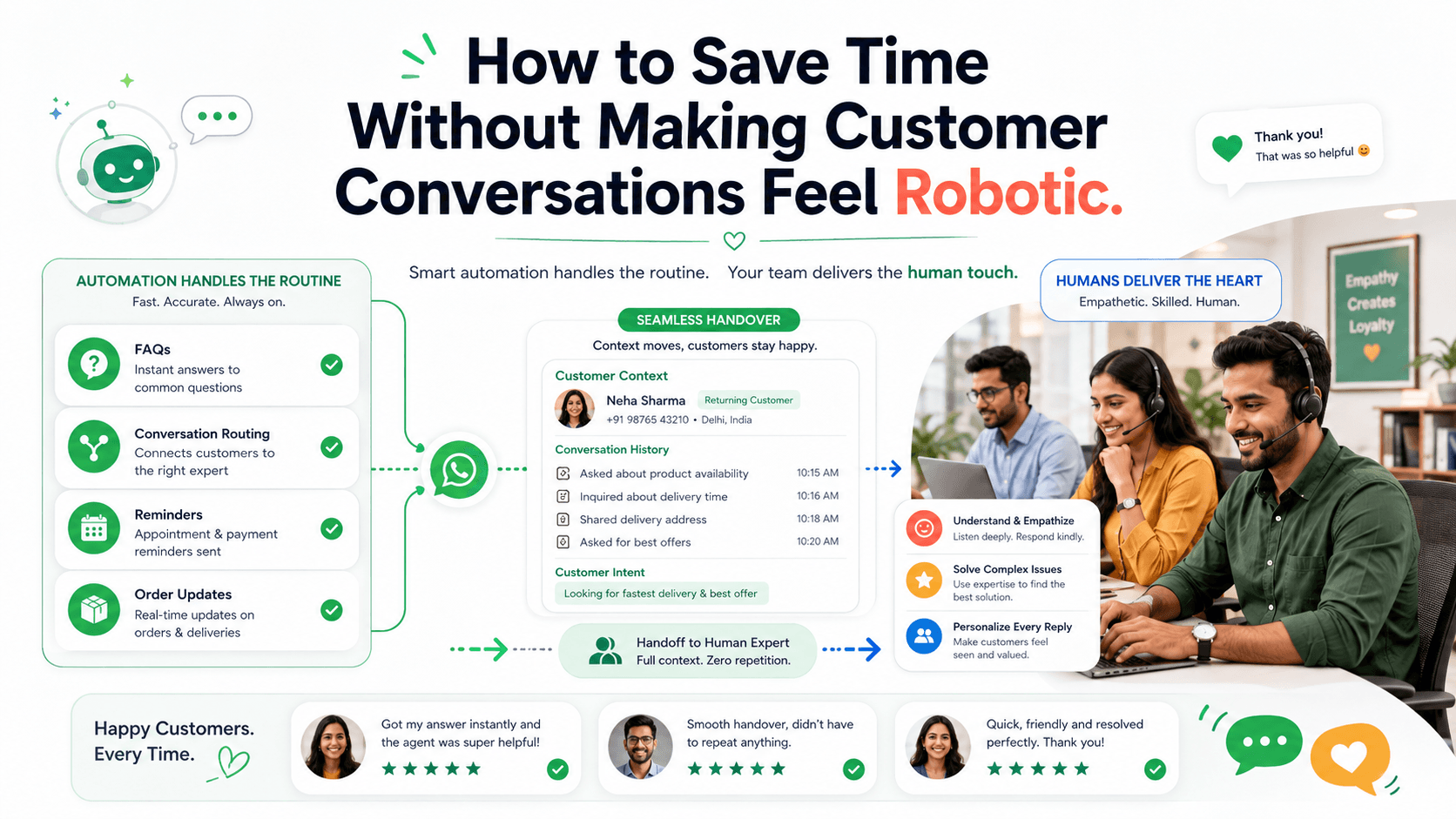
Businesses often face a difficult choice: respond quickly using automation or provide personal service through employees.
In practice, they do not need to choose one or the other.
The right systems can reduce repetitive work while preserving the context, flexibility, and human judgement that make customer conversations valuable.
The goal is not to make every message look manually typed. It is to ensure that every response is relevant, accurate, easy to understand, and appropriate to the customer’s situation.
Here is how businesses can save time on WhatsApp without making customers feel like they are talking to a machine.
Understand What Makes a Conversation Feel Robotic
Customers usually recognise a robotic experience when:
- The response does not answer their question
- The message repeats information they already provided
- Every customer receives identical wording
- The automation ignores emotion or urgency
- There is no clear way to reach a person
- The system continues after the customer’s problem changes
- The customer must navigate a long menu
- Messages contain unnatural or overly formal language
- The business sends irrelevant follow-ups
- An employee joins without knowing the previous context
Automation itself is not the problem. Poorly designed automation is.
A short, accurate automated order update can be more helpful than a delayed manual reply. A long automated response that ignores the customer’s actual question creates frustration.
Automate Repetitive Work, Not the Entire Relationship
Start by identifying tasks that employees perform repeatedly using the same rules.
Suitable tasks may include:
- Greeting new enquiries
- Collecting an order number
- Sharing business hours
- Confirming appointments
- Sending delivery updates
- Answering common questions
- Assigning conversations
- Adding contact tags
- Creating follow-up reminders
- Updating customer stages
- Sending requested catalogues
- Confirming opt-outs
These tasks consume time but usually do not require deep judgement.
Keep human involvement for:
- Complaints
- Negotiations
- Complex recommendations
- Sensitive situations
- Policy exceptions
- Unusual payment concerns
- High-value purchases
- Custom quotations
- Customers who request a person
The most effective workflow automates predictable steps and transfers the conversation when judgement becomes necessary.
1. Use Short, Natural Greetings
An automated greeting should help the customer move forward.
Avoid:
Dear valued customer, thank you for contacting our esteemed organisation. Your message is highly important to us. Please select from the following comprehensive list of services.
Use:
Hi! Thanks for contacting UrbanHome. Are you looking for product information, order help, or support with an existing purchase?
The second version is shorter, clearer, and easier to answer.
If the customer has already stated what they need, do not send a menu. Use their message to route the conversation directly.
2. Write Templates as Starting Points
Templates can save time without forcing employees to send identical messages.
Create approved responses for common situations such as:
- First replies
- Product details
- Quotation follow-ups
- Payment instructions
- Appointment confirmations
- Delivery updates
- Complaint acknowledgements
- Order summaries
- Closing messages
A good template should contain:
- A clear purpose
- Essential information
- Editable placeholders
- One appropriate next action
- Natural language
For example:
Hi [Name], the [Product] you asked about is available in [Variants] for [Price]. Delivery to [Location] is currently available by [Date]. Would you like photos, specifications, or help placing an order?
Employees can adjust the wording based on the conversation instead of starting from a blank message.
3. Personalise With Context, Not Just a Name
Adding a customer’s name does not make an irrelevant message personal.
Useful context may include:
- Product discussed
- Previous purchase
- Preferred variant
- Customer location
- Current order status
- Appointment details
- Requested budget
- Follow-up date
- Open support issue
- Communication preferences
Compare:
Hi Meera, how can we help you today?
With:
Hi Meera, the cotton kurta you asked about is now available in size M. Would you like to see the available colours?
The second response saves time because it continues the existing conversation instead of restarting it.
Use only information the business collected appropriately and needs for the interaction.
4. Preserve Conversation History
Customers should not have to repeat themselves whenever another employee takes over.
A shared conversation history should show:
- Previous messages
- Products discussed
- Quotations sent
- Customer requirements
- Promised actions
- Order information
- Assigned employee
- Internal notes
- Current customer stage
Before replying, an employee should be able to understand what happened and what needs to happen next.
This creates continuity even when several employees work from the same WhatsApp number.
5. Use Internal Notes
Private internal notes help employees share information without exposing operational details to customers.
A useful note might say:
Customer prefers the walnut finish. Budget is ₹20,000. Confirmed delivery to Baner. Waiting for updated stock availability from the warehouse.
Notes should be concise, factual, and relevant.
Avoid recording speculation, unnecessary personal details, or inappropriate comments.
6. Assign Every Conversation
A shared inbox saves time only when responsibility is clear.
Every active conversation should have:
- An owner
- A status
- A next action
- A follow-up date when required
Assignments can be based on:
- Branch
- Product category
- Customer language
- Location
- Sales or support team
- Existing account owner
- Employee availability
Clear ownership prevents duplicate replies, missed questions, and internal confusion.
7. Route Customers Using Their First Message
Traditional automated menus often ask customers to choose from options even when their original message already contains the answer.
For example, a customer writes:
My order was supposed to arrive yesterday, but the tracking page has not changed.
The system should identify this as a delivery-support issue and route it appropriately.
It should not reply:
Press 1 for sales, 2 for support, 3 for store information, or 4 for other enquiries.
Use the customer’s message as the first source of routing information. Ask a clarifying question only when necessary.
8. Ask One Useful Question at a Time
Long questionnaires make conversations feel like forms.
Instead of asking for the product, budget, location, preferred date, quantity, and delivery method in one message, begin with the information needed for the next step.
For example:
Which product are you interested in?
After the customer answers:
What quantity do you need?
This keeps the conversation manageable and allows the workflow to adapt.
When several details must be collected together, explain why:
To check delivery availability, please share your postcode and preferred delivery date.
9. Keep Automated Answers Focused
Customers rarely need an entire policy document in chat.
Answer the immediate question first, then offer more information.
Avoid:
Our return policy allows eligible unused products in their original condition and packaging to be returned according to the conditions described below...
Use:
Unused items can usually be returned within 14 days with the receipt and original packaging. Would you like me to check whether your order is eligible?
Short responses are easier to read and easier to correct when the situation changes.
10. Give Customers Clear Choices
Automation works best when the next actions are obvious.
Useful choices include:
- CONFIRM
- CHANGE
- RESCHEDULE
- CANCEL
- REORDER
- LATER
- TRACK
- HUMAN
- STOP
For example:
Your consultation is booked for Friday at 3:00 p.m. Reply CONFIRM, RESCHEDULE, or CANCEL.
Do not include several unrelated calls to action in one message.
11. Confirm Important Details
Automation should not complete an important action based on incomplete or assumed information.
Before placing an order, confirm:
- Product
- Variant
- Quantity
- Current price
- Delivery charge
- Final amount
- Delivery location
- Estimated fulfilment date
For example:
Order summary
Product: Walnut study desk WD-208 Quantity: 1 Product price: ₹12,500 Delivery: ₹750 Final amount: ₹13,250 Delivery area: Baner, Pune Estimated delivery: 25–27 August
Reply CONFIRM if these details are correct or CHANGE to edit the order.
Confirmation saves time by preventing avoidable corrections, cancellations, and disputes.
12. Use AI to Assist Employees
AI can help employees respond faster without communicating independently in every situation.
It can assist by:
- Suggesting responses
- Summarising long conversations
- Identifying customer intent
- Retrieving relevant information
- Correcting grammar
- Translating messages
- Extracting order details
- Recommending the next action
- Drafting follow-ups
The employee can review and edit the response before sending it.
This approach is especially useful for complex conversations where a fully automated workflow would be too rigid.
AI suggestions should be based on approved information and should never invent prices, policies, availability, or delivery commitments.
13. Create Clear Human-Handover Triggers
Customers should not remain inside automation when it cannot help them.
Transfer the conversation when:
- The customer requests a person
- The system does not understand the request
- The customer repeats the same question
- The customer expresses anger or distress
- A complaint is reported
- A payment problem appears
- The request requires negotiation
- Information conflicts with business records
- An exception is needed
- The conversation involves significant risk
A useful handover message is:
I’m connecting you with a support specialist who can review this. I’ll share the order number and details you have already provided.
Do not make customers restart after the transfer.
14. Tell Customers When a Human Will Reply
If employees are unavailable, provide an honest response time.
For example:
Our support team is currently offline. Your message has been assigned, and a team member will reply tomorrow between 9:00 and 10:00 a.m.
Avoid vague phrases such as “We’ll get back to you soon” when the business can provide a clearer expectation.
Outside-hours automation can still:
- Acknowledge the message
- Collect essential information
- Create an assignment
- Mark urgency
- Schedule a follow-up
- Provide safe self-service options
It should not pretend that a person is actively reviewing the issue.
15. Automate Follow-Up Reminders, Not Pressure
Employees often lose time remembering which customers need follow-ups.
Automation can create reminders based on:
- Quotation date
- Customer-requested callback
- Product availability
- Appointment status
- Payment status
- Reorder schedule
- Promised internal action
The actual follow-up should add value.
Avoid:
Hi, any update?
Use:
Hi Arjun, the compact desk you viewed is now available in the walnut finish. Delivery to Baner is possible on Saturday. Would you like us to reserve it until tomorrow?
Stop automated sales follow-ups after purchase, opt-out, rejection, or an unresolved complaint.
16. Separate Transactional and Promotional Messages
A customer waiting for an order update should not receive an unrelated promotion in the same conversation flow.
Keep message categories organised:
- Order updates
- Service notifications
- Appointment reminders
- Support communication
- Reorder reminders
- Product announcements
- General promotions
WhatsApp requires businesses to obtain appropriate opt-in permission before initiating messages and to respect requests to stop communication. WhatsApp Business Messaging Policy
Where practical, allow customers to choose which categories they want.
17. Use Customer Preferences to Reduce Unnecessary Messages
Saving time is not only about writing faster. It is also about avoiding messages that should never be sent.
Record preferences such as:
- Interested product categories
- Preferred branch
- Language
- Contact frequency
- Reminder schedule
- Promotional opt-in
- Preferred communication time
- Requested pause
A customer who wants delivery updates may not want weekly promotional campaigns.
Accurate preference management reduces employee workload, opt-outs, and complaints.
18. Build Safe Fallback Responses
Automation will sometimes encounter missing information or unexpected questions.
Use a safe fallback such as:
I don’t have enough information to answer that accurately. I’ll connect you with a team member who can help.
Avoid repeatedly replying:
Sorry, I didn’t understand. Please try again.
After one or two failed attempts, offer human assistance.
19. Make Automation Transparent
Customers should know whether they are interacting with automation or a person.
For example:
I’m UrbanHome’s automated assistant. I can help with order tracking, appointments, and common questions, or connect you with our team.
Do not give automation a human employee’s identity or imply that a person reviewed information when nobody did.
Transparency allows customers to set appropriate expectations.
20. Review Real Conversations
Workflow statistics do not reveal every problem.
Regularly review actual conversations to identify:
- Questions the automation cannot answer
- Confusing instructions
- Repeated customer messages
- Unnecessary steps
- Incorrect routing
- Abrupt handovers
- Outdated information
- Unnatural language
- Missed opportunities for human help
Update workflows based on real customer behaviour rather than assumptions made during setup.
Measure Time Saved and Customer Experience
Useful operational metrics include:
- First-response time
- Resolution time
- Employee handling time
- Automated completion rate
- Handover rate
- Number of repeated questions
- Follow-ups completed
- Conversations per employee
Customer-experience metrics include:
- Customer satisfaction
- Resolution rate
- Conversation abandonment
- Complaints
- Opt-outs
- Blocks
- Repeat contact for the same issue
- Successful human handovers
Do not measure success only by how many conversations avoided human involvement.
Automation that reduces employee work but increases customer effort is not efficient.
A Practical Workflow Example
Consider a customer asking about a delayed order.
Step 1: Identify the request
The system recognises a delivery-status question.
Step 2: Collect one required detail
Please share your order number so I can check the latest status.
Step 3: Retrieve accurate information
The workflow checks the connected order system.
Step 4: Provide a focused response
Order VH-2481 was dispatched on Monday and is currently expected on Thursday.
Step 5: Offer appropriate actions
Reply TRACK for the tracking link or HELP if this information does not match your situation.
Step 6: Transfer exceptions
If the customer replies HELP, the workflow assigns a support employee and shares the order details and conversation history.
This saves employee time on routine status checks while preserving human help for incorrect, delayed, or disputed deliveries.
Common Mistakes to Avoid
Automating Too Much
Keep complaints, negotiations, complex decisions, and sensitive matters human.
Using One Template for Every Situation
Create focused templates that employees can adapt using real context.
Sending Long Menus
Use the customer’s first message to identify intent whenever possible.
Hiding the Human Option
Make escalation easy and visible.
Losing Context During Transfers
Give the employee the conversation history and collected information.
Asking Customers to Repeat Information
Store structured details and make them available to the assigned employee.
Allowing Outdated Answers
Assign owners to review prices, policies, availability, and operating information.
Pretending Automation Is Human
Explain clearly when the customer is interacting with an automated assistant.
Measuring Only Speed
Track resolution, satisfaction, repeat contact, and negative feedback.
How Voixt.ai Saves Time While Keeping Conversations Personal
Voixt.ai helps businesses reduce repetitive WhatsApp work without losing customer context or human support.
Teams can use:
- No-code automation workflows for greetings, data collection, routing, reminders, and routine updates
- AI-powered responses to help employees draft accurate replies quickly
- AI-to-human handovers when customers need personal assistance
- Shared multi-agent WhatsApp inboxes so teams can manage conversations together
- Conversation assignments so every enquiry has a clear owner
- Automatic contact capture to maintain organised customer records
- Contact tags and filters for preferences, interests, locations, and customer stages
- Visual CRM pipelines to track enquiries, sales, and support cases
- Follow-up reminders so employees do not need to remember every next action manually
- Private internal notes for sharing relevant context across the team
- Campaign management for targeted, permission-based communication
This allows automation to handle repetitive administration while employees focus on recommendations, decisions, problem-solving, and customer relationships.
Final Thoughts
Saving time does not require removing people from customer conversations.
Businesses can automate routine questions, data collection, routing, status updates, reminders, and administrative work while keeping employees available for situations that require empathy, flexibility, and judgement.
Use short natural messages, preserve context, confirm important actions, provide clear human handovers, and review real conversations regularly.
The best automation does not make the business feel less human. It gives employees more time to be helpful when human involvement matters most.
Voixt.ai helps businesses create this balance by connecting automation, AI assistance, customer context, and team collaboration in one organised WhatsApp workspace.