
Broadcasting Isn't About Sending More Messages — It's About Sending Relevant Ones
Learn why successful WhatsApp broadcasting depends on consent, customer segmentation, useful timing, relevant content, and responsible campaign management—not message volume.
On this page18 sections
- Broadcasting Isn't About Sending More Messages — It's About Sending Relevant Ones
- Why Mass Messaging Stops Working
- Relevance Begins With Permission
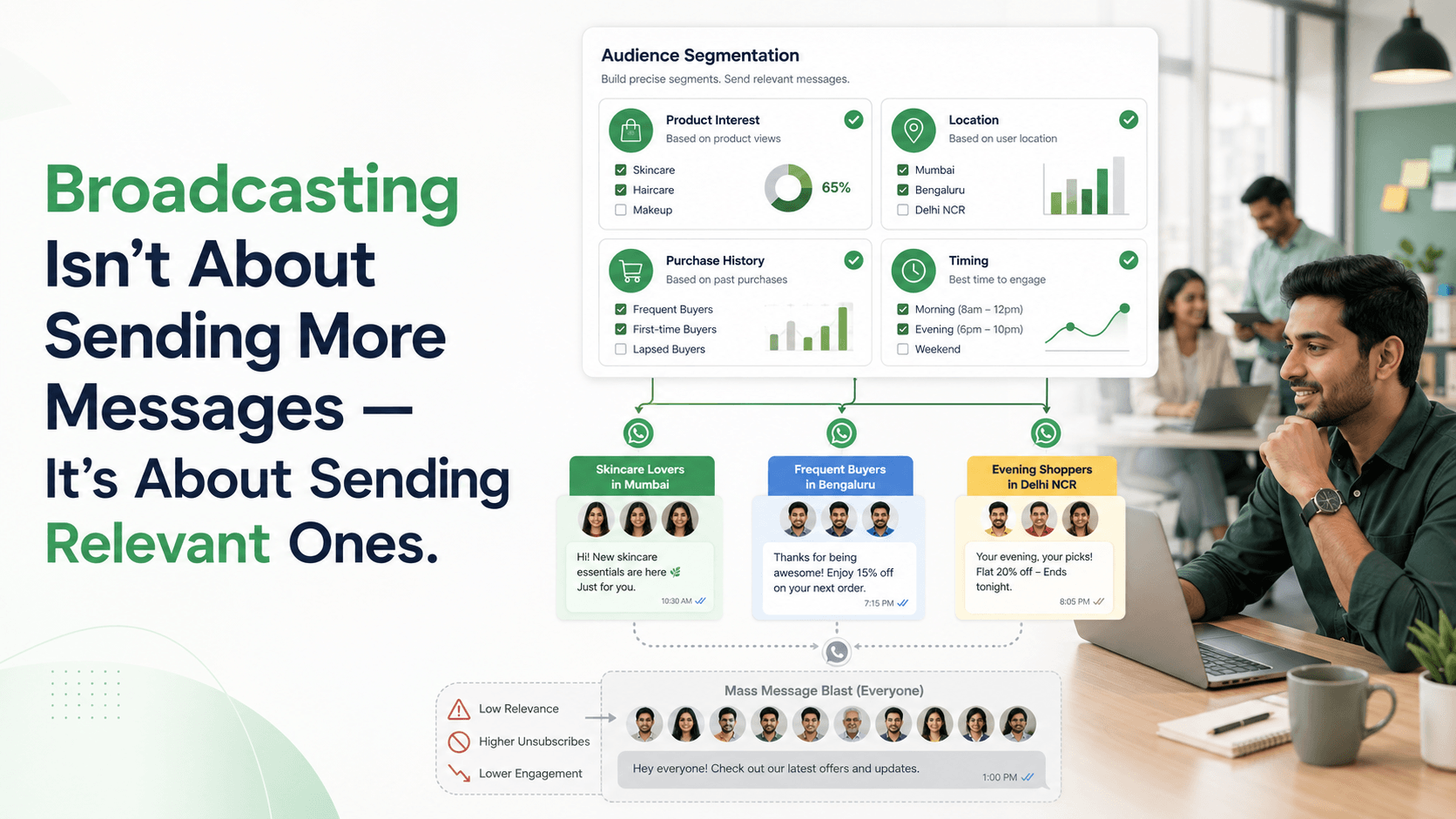
- Segmentation Makes Broadcasting Useful
- Use Customer Behaviour Carefully
- Send Messages With a Clear Purpose
- Examples of Relevant Broadcasts
- Timing Is Part of Relevance
- Frequency Should Match Customer Expectations
- Personalisation Requires More Than a Name
- Use Exclusions as Carefully as Inclusions
- Make the Next Step Easy
- Prepare the Team Before Sending
- Track Replies as Sales Opportunities
- Measure Outcomes, Not Message Volume
- Common Broadcasting Mistakes
- How Voixt.ai Helps Businesses Send Relevant Broadcasts
- Final Thoughts
Broadcasting Isn't About Sending More Messages — It's About Sending Relevant Ones
A large contact list can make WhatsApp broadcasting look simple: create one promotional message, select thousands of customers, and send it to everyone.
That approach may increase the number of messages delivered, but it does not necessarily increase sales. It can also produce unsubscribes, blocks, complaints, and lower customer trust.
Successful broadcasting is not about reaching the largest possible audience. It is about sending useful information to the customers most likely to care about it.
A relevant broadcast answers four questions:
- Why is this customer receiving the message?
- Why is the message useful now?
- What should the customer do next?
- How can the customer control future communication?
If the business cannot answer these questions clearly, the campaign probably needs better targeting.
Why Mass Messaging Stops Working
Customers usually share their phone numbers for a specific reason. They may have placed an order, requested a quotation, booked an appointment, joined a loyalty programme, or asked to receive product updates.
That does not mean every future message will be relevant.
A customer who purchased women’s footwear may not want promotions for men’s formal shirts. Someone in Mumbai does not need an event announcement for Bengaluru. A customer who bought a product yesterday should not immediately receive a reminder to purchase the same item again.
When businesses ignore context, customers begin to treat all messages as noise.
Relevance Begins With Permission
Before sending broadcasts, businesses need appropriate permission from recipients.
WhatsApp’s current Business Messaging Policy states that businesses may contact people only when they have received the person’s phone number and opt-in permission for subsequent messages or calls. It also requires businesses to respect requests to stop communication. WhatsApp Business Messaging Policy
A clear opt-in should explain:
- Which business will send messages
- What types of messages the customer will receive
- The approximate frequency
- How the customer can stop receiving them
For example:
Receive new-arrival updates and up to four promotional messages per month from UrbanStyle on WhatsApp. Reply STOP at any time to unsubscribe.
WhatsApp’s published best practices also recommend setting expectations for different message categories, clearly explaining the value of the communication, and providing intuitive opt-out instructions. WhatsApp Business Messaging Policy
Permission should be meaningful. Avoid preselected consent boxes, unclear language, purchased databases, or scraped phone numbers. Businesses remain responsible for complying with applicable privacy and marketing laws.
Segmentation Makes Broadcasting Useful
Segmentation divides contacts into smaller groups based on relevant information.
Useful segmentation criteria include:
- Product interest
- Purchase history
- Location
- Preferred branch
- Customer type
- Enquiry stage
- Purchase frequency
- Service history
- Membership level
- Communication preference
- Previous campaign response
A campaign may use several criteria together.
For example, a boutique promoting a new festive collection could target customers who:
- Previously purchased ethnic wear
- Asked to receive new-arrival updates
- Live within the delivery area
- Have not purchased from the same collection already
This audience is smaller than the complete contact database, but it is much more relevant.
Use Customer Behaviour Carefully
Customer behaviour can help businesses understand what information may be useful.
Relevant signals might include:
- Products purchased
- Categories viewed or discussed
- Quotations requested
- Appointments booked
- Products added to an enquiry
- Restock requests
- Previous campaign replies
- Typical reorder cycle
Use behaviour the customer would reasonably expect the business to remember. Avoid sensitive inferences, hidden profiling, or information unrelated to the customer relationship.
The goal is to make communication more helpful—not to make customers feel monitored.
Send Messages With a Clear Purpose
Every broadcast should serve one defined purpose.
Useful campaign purposes include:
- Announcing a relevant new arrival
- Notifying customers that a requested product is back in stock
- Reminding customers about an expected reorder
- Sharing an important service update
- Announcing an event for a specific location
- Offering early access to loyal customers
- Sharing seasonal preparation advice
- Promoting a relevant limited-time offer
Avoid combining several unrelated announcements in one long message.
A focused message is easier to understand and act upon.
Examples of Relevant Broadcasts
New-arrival update
Hi Ananya, our new cotton kurta collection has arrived, with sizes S to XXL and prices starting at ₹1,299. Since you previously asked for lightweight everyday styles, we selected five suitable options. Reply CATALOGUE to view them.
Back-in-stock alert
Hi Rahul, the black running shoes you requested are back in stock in size 9. We can reserve one pair until tomorrow at 6:00 p.m. Reply RESERVE if you would like us to keep them aside.
Reorder reminder
Hi Meera, it may be time to reorder your usual 10 kg pack of pet food. It is currently available for ₹1,850, with delivery on Thursday. Reply REORDER to confirm or LATER if you do not need it yet.
Location-specific event
Hi Kavya, our Koramangala branch is holding a free home-organisation workshop this Saturday at 11:00 a.m. Reply BOOK if you would like us to reserve a seat.
Helpful seasonal message
Monsoon care reminder: Allow damp garments to dry completely before storing them in a closed wardrobe. Reply CARE if you would like our short fabric-care checklist.
Each message has a clear audience, purpose, value, and next action.
Timing Is Part of Relevance
Even useful information can become irrelevant when sent at the wrong time.
Consider:
- Customer’s buying cycle
- Product availability
- Event date
- Delivery window
- Previous purchase date
- Customer’s requested follow-up time
- Local time zone
- Reasonable communication hours
A reorder reminder sent immediately after purchase is not helpful. A workshop invitation sent after the event is useless. A restock alert sent several weeks after the product sells out again creates frustration.
The best time is when the customer can still act on the information.
Frequency Should Match Customer Expectations
There is no perfect broadcast frequency for every business.
A grocery store, boutique, coaching institute, property agency, and vehicle-service centre have different customer cycles.
Businesses should monitor:
- Replies
- Purchases
- Bookings
- Opt-outs
- Blocks
- Complaints
- Falling engagement
- Time between campaigns
Do not respond to declining engagement by sending more messages. Review relevance, targeting, timing, and frequency first.
Customers should also be able to choose which messages they want. Someone may want order updates but not promotions, or reorder reminders but not event announcements.
Personalisation Requires More Than a Name
Adding a customer’s name does not make an irrelevant message personal.
Useful personalisation refers to legitimate customer context:
- Product category
- Previous enquiry
- Requested alert
- Location
- Preferred branch
- Purchase cycle
- Customer stage
Compare these messages:
Hi Meera, enjoy 10% off our latest products.
Hi Meera, the storage baskets you asked about are back in stock. The medium size is available in the natural and charcoal colours you viewed.
The second message is useful because it is based on a known customer request.
Use Exclusions as Carefully as Inclusions
A well-designed campaign does not only identify who should receive it. It also identifies who should not.
Exclude customers who:
- Already purchased the promoted product
- Recently received a similar message
- Declined the offer
- Asked to stop promotional communication
- Live outside the eligible area
- Are not interested in the category
- Have an unresolved complaint
- Are at an inappropriate sales stage
Exclusions protect the customer experience and prevent embarrassing mistakes.
Make the Next Step Easy
A broadcast should tell the customer what to do next.
Possible actions include:
- Reply CATALOGUE
- Reply RESERVE
- Reply REORDER
- Book an appointment
- Request a quotation
- Speak with an employee
- View complete terms
- Change message preferences
Avoid vague endings such as:
Contact us for more information.
Use:
Reply SIZE to check availability or VISIT to book a store appointment.
Simple actions increase the likelihood of a response.
Prepare the Team Before Sending
A successful campaign can generate many replies within a short period.
Before launching, confirm:
- Which employees will handle responses
- How conversations will be assigned
- Whether stock is available
- Whether prices and terms are approved
- How orders will be recorded
- Which quick replies are ready
- What happens when human assistance is required
- How opt-outs will be processed
Do not send a large campaign when nobody is available to answer the resulting conversations.
Track Replies as Sales Opportunities
Campaign replies should not remain unorganised chats.
A simple pipeline might include:
- Campaign delivered
- Customer replied
- Requirement identified
- Product or service recommended
- Awaiting decision
- Follow-up scheduled
- Purchase confirmed
- Not interested
- Opted out
Every interested response should have an owner and next action.
Without this structure, the campaign may generate attention but lose the sales opportunities it creates.
Measure Outcomes, Not Message Volume
A large delivery count does not prove that a campaign was successful.
Measure:
- Reply rate
- Qualified enquiries
- Catalogue requests
- Appointments
- Orders
- Revenue
- Conversion rate
- Opt-outs
- Blocks and complaints
- Performance by segment
- Performance by message type
A campaign sent to 300 carefully selected customers may produce more sales than one sent to 10,000 unrelated contacts.
Relevance often matters more than reach.
Common Broadcasting Mistakes
Sending every campaign to every contact
Create segments based on customer needs and context.
Buying or scraping phone-number lists
Build an audience through transparent, permission-based relationships.
Sending only discounts
Mix appropriate promotions with useful updates, reminders, and information.
Increasing frequency when engagement falls
Improve relevance before sending more messages.
Ignoring opt-outs
Record and apply customer preferences immediately.
Using false urgency
Use deadlines and scarcity only when they are genuine.
Failing to prepare for replies
Assign employees and create a response process before launching.
Measuring only delivery
Track conversations, conversions, revenue, and negative feedback.
How Voixt.ai Helps Businesses Send Relevant Broadcasts
Voixt.ai helps businesses organise customer information, create focused segments, manage campaigns, and handle the conversations generated by broadcasts.
Teams can use:
- Contact tags and filters to build audiences based on products, locations, interests, and customer stages
- Campaign management to organise broadcasts and monitor responses
- Shared multi-agent WhatsApp inboxes to manage customer replies together
- Automatic contact capture to maintain organised customer records
- Conversation assignments so campaign replies reach the right employee
- Visual CRM pipelines to track interested customers from reply to purchase
- Follow-up reminders so sales opportunities are not forgotten
- No-code automation workflows for tagging, routing, preferences, and next actions
- AI-powered responses to help teams answer common campaign questions
- Private internal notes for coordination
- AI-to-human handovers when a customer needs personal assistance
This allows businesses to focus on relevant communication instead of simply increasing message volume.
Final Thoughts
WhatsApp broadcasting works best when customers understand why they are receiving a message and find it useful.
Businesses should build permission-based audiences, maintain accurate customer information, create relevant segments, choose appropriate timing, and make every next action clear.
The objective is not to send more messages. It is to send fewer, better messages that customers recognise, value, and act upon.
Voixt.ai helps businesses create that structure while keeping replies, follow-ups, and customer preferences organised.