
Which WhatsApp Conversations Should You Automate — and Which Should Stay Human?
Learn which WhatsApp conversations are suitable for automation, which require human judgement, and how to build effective handovers between automated workflows and employees.
On this page35 sections
- Which WhatsApp Conversations Should You Automate — and Which Should Stay Human?
- Automation Should Make the Customer’s Task Easier
- Conversations That Are Good Candidates for Automation
- 1. Frequently Asked Questions
- 2. Initial Enquiry Collection
- 3. Conversation Routing
- 4. Order and Delivery Updates
- 5. Appointment Reminders and Confirmations
- 6. Reorder and Renewal Reminders
- 7. Restock and Availability Notifications
- 8. Simple Data Collection
- 9. Internal Tasks Triggered by Customer Messages
- Conversations That Should Usually Stay Human
- 1. Complaints and Angry Customers
- 2. Refunds, Disputes, and Payment Problems
- 3. Complex Sales Conversations
- 4. Negotiation
- 5. Exceptions to Policy
- 6. Sensitive or Emotional Conversations
- 7. High-Value or High-Risk Decisions
- 8. Customers Who Ask for a Person
- Conversations That Work Best With Both Automation and Human Support
- Build Clear Handover Triggers
- Preserve Context During Handover
- Make the Automation Transparent
- Avoid Open-Ended Automation Without Safeguards
- Require Confirmation Before Important Actions
- Respect Consent and Communication Preferences
- Monitor Automated Conversations
- Review Every Automation Regularly
- A Practical Automation Test
- Examples of Balanced WhatsApp Workflows
- Common Automation Mistakes
- How Voixt.ai Balances Automation and Human Conversations
- Final Thoughts
Which WhatsApp Conversations Should You Automate — and Which Should Stay Human?
WhatsApp automation can answer common questions, collect customer information, route conversations, send updates, and reduce repetitive work.
However, not every customer interaction should be automated.
A workflow may handle a delivery-status request perfectly but struggle with an angry customer, an unusual quotation, a sensitive payment concern, or someone who simply wants to speak with an employee.
The best approach is not complete automation or complete manual handling. It is a clear division of responsibility.
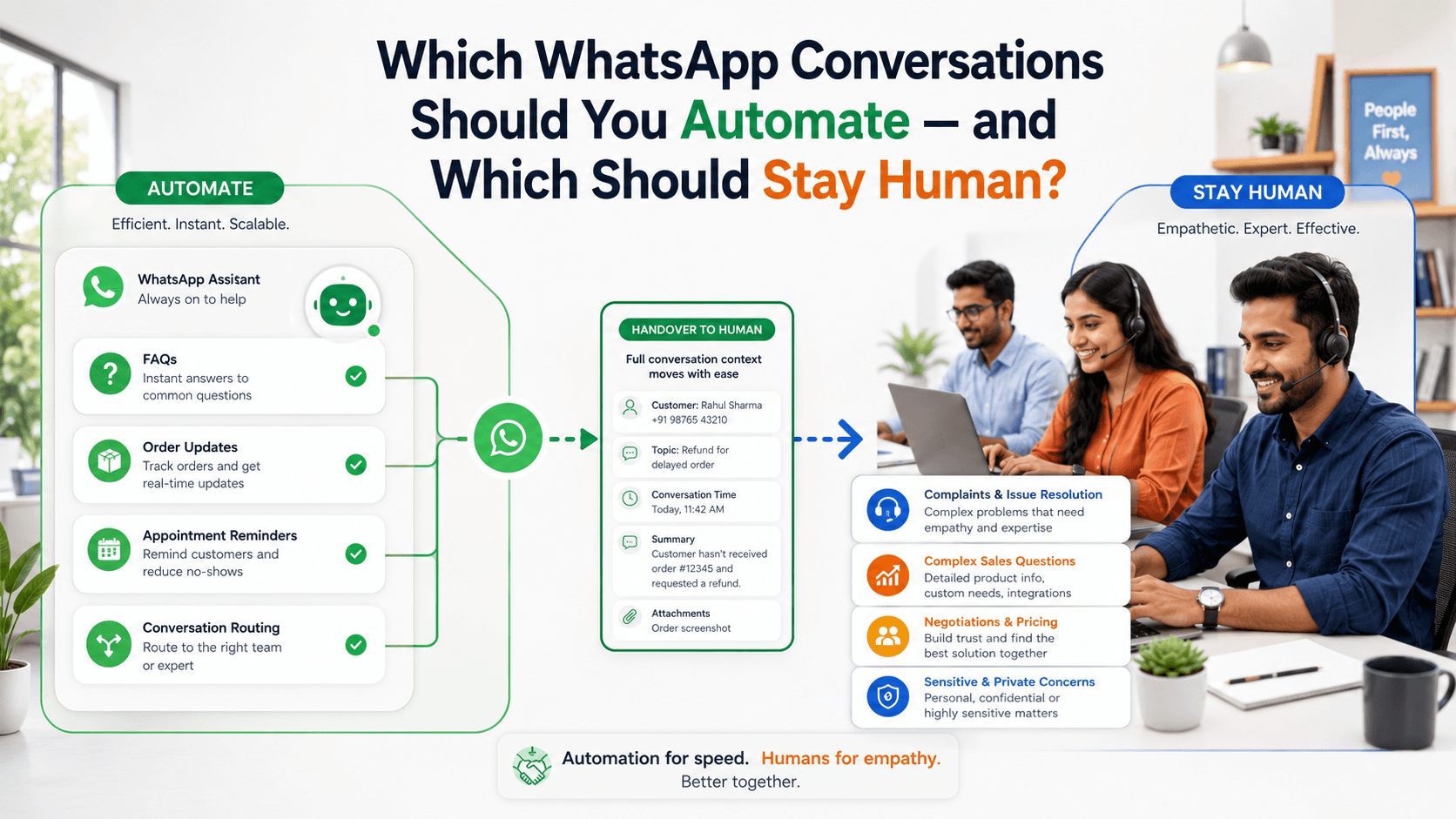
Automate conversations that are predictable, repetitive, low-risk, and supported by reliable information. Keep conversations human when they require judgement, empathy, negotiation, accountability, or an exception to the normal process.
Automation Should Make the Customer’s Task Easier
Automation is useful when it reduces effort for both the customer and the business.
A good automated conversation helps the customer:
- Receive an immediate answer
- Find the correct information
- Complete a simple task
- Check a status
- Provide required details
- Reach the correct employee
- Avoid repeating information
Automation becomes harmful when it creates a barrier between the customer and the help they need.
Customers should not have to select several irrelevant options, repeat the same question, or intentionally enter incorrect information to reach a person.
The WhatsApp Business Platform supports automated conversational flows and routing conversations when live-agent assistance is needed. WhatsApp Business Platform
Conversations That Are Good Candidates for Automation
The strongest automation candidates have clear inputs, defined rules, reliable data, and predictable outcomes.
1. Frequently Asked Questions
Automation can handle common questions when the answers are stable and approved.
Examples include:
- Business hours
- Store locations
- Delivery areas
- Return-policy summaries
- Appointment availability
- Basic product specifications
- Accepted payment methods
- Service coverage
- Required documents
- Contact details
For example:
Our Indiranagar store is open Monday to Saturday from 10:00 a.m. to 8:00 p.m. and Sunday from 11:00 a.m. to 6:00 p.m. Would you like directions or help contacting the store?
Create an owner for every automated answer. When information changes, someone must update the workflow immediately.
Do not automate an answer if the underlying information is frequently inaccurate or unavailable.
2. Initial Enquiry Collection
Automation can collect basic information before assigning a conversation to an employee.
A property business might ask:
- Preferred location
- Property type
- Budget range
- Purchase or rental requirement
- Expected move-in date
A service business might ask:
- Required service
- Location
- Preferred date
- Relevant equipment or product
- Short description of the issue
For example:
Thank you for contacting BrightCare. To connect you with the right team, please choose one option:
- New service enquiry
- Existing booking
- Payment question
- Support issue
Keep qualification short. Collect only the information required for routing or preparing the next response.
3. Conversation Routing
Routing is one of the most valuable forms of automation.
A workflow can assign conversations according to:
- Product category
- Branch
- Customer location
- Language
- Enquiry type
- Existing account owner
- Support priority
- Employee availability
The customer should not need to understand the company’s internal structure.
For example, someone asking about a delayed delivery should reach the fulfilment or support team—not a general sales queue.
Routing should include a fallback when no suitable employee is available.
4. Order and Delivery Updates
Routine transactional updates are suitable for automation when they are connected to accurate order data.
Examples include:
- Order confirmation
- Payment confirmation
- Packing update
- Dispatch notification
- Tracking details
- Delivery estimate
- Delivery completion
- Cancellation confirmation
- Refund-status update
WhatsApp describes utility messages as suitable for timely order, account, and transaction updates. WhatsApp Utility Messages
A useful message might say:
Your order VH-2481 has been dispatched and is expected to arrive on Thursday. Track it here: [Approved Tracking Link]. Reply HELP if the delivery information appears incorrect.
Include a clear route to human help when the status is wrong, the tracking link fails, or the customer needs to change something.
5. Appointment Reminders and Confirmations
Automation can confirm appointments and reduce missed bookings.
A reminder can include:
- Date
- Time
- Location
- Employee or service name
- Preparation instructions
- Rescheduling option
- Cancellation option
For example:
Reminder: Your consultation is scheduled for 22 August at 3:30 p.m. at our Koramangala branch. Reply CONFIRM, RESCHEDULE, or CANCEL.
Do not make customers contact an employee merely to confirm a routine appointment.
Escalate when the customer requests an unusual time, has special requirements, or needs an exception to the booking policy.
6. Reorder and Renewal Reminders
Predictable reminders can be automated when customers have agreed to receive them.
Examples include:
- Product replenishment
- Subscription renewal
- Annual maintenance
- Service scheduling
- Membership expiry
- Document renewal
For example:
Hi Arjun, your annual equipment service is due next month. Reply BOOK to view available dates, LATER to receive another reminder, or HELP to speak with our service team.
A reminder should never complete a charge or order without appropriate customer confirmation.
7. Restock and Availability Notifications
Customers often ask businesses to notify them when a product becomes available.
Automation can monitor the relevant status and send a message when:
- A product returns to stock
- A requested size becomes available
- Appointment capacity opens
- A service becomes available in the customer’s area
- A property matching stated criteria is listed
For example:
The blue linen dress you requested is back in stock in size M for ₹2,899. Reply RESERVE to request a short hold or DETAILS for more information.
Confirm that the inventory information is current before sending the notification.
8. Simple Data Collection
Automation can collect structured information required for a process.
Examples include:
- Preferred callback time
- Order number
- Product code
- Delivery postcode
- Appointment type
- Satisfaction rating
- Requested quantity
Use clear questions and allow customers to correct mistakes.
Avoid requesting passwords, card PINs, one-time passwords, or unnecessary sensitive information through chat.
9. Internal Tasks Triggered by Customer Messages
Automation does not always need to reply directly to the customer.
It can also perform background tasks such as:
- Add a contact tag
- Update the customer stage
- Assign an employee
- Create a follow-up reminder
- Notify a supervisor
- Add an internal note
- Move an opportunity through a pipeline
- Stop a campaign after purchase
These workflows reduce administrative work without making the customer conversation feel robotic.
Conversations That Should Usually Stay Human
Human involvement is essential when the correct response depends on context, emotion, authority, or judgement.
1. Complaints and Angry Customers
Automation can acknowledge a complaint and collect an order number, but a person should handle the resolution.
A suitable automated acknowledgement might say:
I’m sorry that your order has not arrived as expected. Please share your order number, and I’ll connect you with a support specialist who can review this.
The workflow should then transfer the conversation with the collected information and previous messages attached.
Do not trap an upset customer inside a menu of generic responses.
2. Refunds, Disputes, and Payment Problems
Payment-related conversations often require verification, explanation, and authorised decisions.
Human review is appropriate when:
- The customer disputes a charge
- A payment appears missing
- A refund is delayed
- The amount is incorrect
- The customer reports possible fraud
- The situation falls outside standard policy
- Evidence must be reviewed
Automation may provide a status or collect a reference number, but it should not make unsupported promises or reject a claim without appropriate review.
3. Complex Sales Conversations
A simple product enquiry may be automated. A complex purchase usually requires a person.
Human assistance is valuable when the customer needs:
- A tailored recommendation
- A custom quotation
- A product comparison
- Compatibility confirmation
- Technical explanation
- Configuration advice
- A site assessment
- A negotiated commercial agreement
For example, automation can collect the customer’s room size and budget for a furniture enquiry. An employee should evaluate the information and recommend suitable products.
4. Negotiation
Negotiation requires context and commercial authority.
Examples include:
- Price negotiation
- Bulk-order terms
- Custom payment schedules
- Contract conditions
- Delivery commitments
- Service-level agreements
- Special discounts
An automated system should not invent discounts or commit the business to terms outside approved rules.
It can identify negotiation intent and route the conversation to an authorised employee.
5. Exceptions to Policy
Standard processes can be automated. Exceptions should usually be reviewed by a person.
Examples include:
- A return outside the normal period
- An urgent delivery request
- A change after dispatch
- A replacement without standard documentation
- A missed cancellation deadline
- A special accessibility requirement
The employee may need to balance customer history, operational constraints, cost, fairness, and policy.
6. Sensitive or Emotional Conversations
Some conversations need empathy and careful language.
Examples include:
- Serious service failures
- Bereavement-related requests
- Financial hardship
- Health-related concerns
- Safety issues
- Harassment reports
- Account-security concerns
Automation may provide an immediate acknowledgement and priority routing. It should not imitate emotional understanding or continue with promotional messaging.
7. High-Value or High-Risk Decisions
Human oversight is appropriate when an incorrect response could create significant financial, legal, safety, or reputational consequences.
Examples include:
- Large purchases
- Contract approval
- Account closure
- Identity disputes
- Safety complaints
- Regulatory questions
- High-value refunds
- Unusual transaction activity
Automation can support the employee by organising information, but the final decision should remain with an authorised person.
8. Customers Who Ask for a Person
If a customer clearly asks for a human, provide a direct handover.
Do not continue asking unnecessary questions merely because the automation was designed to complete a fixed sequence.
A simple response is enough:
I’ll connect you with a team member. I’ve shared the information already provided, so you won’t need to repeat it.
If nobody is currently available, state the expected response time honestly.
Conversations That Work Best With Both Automation and Human Support
Many interactions should not be classified as entirely automated or entirely manual.
A combined approach is often more effective.
Product enquiry
Automation can collect the category, budget, preferred variant, and location. An employee can recommend products and answer detailed questions.
Support request
Automation can collect the order number, identify the issue type, and retrieve basic status information. A support employee can investigate the exception and resolve it.
Appointment booking
Automation can display standard availability and confirm a routine booking. An employee can handle special scheduling requirements.
Quotation request
Automation can collect required specifications. An employee can validate the scope, prepare the quotation, and explain the terms.
Reorder request
Automation can retrieve the previous product and current price. The customer confirms the details, while an employee handles changes or unusual requests.
Build Clear Handover Triggers
A workflow should define exactly when automation must stop and a person must take over.
Useful triggers include:
- Customer requests a human
- Customer expresses anger or dissatisfaction
- The same question is repeated
- The automation fails to understand the message
- Information conflicts with business records
- A payment or refund issue appears
- The request falls outside approved rules
- The customer rejects all available options
- A sensitive topic is detected
- The value or risk exceeds a defined threshold
- The workflow reaches its maximum number of attempts
Do not wait until the customer becomes frustrated before offering help.
Preserve Context During Handover
A handover fails when the employee begins with:
How can I help you?
After the customer has already explained the issue.
The employee should receive:
- Customer name
- Contact record
- Conversation history
- Order or booking number
- Information collected by automation
- Detected issue type
- Previous actions
- Relevant internal notes
- Reason for escalation
A strong handover message might say:
Priya from our support team has joined the conversation. She can see your order number and the delivery details you shared.
This reassures the customer that the transfer preserved context.
Make the Automation Transparent
Customers should understand whether they are interacting with an automated assistant or an employee.
Use clear wording such as:
I’m the Voixt automated assistant. I can help with order status, appointments, and common questions, or connect you with a team member.
Do not make the automation pretend to be a named employee.
Transparency helps customers choose the correct path and set realistic expectations.
Avoid Open-Ended Automation Without Safeguards
Automation should operate within defined boundaries.
Set rules for:
- Information sources
- Actions it can complete
- Actions requiring confirmation
- Topics it cannot handle
- Escalation conditions
- Maximum response attempts
- Employee availability
- Audit and review
An automated response should not guess prices, availability, policies, delivery dates, or account information.
When reliable information is unavailable, the workflow should say so and transfer the conversation.
Require Confirmation Before Important Actions
Automation should request explicit confirmation before actions such as:
- Placing an order
- Cancelling a booking
- Changing an address
- Submitting a return
- Starting a payment
- Updating important account information
- Scheduling a paid service
For example:
Please confirm the following booking:
Service: Air-conditioner maintenance Date: 24 August Time: 11:00 a.m. Address: 18 Lake Road, Pune Service fee: ₹850
Reply CONFIRM to book or CHANGE to edit the details.
This prevents accidental actions and gives customers an opportunity to correct information.
Respect Consent and Communication Preferences
Automation does not remove the business’s responsibility to communicate appropriately.
Businesses should obtain appropriate permission before initiating WhatsApp messages and respect requests to stop communication. Customers should also understand what types of messages they will receive.
Possible preference categories include:
- Order updates
- Appointment reminders
- Reorder reminders
- Product announcements
- Offers
- Support messages
Make opt-out and preference changes easy to complete and apply them consistently across automated and manual campaigns.
Monitor Automated Conversations
A workflow should not be considered finished when it is activated.
Review:
- Completion rate
- Handover rate
- Unrecognised questions
- Repeated customer messages
- Abandoned conversations
- Incorrect answers
- Employee corrections
- Resolution time
- Customer satisfaction
- Complaints and opt-outs
Read actual conversation samples. A workflow can appear successful in a dashboard while customers are still struggling to complete their tasks.
Review Every Automation Regularly
Business information changes.
Regularly verify:
- Prices
- Opening hours
- Product availability
- Policies
- Delivery areas
- Appointment schedules
- Employee assignments
- Links
- Escalation contacts
- Consent rules
- Template wording
Pause an automation when its information source is unreliable.
An immediate but incorrect answer is worse than a slightly slower accurate one.
A Practical Automation Test
Before automating a conversation, ask:
- Is the customer’s goal clear and predictable?
- Are the required inputs easy to collect?
- Is the information source accurate?
- Can the outcome be determined using approved rules?
- Is the action low-risk or reversible?
- Can the customer correct information before completion?
- Is there a clear human-handover path?
- Will the customer save time?
If several answers are no, keep the conversation human or automate only the initial administrative steps.
Examples of Balanced WhatsApp Workflows
Delivery-status workflow
- Ask for the order number
- Retrieve the current status
- Share the tracking information
- Offer human help if the information appears incorrect
- Transfer delayed, missing, or disputed deliveries to support
New sales enquiry
- Identify the requested product or service
- Collect location and basic requirements
- Add the appropriate customer tags
- Assign the conversation to a suitable salesperson
- Provide the employee with the collected context
Complaint workflow
- Acknowledge the concern
- Collect the order or booking number
- Mark the conversation as urgent
- Stop promotional automation
- Assign a support employee
- Notify a supervisor when required
Appointment workflow
- Identify the service
- Display available standard times
- Collect required details
- Show a complete booking summary
- Request confirmation
- Escalate special requirements to an employee
Common Automation Mistakes
Automating Every Conversation
Automate predictable tasks, not every customer interaction.
Hiding Human Support
Give customers a clear route to an employee.
Asking Too Many Questions
Collect only the information required for the next step.
Losing Context During Handover
Transfer the conversation history and structured customer details.
Using Outdated Information
Connect automation to reliable sources and assign content owners.
Making Decisions Without Confirmation
Show complete details before completing important actions.
Ignoring Repeated Failures
Escalate when the workflow cannot understand or resolve the request.
Measuring Only Deflection
Reducing employee involvement is not success if customer effort or dissatisfaction increases.
How Voixt.ai Balances Automation and Human Conversations
Voixt.ai helps businesses automate repetitive WhatsApp tasks while keeping employees available for conversations that require judgement and personal assistance.
Teams can use:
- No-code automation workflows for common questions, data collection, routing, reminders, and status updates
- AI-powered responses to help handle routine customer enquiries efficiently
- AI-to-human handovers when a conversation requires personal assistance
- Shared multi-agent WhatsApp inboxes so employees can manage customer conversations together
- Conversation assignments so every escalated enquiry has a clear owner
- Automatic contact capture to maintain organised customer records
- Contact tags and filters for customer type, issue category, priority, and preferences
- Visual CRM pipelines to track sales and support conversations through defined stages
- Follow-up reminders so promised actions are completed
- Private internal notes for sharing context without exposing it to the customer
- Campaign management for organised, permission-based communication
This allows automation to handle timing, organisation, and repetitive steps while employees focus on empathy, judgement, negotiation, and exceptions.
Final Thoughts
The question is not whether automation or human service is better.
Each is better at different work.
Automation is effective for predictable questions, structured data collection, routine updates, reminders, routing, and background administration.
Human employees are essential for complaints, negotiation, sensitive situations, unusual requests, complex recommendations, and high-risk decisions.
The strongest WhatsApp experience connects both. Automation should make simple tasks faster and prepare complex conversations for an informed employee.
Voixt.ai helps businesses create that balance so customers receive quick answers when automation is enough and genuine human help when it matters.