
When Two Team Members Reply to the Same Customer
Learn why duplicate WhatsApp replies happen and how assignments, ownership, shared context, internal notes, and clear handovers prevent customer confusion.
On this page28 sections
- When Two Team Members Reply to the Same Customer
- How Duplicate Replies Happen
- What the Customer Experiences
- The Business Cost of Duplicate Replies
- 1. Employees Repeat the Same Work
- 2. Customers Receive Conflicting Information
- 3. Customers Repeat Information
- 4. Follow-Ups Become Unclear
- 5. Accountability Disappears
- Assign One Owner to Every Active Conversation
- Assign Conversations Automatically
- Use an Unassigned Queue
- Show Real-Time Activity
- Use Clear Conversation Statuses
- Add Internal Notes Before Leaving the Conversation
- Keep One Source of Truth
- Use Approved Response Templates
- Use Structured Order and Quotation Summaries
- Create a Proper Handover Process
- Manage Shift Changes
- Define Supervisor Responsibilities
- Prevent Duplicate Automated and Human Replies
- Handle a Duplicate Reply When It Happens
- Build a Simple Conversation-Ownership Workflow
- Measure Duplicate-Reply Problems
- Common Mistakes to Avoid
- How Voixt.ai Prevents Duplicate Team Replies
- Final Thoughts
When Two Team Members Reply to the Same Customer
A customer sends a WhatsApp message asking whether a product is available.
One employee opens the conversation and begins checking stock. At the same time, another employee sees the same message and replies immediately.
The first employee then returns with a different answer.
The customer receives two responses from the same business—possibly with different prices, availability, instructions, or promises.
This is not simply an awkward messaging mistake. Duplicate replies can create order errors, pricing disputes, repeated work, and loss of customer trust.
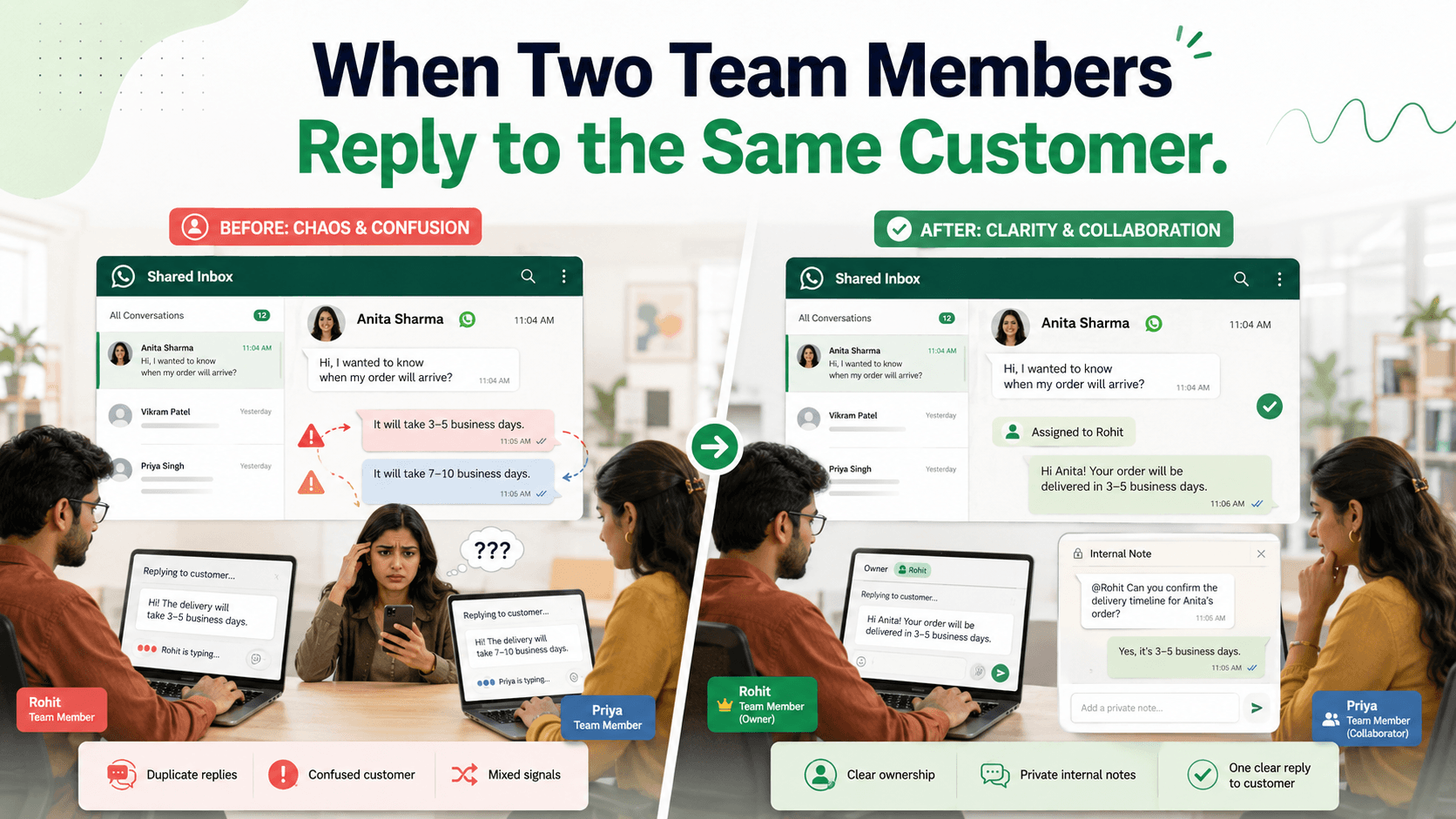
The solution is clear conversation ownership supported by a shared inbox, visible activity, internal notes, and structured handovers.
How Duplicate Replies Happen
Duplicate responses are common when several employees share one WhatsApp number without a coordinated process.
Typical causes include:
- Several employees can open the same conversation
- Nobody is assigned as the owner
- Employees cannot see who is typing
- One employee begins an offline task without leaving a note
- Conversation status is unclear
- Messages are forwarded between personal phones
- Customer details are stored in separate spreadsheets
- Shift handovers are informal
- Notifications reach several employees simultaneously
- Employees prioritise speed over coordination
The problem becomes more frequent during campaigns, product launches, seasonal sales, service disruptions, and other high-volume periods.
What the Customer Experiences
From the customer’s perspective, duplicate replies can make the business appear disorganised.
They may receive:
Hi Meera, the blue dress is available in size M for ₹2,899.
Followed by:
Hello! The blue dress is currently unavailable, but we have size L for ₹2,799.
The customer now has several questions:
- Is the product available?
- Which price is correct?
- Which employee should they trust?
- Has anyone checked the actual stock?
- Will the business honour the first offer?
Even when both responses contain the same information, receiving two greetings or repeated questions creates unnecessary friction.
The Business Cost of Duplicate Replies
1. Employees Repeat the Same Work
Two employees may independently:
- Read the conversation
- Check the customer record
- Look up stock
- Prepare a quotation
- Ask another department for help
- Write a response
The business pays for the same task twice while other customers remain unanswered.
2. Customers Receive Conflicting Information
Different employees may use different sources or versions of the information.
One may check the current inventory system, while another uses an old spreadsheet.
Conflicts can involve:
- Price
- Availability
- Delivery date
- Discount
- Return terms
- Payment method
- Appointment time
- Product specifications
The business may then need to correct the mistake or honour an unauthorised promise.
3. Customers Repeat Information
One employee may ask for the order number while another asks for the same detail several minutes later.
Repeated questions show that the team is not sharing context.
Customers should not need to manage the business’s internal coordination.
4. Follow-Ups Become Unclear
If two employees participate, both may assume the other will complete the next action.
A promised quotation, stock check, refund update, or callback may then be forgotten.
Alternatively, both employees may follow up, creating more duplicate communication.
5. Accountability Disappears
When nobody owns the conversation, it becomes difficult to answer:
- Who is responsible for the customer?
- What was promised?
- Which price was approved?
- Who should follow up?
- When can the conversation be closed?
Shared access without ownership creates visibility but not accountability.
Assign One Owner to Every Active Conversation
The most important rule is simple:
One active conversation should have one responsible owner.
The owner is accountable for moving the conversation forward.
They may ask another employee for information or transfer the conversation, but the customer should experience one coordinated response.
Ownership should be visible to the entire team.
A conversation record might show:
- Owner: Arjun
- Team: Furniture sales
- Status: Waiting for stock confirmation
- Next action: Reply by 4:00 p.m.
- Priority: Standard
This prevents other employees from replying without understanding the current work.
Assign Conversations Automatically
Manual assignment may be sufficient for a very small team. As message volume increases, automatic routing becomes more reliable.
Conversations can be assigned using:
- Product category
- Customer location
- Branch
- Language
- Enquiry type
- Existing account owner
- Sales or support team
- Employee availability
- Workload
- Priority
For example:
- New furniture enquiries → Furniture sales queue
- Existing delivery issues → Fulfilment support
- Payment questions → Accounts team
- Mumbai customers → Mumbai branch
- Existing key accounts → Assigned account manager
Each routing rule should include a fallback for conversations that do not match any condition.
Use an Unassigned Queue
New conversations can enter a shared unassigned queue before someone accepts responsibility.
The queue should show:
- Customer name
- First message
- Waiting time
- Detected enquiry type
- Priority
- Source
When an employee accepts the conversation, it should immediately display their ownership to everyone else.
Do not allow employees to read and leave a conversation without either assigning it or returning it clearly to the queue.
Show Real-Time Activity
A shared inbox should make current activity visible.
Useful indicators include:
- Employee viewing the conversation
- Employee typing
- Draft in progress
- Conversation assigned
- Internal action pending
- Last employee response
If Meera can see that Arjun is already typing, she can avoid preparing a duplicate reply.
Activity indicators reduce accidental collisions but do not replace assignments. Someone viewing a conversation is not necessarily responsible for resolving it.
Use Clear Conversation Statuses
Statuses help employees understand what is happening without reading the entire history.
Useful statuses include:
- New
- Unassigned
- Assigned
- In progress
- Waiting for customer
- Waiting for internal action
- Follow-up scheduled
- Escalated
- Resolved
- Closed
For example, “Waiting for internal action” tells the team that the customer has already received a response and an employee is completing a task behind the conversation.
Avoid using unread status as a substitute for workflow status. A read message can still require action.
Add Internal Notes Before Leaving the Conversation
An employee should leave a private internal note when work continues outside WhatsApp.
For example:
Checking size M availability with the Indiranagar store. I told the customer I would reply by 4:00 p.m. — Arjun
A useful note records:
- What is being checked
- Who is responsible
- What the customer was told
- When the next action is due
Internal notes should be factual and concise.
Avoid unnecessary personal details, speculation, or comments that would be inappropriate in a customer record.
Keep One Source of Truth
Duplicate replies become more dangerous when employees use different information sources.
Define an authoritative source for:
- Product prices
- Inventory
- Delivery dates
- Discounts
- Customer stage
- Payment status
- Order details
- Support status
For example:
| Information | Authoritative source |
|---|---|
| Product price | Approved product catalogue |
| Stock | Inventory system |
| Payment | Approved payment system |
| Delivery | Courier or fulfilment system |
| Conversation owner | Shared WhatsApp inbox |
| Customer stage | CRM pipeline |
Employees should not quote information from private notes or outdated spreadsheets when a current source exists.
Use Approved Response Templates
Templates reduce response time and improve consistency.
Useful templates may cover:
- Product availability
- Quotation summaries
- Order confirmations
- Payment instructions
- Delivery updates
- Complaint acknowledgements
- Appointment reminders
- Human handovers
For example:
Hi [Name], the [Product] is available in [Variant] for [Price]. Delivery to [Location] is currently available by [Date]. Would you like photos, specifications, or help placing an order?
Employees should edit the template to match the customer’s actual situation.
Templates should not encourage several employees to send the same reply. Ownership still comes first.
Use Structured Order and Quotation Summaries
Confusion often occurs when two employees discuss different versions of an order.
Before requesting payment, send one complete summary:
Order summary
Product: Blue linen dress LD-108 Size: M Quantity: 1 Price: ₹2,899 Delivery: ₹100 Final amount: ₹2,999 Estimated delivery: 24–26 August
Reply CONFIRM if these details are correct.
Store the confirmed version with the customer record.
If another employee joins later, they should use the confirmed summary rather than reconstructing the order from individual messages.
Create a Proper Handover Process
Sometimes a conversation must move from one employee to another.
A useful handover includes:
- Reason for transfer
- Customer requirement
- Information already collected
- Actions completed
- Outstanding action
- Promise made to the customer
- Due time
- Relevant order or quotation
For example:
Transfer to Priya in delivery support. Order VH-4821 is marked delivered, but the customer cannot locate it. Tracking and address have been verified. Customer expects an update by 5:00 p.m.
Notify the customer when appropriate:
Priya from our delivery-support team has joined the conversation. She can see your order details and the information already provided.
The new owner should acknowledge the transfer and continue from the existing context.
Manage Shift Changes
Duplicate replies and missed actions frequently occur when shifts change.
Before ending a shift, employees should review:
- Active conversations
- Promised follow-ups
- Waiting internal actions
- Urgent issues
- Customers awaiting quotations
- Payment or delivery problems
- Appointments requiring confirmation
Every unfinished conversation should be:
- Retained by an available owner
- Transferred to another employee
- Assigned to a team queue
- Scheduled for a specific follow-up
Do not leave conversations assigned to employees who are unavailable for extended periods.
Define Supervisor Responsibilities
Supervisors should monitor coordination without replying to every conversation.
They can review:
- Unassigned conversations
- Oldest unanswered messages
- Duplicate employee activity
- High-priority cases
- Workload distribution
- Conversations without next actions
- Overdue follow-ups
- Frequent transfers
When intervening, supervisors should either leave an internal note or formally take ownership.
Silent intervention can create another duplicate response.
Prevent Duplicate Automated and Human Replies
Duplicate messages can also occur when automation and employees respond simultaneously.
For example:
- A customer asks for order status
- An employee begins checking the order
- An automated keyword workflow sends a generic tracking reply
- The employee sends a different update
Prevent this using rules such as:
- Pause routine automation when an employee takes ownership
- Stop campaigns when a support issue opens
- Check the latest conversation status before sending
- Exclude customers with active human conversations
- Cancel scheduled messages when the relevant action is completed
- Prevent duplicate triggers for the same event
Automation should support employees, not compete with them.
Handle a Duplicate Reply When It Happens
If two employees have already replied, correct the experience quickly.
Step 1: Stop Additional Replies
Assign one employee immediately.
Step 2: Verify the Correct Information
Check the authoritative system for price, stock, status, or policy.
Step 3: Acknowledge the Confusion
Use a clear message:
I’m sorry for the conflicting replies. I’ve checked the current inventory record, and the correct information is that the blue dress is available in size M for ₹2,899. I’ll manage this conversation from here.
Step 4: Resolve Any Promise or Price Conflict
If an incorrect promise was made, an authorised employee should decide how the business will handle it.
Step 5: Record the Cause
Identify whether the duplicate reply resulted from missing ownership, delayed status updates, unclear information, or workflow failure.
Do not blame employees publicly in the customer conversation.
Build a Simple Conversation-Ownership Workflow
A practical workflow might be:
- New message enters the unassigned queue
- Intent and priority are identified
- Conversation is routed to the appropriate team
- One employee accepts ownership
- Other employees see the active owner
- Owner responds or adds an internal note
- External tasks create follow-up reminders
- Transfers include a structured handover
- Conversation remains assigned until resolved
- Resolution status closes the active work
This process should remain simple enough that employees use it consistently.
Measure Duplicate-Reply Problems
Track:
- Number of conversations with multiple employee replies
- Conflicting information incidents
- Duplicate quotations
- Duplicate payment links
- Repeated customer questions
- Conversation transfers
- Unassigned-message time
- Overdue follow-ups
- Customer complaints about confusion
- Average resolution time
Review the conversations behind the numbers.
A low duplicate-reply count may still hide serious pricing or payment mistakes.
Common Mistakes to Avoid
Giving Everyone Access Without Ownership
Shared access should include visible assignments and responsibility.
Using Read Status as Workflow Status
A read message may still require action.
Working Offline Without Leaving a Note
Record stock checks, approvals, and promised updates inside the shared conversation workspace.
Transferring Without Context
Tell the new owner what happened and what must happen next.
Keeping Conversations Assigned to Unavailable Employees
Reassign active work during shift changes and absences.
Letting Automation Reply During Human Handling
Pause conflicting workflows when an employee owns the conversation.
Allowing Several Information Sources
Define approved sources for prices, inventory, orders, and payments.
Closing the Conversation After Sending a Message
Confirm that the customer’s request or promised action is complete.
How Voixt.ai Prevents Duplicate Team Replies
Voixt.ai helps businesses coordinate employees working from one WhatsApp number.
Teams can use:
- Shared multi-agent WhatsApp inboxes so everyone sees the same customer conversation
- Conversation assignments so every active enquiry has one responsible owner
- Private internal notes for stock checks, approvals, promises, and handovers
- Automatic contact capture to maintain one organised customer record
- Contact tags and filters for enquiry type, branch, priority, and customer stage
- No-code automation workflows for routing, ownership, status updates, and escalation
- AI-powered responses to help assigned employees draft replies efficiently
- AI-to-human handovers that preserve conversation context
- Visual CRM pipelines to track sales and support conversations through defined stages
- Follow-up reminders so outstanding actions remain visible
- Campaign management that can exclude customers with active support or sales conversations
This gives teams shared visibility while preserving individual accountability.
Final Thoughts
When two team members reply to the same customer, the problem is rarely caused by bad intentions. It is usually caused by missing ownership, limited visibility, separate information sources, or an unclear handover process.
Give every active conversation one owner. Make assignments, statuses, internal notes, and employee activity visible. Preserve context during transfers and pause automation when a person is actively handling the conversation.
Customers should experience one informed business conversation, regardless of how many employees work behind it.
Voixt.ai helps teams create that coordinated experience by connecting shared WhatsApp access with ownership, routing, customer context, and follow-up management.